These nine best free kontakt libraries skip the demo crap and give you usable content – performance engines that understand how instruments actually behave, presets built for specific production roles, and macro controls that keep workflow moving without deep menu diving.
They work on modest systems, load quickly, and deliver sounds that fit in tracks without stacking external effects, covering cinematic scoring, atmospheric beds, electric guitar and bass with realistic articulation logic, and heavily processed synths and pianos designed for modern productions.
I tried my best to find the most relevant libraries that are also not too old and stale (and that also looks great). I definitely wanted to include more libraries (about 30) but then I realized it would not work on my current Kontakt 8, so I just narrowed it to “top 9” list. With that said, let’s get started, starting with Glade:
1. Audio Imperia GLADE (The Unearthed Orchestra)

I’ve found that most free Kontakt libraries fall into one of two categories – either they’re tiny promotional samples with barely enough content to finish a track, or they’re stripped-down versions of paid libraries with the best articulations deliberately removed to push you toward upgrading.
I wonder how many of you have downloaded dozens of free orchestral libraries only to realize none of them contain enough depth or variety to actually compose with. Glade Kontakt library breaks this pattern as a full cinematic instrument designed for the Free Kontakt Player that finally feels like a serious production tool rather than a marketing teaser.
The library comes in two versions: Standard Edition at approximately 4.41 GB installed and GLADE Studio Edition at approximately 12.51 GB installed which adds four mic positions (Spot, Decca Tree, Outrigger, Far) for deeper mix control. That’s a lot of content for a free library, really nice!
Here is what you get with Glade:
- Individual Orchestral and World Instruments
You get 19 individual orchestral and world instruments including strings, woodwinds, percussion, and exotic instruments like duduk, fujara, pan pipes, shakuhachi, ney, and kalimba organized in a 4-Layer Designer Engine with 80+ curated presets and 84 Designer Snapshots.
I think these are more than textures because each instrument can be used melodically or atmospherically. I’ve experienced how this mix of traditional orchestra and ethnic instruments gives GLADE a hybrid cinematic vibe useful in modern scoring and ambient contexts, and I often find this diversity is rare among free libraries that typically focus on just strings or just percussion.
- 4-Layer Designer Engine with Macro Control
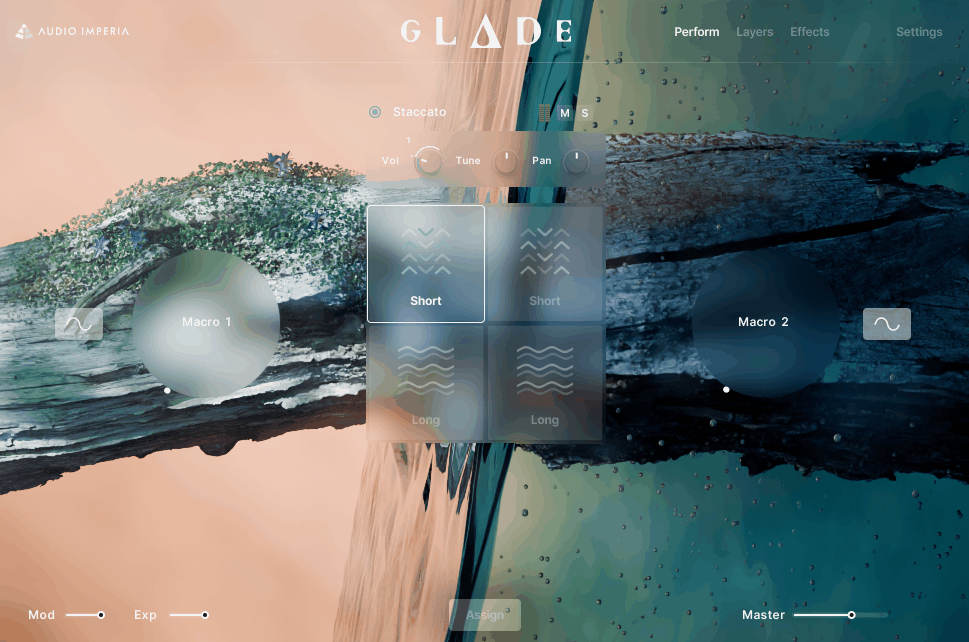
You can stack up to 4 sources per patch combining strings, winds, percussion, and voices. Each layer has per-layer EQ, filters, envelopes, and effects all available right on the main UI. In addition, you get 2 Macro controls that can be mapped to nearly anything like filter cutoff, dynamics, or effects for evolving sound movement.
I imagine for producers juggling sketching and composition, this layered macro system can turn static chords into living pads or evolving atmospheres without manual automation..
- Dual Engine System for Different Workflows
GLADE offers both a Designer Engine for layered textures and a Traditional (Pyramid) Engine for detailed control.
I can see how the Traditional Engine provides keyswitchable articulations where available, consistent dynamics mapping, and straightforward controls. I believe this means you’re not limited to macro layers but can do more detailed orchestration or stems when you need cleaner section recordings.
- Designer Snapshots
You get 84 designer snapshots Ready to Load! For a free library, this is an unusually generous preset count spanning moods from ambient pads to more aggressive tensions. It help you start composing fast, and you can save your own snapshot combinations as well if you wish.
- Studio Edition with 4 Mic Positions
In the standard edition you get two macro mixes (Classic and Modern), while Studio Edition adds 4 mic positions for proper mix blending.
This means standard delivers a ready-to-drop-in mix while Studio gives you room placement control which is rare among free Kontakt libraries. I noticed having mic control transforms a library from preset-only to genuinely mixable.
2. Native Instruments Hypha (Hybrid Synth for Evolving Textures)

HYPHA is a Native Instruments’ free hybrid synth instrument for Kontakt Player designed specifically for evolving, organic, and slightly unstable synthetic sounds rather than being a traditional subtractive synth or preset-only rompler.
For me, what makes this practical is the workflow that favors movement over deep synthesis programming. Hypha ships with 156 factory presets covering pads, sequences, basses, pulses, noise beds, and abstract textures (that’s a looot of stuff), and I’ve realized it also uses a hybrid sound engine that blends sampled sources with synthesis processing where the emphasis is clearly on motion, texture, and instability.
Other than that, you get:
- Macro Controls
Instead of exposing dozens of synthesis parameters, HYPHA centers around 8 macro controls per preset. These macros are mapped differently depending on the sound and typically control multiple parameters at once like filter movement, modulation depth, distortion intensity, or spatial effects.
I’d argue this makes HYPHA particularly suitable for automation-heavy workflows because a single macro lane can create evolving motion that would otherwise require multiple automation tracks in a traditional synth. I can see how for bedroom producers working quickly this keeps sessions lighter and more manageable.
- Built-In Rhythmic Movement
Many presets make use of internal rhythmic modulation including tempo-synced movement and step-based modulation. I’ve noticed while HYPHA is not a full step sequencer instrument, a large portion of its sounds are designed to pulse, drift, or evolve over time without MIDI complexity. I feel like the movement is baked into the sound design which reduces the need for external arpeggiators or modulation plugins, and I imagine this is particularly useful for ambient beds, underscore-style patterns, or minimal electronic tracks.
- Deeply Integrated Effects Architecture
HYPHA’s effects are not an afterthought because distortion, modulation, filtering, and spatial effects are deeply integrated into each preset and often tied directly to macro controls. I believe the practical benefit is that sounds tend to feel finished and mix-aware straight out of the box which is pretty cool.
When it comes to effects, they are part of the identity of the instrument, and I tend to notice this means you’re getting processed textures rather than raw sources for heavy external processing.
- Sound Engine
Under the hood HYPHA uses a hybrid sound engine that blends sampled sources with synthesis processing. I’m convinced Native Instruments doesn’t position it as a “build-your-own” synth but instead structures it around curated sound sources that are heavily shaped through modulation, filtering, and effects.
I wonder how many producers overlook this hybrid approach, but I’d say it’s what gives HYPHA its organic, slightly imperfect character that pure synthesis can’t replicate.
3. Native Instruments Analog Dreams (Vintage Synth Sounds for Modern Production)

Another free library by Native Instruments, Analog Dreams, positions itself as a Play Series instrument for Kontakt Player that focuses on processed vintage synth sounds that already behave like finished records rather than raw oscillators.
The library isn’t about recreating specific hardware models but about taking analog-era material and pushing it through modern processing chains to make it immediately usable in contemporary productions.
This approach matters for bedroom producers because Analog Dreams is designed to skip the sound-design phase almost entirely, delivering over 300 factory presets grouped into functional categories like pads, leads, basses, sequences, keys, textures, and effects. The instrument runs in the free Kontakt Player (obviously) and uses a two-layer structure where each preset is built from independent layers that can be blended, detuned, filtered, and modulated against each other.
- Presets as a main feature
Analog Dreams includes 207 factory presets where everything begins with a curated sound that already has modulation, effects, and movement applied. I think there is no concept of starting from an init patch, and I’ve noticed the real unifier is tone where almost everything has motion, saturation, filtering, and spatial character already applied.
I’d argue this is not a neutral library and it’s not trying to be, which matters if you want sounds that feel wide, saturated, and mix-present immediately.
- Layering
Each preset is built from two independent layers where each layer can load a different sampled synth source. These can be blended, detuned, filtered, and modulated which is where much of the width and movement comes from.
I’ve experienced how this two-layer structure allows relatively complex sounds without overwhelming you, and I often find instead of stacking multiple tracks in a DAW Analog Dreams encourages internal layering keeping projects cleaner and easier to manage on limited systems.
- Macro Controls
The instrument uses 8 macro controls per preset that are context-sensitive and often control multiple parameters at once. I can see how a single macro might increase filter movement, modulation depth, and reverb size simultaneously.
I feel like the practical benefit is speed where automation becomes simple and sounds can evolve dramatically with minimal effort. I imagine the trade-off is that you don’t get access to low-level synthesis parameters like oscillator tuning or envelope curves in a traditional sense.
- Sequencer
A significant portion of presets rely on the built-in step sequencer and motion modulation including tempo-synced rhythmic patterns, gated movement, and pulsing modulation that reacts musically to tempo changes.
This makes Analog Dreams particularly effective for arpeggiated synth patterns, pulsing pads that move without MIDI complexity, and underscore-style rhythmic beds. I tend to notice much of the rhythm comes from internal modulation not MIDI programming, and I’d say for producers who prefer to play sustained chords and let the instrument do the movement this is a major advantage.
- Heavily Processed Effects as Part of Sound Identity
Each layer passes through filters, modulation effects, distortion, delay, and reverb where these effects are not optional flavor but part of the sound identity. I’ve realized presets tend to feel wide, saturated, and mix-present immediately, though I’ll admit this also means Analog Dreams is not ideal if you want dry analog tones for external processing
4. Native Instruments Ethereal Earth (Hybrid Atmospheric Engine)

I think this is one of the best free Kontakt libraries at the moment. Free atmospheric libraries typically offer either basic synth pads with limited variation or field recordings locked into static tones. Ethereal Earth sits between those extremes as a hybrid atmospheric environment engine focused on texture, mood, and sonic layering.
It’s not trying to replicate specific acoustic instruments but provides shapeable ambient material that works without extensive sound design.
Key Features:
- 202 Presets Across Wide Category Range
The library comes with 202 presets grouped into categories including Ambience, Bass, Brass, Drone, FX, Lead, Pad, Pluck, String, Texture, and Wind. I feel like this wide variety reflects how the library is structured where you’re not navigating a single instrument with a few articulations but a palette of layered sonic possibilities ranging from tonal pads to evolving drones and processed effects.
- Layered Design
As with the other libraries in this list, at the core is a two-layer sound source system where each layer can draw from the internal pool of sound sources. I’d argue this dual-source approach is not simply two instruments stacked together but designed so each layer can be independently shaped in the Sound Editor with its own tuning, filtering, panning, and envelope controls
- Six Assignable Macro Controls
The interface surfaces six assignable macro controls that map to meaningful parameters across both layers and the built-in effects chain.
These macros can control everything from filter cutoff to modulation depth to distortion intensity. I’ve noticed this macro focus is practical because it lets you tweak or automate big-picture movement in a few lanes instead of automating multiple knobs manually, which helps when you’re sketching out ideas quickly.
- Sound & FX Editor
The Sound Editor lets you adjust individual layer parameters like envelopes, filters, and tuning, while the FX Editor lets you craft custom effects chains using up to six slots. I can see how you can load classic KONTAKT effects like chorus, distortion, dynamic processing, saturation, and spatial effects, rearranging the order via drag-and-drop to change how a preset sounds at the signal path level.
- Sequencer
You also get a sequencer in this library as well
5. Impact Soundworks Shreddage 3 Precision FREE (Performance Electric Bass)

Shreddage 3 Precision FREE is a performance-aware electric bass instrument built on the same scripting engine as Impact Soundworks’ paid Shreddage 3 libraries.
The distinction matters because this isn’t a set of static samples but a realistic bass workspace that responds to how parts are written rather than simply what notes are triggered.
It fills a very specific role delivering convincing bass parts that groove with programmed drums without relying on loops or synth subs. I believe the library centers on one Fender-style Precision Bass recorded with string-by-string sampling where the engine tracks which string and fret each note is played on affecting tone, sustain behavior, and transition behavior.
This free Kontakt library includes 6 articulations (sustain, palm mute, hammer-on/pull-off, slide, ghost note, release) with roughly 8-12 basic factory presets all using the full Shreddage 3 performance engine.
Features:
- Bass Engine with Performance Logic
Even as a free product, Precision Free uses the full Shreddage 3 performance engine including fret and string position logic that informs tone, automatic transition handling for legato vs. re-pick, and intelligent muting and release scripting. These are the same core features found in paid versions of Shreddage 3 instruments.
- Articulations
The library includes 6 practical articulations that are the articulations most commonly used in real arrangements. I can see this constellation covers rhythm and groove essentials, and I imagine there’s no slap, no tapping, no pinch harmonics because those techniques are rarely essential in songs where bass functions as a foundation rather than a lead voice. I’d say the decision to focus on these specific articulations keeps the library smaller but musically usable.
- String-by-String Sampling with Position Tracking
At the core is one Fender-style Precision Bass recorded with string-by-string sampling where the engine tracks which string and fret each note is played on. I’ve noticed this affects tone because lower strings sound thicker, sustain behavior where higher frets ring differently, and transition behavior where the next note responds relative to the previous one.
I’m inclined to believe this is not a generic “keyboard bass” where every note sounds identically voiced but closer to how a real bassist negotiates the fingerboard.
- Velocity-Driven Realism Rather Than Random Variation
Instead of relying on round-robin or random velocity switching, Precision Free leans on straight MIDI performance data including velocity, note length, and timing to produce realism.
I feel like this design choice means the instrument responds predictably to how you program MIDI, rewards careful velocity shaping, and avoids unpredictable “random” variations that can distract in tight mixes.
- Clean DI Signal for Flexible Processing
Precision Free was recorded as a clean DI source not a processed or amp-baked tone. I believe this allows reliable use with external amp simulators, and I tend to notice the bass fits into different styles from pop to rock to electronic depending on processing. You’rre not fighting baked-in distortion or coloration, as this DI-forward design means the instrument acts as a raw performance source rather than a finished tone.
6. Impact Soundworks Shreddage 3 Stratus FREE (Performance Electric Guitar)

The biggest giveaway that guitar parts are programmed rather than played is how notes transition between each other – most free guitar plugins treat every note as an isolated event triggering the same sample regardless of what came before, which creates that obvious “keyboard playing guitar sounds” problem.
I’ve realized the challenge isn’t just about sample quality but about how the instrument understands string bhavior, fret positions, and the physical logic of actual guitar playing.
Shreddage 3 Stratus FREE approaches this as a performance-based electric guitar instrument that expects you to think like a guitarist when writing MIDI rather than being a loop library, chord generator, or guitar-flavored synth.
It’s built around a single Stratocaster-style electric guitar sampled string-by-string rather than as blended chord recordings, and I believe it runs on the full Shreddage 3 engine (not a simplified playback system) with 8 articulations and roughly 10-15 factory presets.
The critical detail here is how the engine tracks string selection and fret position internally affecting tone, sustain length, and transitions, which means lower strings naturally sound thicker and sustain differently than higher strings.
Key Features:
- Full Shreddage 3 Performance Engine
Although the content is reduced, Stratus FREE runs on the full Shreddage 3 engine including real-time string and fret allocation, context-aware legato vs re-picked note handling, and automatic mute and release behavior based on playing style.
I’d argue the realism comes from how notes relate to each other not from heavy randomization or exaggerated round robins. I’ve experienced how this means the instrument reacts to how parts are written not just what notes are triggered, and I often find this attention to performance logic is what prevents the “keyboard guitar” sound.
- Practical Articulations for Rhythm and Riffs
The free version includes 8 articulations covering sustains, palm mutes, hammer-ons/pull-offs, vibrato, and basic mutes and releases. I can see there are no advanced lead techniques such as pinch harmonics, tapped notes, extended slides, or feedback effects. This makes it unsuitable for flashy solo guitar work but still very usable for rhythm guitars, riffs, and simple melodic lines where you need consistency and tight timing.
- Velocity and Note Length as Realism Controls
Stratus FREE relies heavily on velocity and note duration to control articulation and feel. I’ve noticed softer velocities produce gentler attacks while harder velocities push the pick response and brightness, and short note lengths naturally trigger tighter, more muted behavior. I feel like this puts realism firmly in the MIDI programming stage where clean timing, realistic spacing, and controlled velocity ranges matter more than complex automation.
- DI-First Design for External Amp Sims
The library is recorded as a clean DI guitar with basic onboard tone shaping available. The raw signal works very well when routed into external amp simulators which is how the instrument is clearly meant to be used. I’m inclined to think this avoids the common free-library issue where amp tone is baked into samples and can’t be undone, and I tend to notice with Stratus FREE the guitar behaves predictably through third-party amp sims, pedals, and cabinet IRs.
- String-by-String Sampling for Natural Tone Variation
The guitar is sampled string-by-string rather than as blended chord recordings. The detail is crucial because the engine tracks string selection and fret position internally which affects tone and sustain length.
7. Heavyocity Foundations: Synth Bass (Modern Electronic Low-End)

Electronic bass production typically forces you between hour-long synthesis sessions tweaking oscillators or weak generic presets that collapse in mono or disappear on small speakers.
Foundations: Synth Bass is Heavyocity’s free preset-driven instrument built around finished low-end structures rather than raw synthesis tools. You get 10 factory presets, all controlled through 4 macro parameters mapped to multiple settings simultaneously.
The design assumes you’re selecting complete bass behaviors, not building patches from zero.
- Layered Sound Engine Built for Low-End Stability
Each preset is constructed using a layered engine that combines multiple sound sources internally. These layers are pre-balanced to avoid phase instability and excessive sub build-up which is a common problem when you stack bass sounds manually in a DAW.
I can see how this internal structure allows the bass to feel wide and aggressive while still remaining mono-compatible in the low frequencies, and I’m convinced this is crucial for mixes that need to translate to headphones, small speakers, and club systems.
- Macro Controls
The interface centers around 4 macro controls each mapped to multiple parameters simultaneously. These macros typically control elements like harmonic intensity, movement, distortion amount, or spatial character depending on the preset.
From a workflow perspective this makes the instrument very automation-friendly where one automation lane can take a bass from subtle and controlled to aggressive and dominant without requiring complex modulation routing or multiple plugins.
- Internal Rhythmic Modulation Without MIDI Complexity
Many presets include internal rhythmic modulation such as pulsing filters or gated amplitude movement. This means bass lines can feel animated even when you play long sustained MIDI notes. I feel like for producers who prefer writing simple MIDI parts and letting the instrument handle motion this is a practical advantage, and it also reduces the need for external sidechain or gating plugins in early writing stages.
- Tone Shaping Tailored to Modern Genres
The sound palette leans heavily toward modern electronic, cinematic, and hybrid styles where distortion, saturation, and filtering are part of the core sound design not optional extras. I believe most presets sit well in dense arrangements without needing much additional processing, meaning you can drop them into tracks and they work immediately
8. Heavyocity Foundations: Nylon Guitar (Phrase-Based Guitar)

Foundations: Nylon Guitar completely skips the traditional “play-every-note” guitar library approach where you’re expected to program realistic fingerpicking patterns or strumming by hand.
I’ve found that most nylon guitar libraries either give you isolated notes that sound mechanical when sequenced or locked audio loops that don’t adapt to your chord progressions. What Heavyocity did here is focus on musical phrases, textures, and playable tonal layers designed to drop into modern productions with minimal effort rather than trying to recreate full classical guitar technique.
This is not a concert guitar simulator but a production-oriented nylon guitar tool that prioritizes mood, rhythm, and consistency. The library includes 10 factory presets (just like Synth Bass) that are clearly curated for different musical roles where each one represents a different performance concept or musical use case, and I’ve noticed the interface centers around 4 macro controls each mapped to multiple internal parameters. I’m convinced a large portion of the library is built around tempo-syncable rhythmic phrases and patterns rather than isolated single notes.
- Tempo-Syncable Rhythmic Phrases Mapped Across Keyboard
A large portion of the library is built around tempo-syncable rhythmic phrases and patterns rather than isolated single notes. I think these phrases are mapped across the keyboard allowing quick access to different rhythmic ideas without programming complex MIDI.
- 4 Macro Controls for Quick Sound Shaping
The interface centers around 4 macro controls each mapped to multiple internal parameters. These typically influence tone, dynamics, texture, and spatial processing.
I feel like from a practical standpoint this allows meaningful changes with very little automation, and I imagine a single macro movement can shift a guitar part from intimate and dry to wide and atmospheric which is useful when arranging transitions.
- Playable Melodic Patches Alongside Phrases
In addition to phrases, the instrument includes playable melodic nylon guitar patches designed for simple lead lines, arpeggios, and harmonic support rather than virtuosic classical performance. I’ve noticed the tonal character is consistent and controlled which helps the guitar sit in a mix without unpredictable dynamics. I’m inclined to believe this makes it
These nine best free kontakt libraries skip the demo crap and give you usable content – performance engines that understand how instruments actually behave, presets built for specific production roles, and macro controls that keep workflow moving without deep menu diving.
They work on modest systems, load quickly, and deliver sounds that fit in tracks without stacking external effects, covering cinematic scoring, atmospheric beds, electric guitar and bass with realistic articulation logic, and heavily processed synths and pianos designed for modern productions.
I tried my best to find the most relevant libraries that are also not too old and stale (and that also looks great). I definitely wanted to include more libraries (about 30) but then I realized it would not work on my current Kontakt 8, so I just narrowed it to “top 9” list. With that said, let’s get started, starting with Glade:
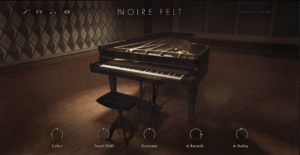
9. Heavyocity Foundations: Piano (Processed Cinematic Piano)

Heavyocity positions Foundations: Piano as a production-ready cinematic piano instrument where the piano is treated as raw material for mood, texture, and movement rather than a purely acoustic centerpiece.
The design choice shapes everything about how this instrument works and who it’s actually useful for. This free Kontakt library includes 10 presets where each preset represents a distinct processing and performance concept ranging from relatively natural cinematic pianos to heavily processed, atmospheric, and hybrid piano textures.
Underneath the interface is one sampled piano source (not multiple piano models) where Heavyocity’s focus is on how that single piano can be transformed through processing, layering, and modulation.
Key Features:
- Layered Engine for Cinematic Depth
Presets use multiple internal layers blending the core piano with processed textures, tonal layers, or harmonic content. These layers are pre-balanced so the piano remains present while supporting elements add width, motion, or emotional weight.
- Macro Controls for Quick Variation
As with the other Heavyocity libraries, the interface also revolves around 4 macro controls each mapped to multiple parameters simultaneously. Depending on the preset, these macros control things like tonal brightness, texture intensity, movement, and spatial depth. I feel like this allows meaningful variation with minimal automation because instead of adjusting several plugins or parameters, one macro lane can take a piano from intimate to expansive.
- Single Piano Source Heavily Shaped Through Processing
Underneath is one sampled piano source where Heavyocity’s focus is on how that single piano can be transformed through processing, layering, and modulation. This keeps the instrument lightweight and consistent
- Processed Character Built Into Sound Design
Foundations: Piano is intentionally not a dry, classical piano because many presets include built-in reverb, modulation, saturation, or textural layers that are part of the sound identity.
I imagine this makes it easy to place the piano in cinematic, ambient, and hybrid productions without additional processing. I’m inclined to believe the downside is that producers looking for a neutral piano for classical, jazz, or exposed solo work will find it limiting.

Hello, I’m Viliam, I started this audio plugin focused blog to keep you updated on the latest trends, news and everything plugin related. I’ll put the most emphasis on the topics covering best VST, AU and AAX plugins. If you find some great plugin suggestions for us to include on our site, feel free to let me know, so I can take a look!