Delay plugins are incredibly useful for music production. They add depth, rhythm, and atmosphere to your tracks. With the right delay, you can make vocals, synths, guitars, or drums sound much more lively and dynamic.
Free delay VST plugins have improved a lot in recent years. Many now include features that were once only found in paid versions. You can get anything from basic tape echoes to advanced rhythmic delays with modulation and filtering.
In this guide, I’ll show you 14 of the best free delay plugins you can get right now. I’ve tried each one and highlighted the most important features. You’ll also find out how delay plugins work and get tips on using them to improve your music. By the end, you’ll know which free delays are right for your style and workflow.
1. Sonimus DelaySon

The best thing about DelaySon is not just that it’s totally free, but also that Sonimus managed to pack in so much analog warmth and character without charging anything.
When I first loaded it up, I was struck by how intuitive the layout feels. The interface splits into three clean sections: Time, Color, and Delay. Each one handles a different piece of the puzzle, and nothing feels cluttered or confusing. You can jump right in and start tweaking without reading a manual.
DelaySon stands out because of how well it captures that vintage tape delay sound. The modulation adds gentle pitch changes and natural movement, making the echoes feel lively instead of flat. When I want a delay with real character in my mix, I use this plugin.
Features:
- Time Controls & Sync Options
You have full control over the delay timing, with both manual millisecond settings and tempo-sync options. I like locking delays to quarter notes or dotted eighths for rhythmic parts. The wet mix knob helps you blend in just the right amount of delay without covering up your original sound. It’s great for anything from subtle vocal doubling to big, spacey echoes.
- Color Module for Analog Soul
This is where DelaySon really stands out. The wow and flutter modulation brings back those tape machine imperfections that add warmth and movement to the delay. I recommend using it on guitars and synths.
The tone control is simple and works well. If you want lo-fi vibes, use the darker settings; for a clearer sound, go brighter. The built-in low-cut filter at 100 Hz keeps the low end clean, which helps me avoid muddy mixes when using delay on bass-heavy sounds.
- Delay Module with Saturation
The feedback control goes from a single slapback to wild, self-oscillating sounds, depending on what you need. I use low feedback for classic rockabilly slap and turn it up for more experimental effects.
The L/R offset adds stereo width without needing separate delay lines, so everything feels more spacious. The drive knob gives you tape-style saturation, making your echoes sound thicker and warmer. When I want delays to sound thick and analog, I turn up this control.
- Versatile Use Cases
DelaySon is useful in lots of situations. I’ve used it for vintage slapback on vocals, rhythmic delays on synths, and ambient textures on pads. The preset manager lets you save your favorite settings and bring them back fast. Whether you’re making lo-fi beats, rock songs, or cinematic tracks, DelaySon fits right in.
2. Native Instruments Replika

Native Instruments Replika stands out because it lets you try different types of delay. I like that this free delay VST plugin offers several delay styles in one place, from clean digital repeats to warm tape echoes.
There are five delay modes, each with its own sound. Modern mode gives you clear digital repeats when you want a clean effect. Vintage Digital adds a warmer, old-school sampler vibe.
Analogue mode gives you the warm, slightly distorted sound of bucket-brigade delays. Tape mode brings the wobbly feel of old tape machines, and you can adjust how old the tape sounds. Diffusion mode turns your repeats into soft, ambient textures instead of clear echoes.
I use Replika when I want fast results and good sound. The interface is simple and easy to use, so you don’t waste time searching through menus. If you want more control, there are still plenty of options.
Here’s what Replika offers:
- Multiple delay styles in one plugin
What grabbed me first was having five delay types ready without needing to load another plugin. If I want a sharp digital delay for vocals and then a tape echo for guitar, I just change the mode.
Analogue mode gives my synths that classic BBD warmth, and Diffusion creates dreamy, ambient sounds. Each mode is different enough that it feels like having five separate delay plugins.
- Tempo sync and ping-pong stereo options
Replika makes timing effortless with tempo sync that locks to your DAW, offering straight, dotted, and triplet note divisions. You can also set the delay time freely in milliseconds when you want to experiment with timing.
The ping-pong mode bounces and repeats between left and right channels, creating wide stereo movement that makes delays feel huge in the mix. Use the wide mode when you want subtle stereo spread without the obvious back-and-forth bounce.
- Low CPU use and reliable performance
I like that Replika doesn’t use much CPU. Even with several instances in a big project, it doesn’t slow down my computer like some other delay plugins. This means I can use it anywhere in my mix without worrying about performance.
3. Tritik Tymee

This is one of those rare free plugins that actually feels complete. Rather than just adding a basic delay to your track, it gives you features that help you create more interesting sounds.
What really hooked me about Tritik Tymee is the built-in spectrogram. It shows you exactly what’s happening to your delay signal in real time. You can see the frequencies light up as your echoes fade out, which is surprisingly helpful when you’re digging into sound design or trying to clean up muddy repeats.
I also like that Tritik first made this plugin as a teaching tool for audio programming. That’s probably why it’s simple to use but still has features you’ll actually use, instead of too many options you don’t need.
- 10-Second Delay Line with Tap Tempo
The 10-second delay line is much longer than what most free delays offer. I use it for long ambient trails or when I want atmospheric textures with lots of space. The tap tempo feature keeps everything in sync with your project, so you don’t have to figure out the timing yourself. Just tap the tempo and your delays fit perfectly.
- Down-Sampler for Lo-Fi Character
This is where Tymee gets fun. The downsampler intentionally degrades your delayed signal, introducing digital artifacts, aliasing, and that crunchy lo-fi vibe. I reach for this when I’m working on beats that need a dusty, vintage feel or when I want delays that sound like they’re coming from old hardware. It’s perfect for lo-fi hip-hop, vaporwave, or experimental electronic tracks where clean isn’t the goal.
- Resonant Low-Pass Filter
The resonant filter lets you shape the tone of your echoes in satisfying ways. You can lower the highs to make delays sound warmer in the mix, or increase the resonance for a bit of grit. I often adjust this when I want delays that don’t clash with vocals or leads but still add depth and movement.
- Real-Time Spectrogram Visualization
Honestly, the spectrogram surprised me the most. Watching how your delay affects the frequency spectrum helps you understand what’s actually happening under the hood. When you’re adjusting the filter or degradation settings, you can see exactly which frequencies are changing. It’s useful for sound design work, and it makes experimenting way more intuitive.
4. The Department of Sound EcoSlap

EcoSlap stands out because it uses a real analog plate reverb algorithm, which most delay plugins do not. The Department of Sound took the shortest decay from their Ecoplate I reverb and made it into a free slap delay with its own unique sound.
I appreciate this approach because you’re not getting another generic digital delay engine. The delay tail comes from actual plate reverb circuitry, which means every echo carries some of that spatial, room-like character you’d normally only get from reverb plugins. It’s a hybrid that sits somewhere between delay and ambience.
EcoSlap VST is helpful in my workflow because I can quickly get a natural-sounding slapback. It’s always free, works on Mac and Windows, and keeps things simple without too many settings. You get what you need without a steep learning curve.
- Plate Reverb-Derived Delay Tail
This is what makes EcoSlap different from other free delays. Since the delay uses the Ecoplate I plate reverb, the echoes have more depth and space than a regular digital delay. Each repeat has a room-like quality, which is great for vocals, guitars, and percussion when you want a warmer sound than a plain slapback.
- Pre-Delay Control
Instead of typical delay-time controls, EcoSlap uses a pre-delay knob that lets you set when the slap hits after your original signal. Push it short for tight slapback effects on vocals, or stretch it out for more detached echoes. It’s simple but gives you the range you need for different styles, from lo-fi to indie rock.
- High-Pass and Low-Pass Filtering
There are dedicated high and low-pass filters for the delayed signal, so you can shape the tone of your echoes without making your mix muddy. Cut the lows to keep the bass clear, or roll off the highs for darker, vintage-style repeats. I recommend using these filters to help your delays fit in the mix without clashing with other sounds.
5. Integraudio & Sixth Sample Deelay

Most free delay plugins just cover the basics and stop there. Deelay, though, feels like a creative effects lab packed into a single, easy-to-use interface. It offers five unique delay modes, including reverse and chaos options that can completely transform your echoes. Try Chaos mode if you want unpredictable, evolving textures.
What really grabbed my attention is how much control you get over the delayed sound. With built-in distortion, diffusion, tape emulation, and modulation, you can turn a basic echo into a gritty, warped, reverb-heavy effect without needing extra plugins. It’s great for experimenting or going beyond typical delay sounds.
Here’s what I discovered:
- Five Delay Modes with Reverse and Chaos Options
Deelay offers Normal, Reverse-Forward, Pure Reverse, Chaos, and Reversed Chaos modes. The reversed options play your echoes backward, which can sound amazing on vocals or melodies. Chaos mode adds pitch shifts and random timing, making your delays feel more like evolving sound design than simple repeats. I’ve used it on synth pads and drum fills when I want something that changes on its own. You can sync everything to your project’s tempo or set the timing manually if you like more control.
- Built-In Diffusion Engine for Reverb-Like Tails
The diffusion feature is what lets Deelay blend delay and reverb together. You can turn echoes into smooth, spacious tails that go from small rooms to big, cinematic swells. Controls for size, amount, and quality help you decide how dense or open the effect sounds. When I want ambient textures without using another reverb plugin, I just increase the diffusion and let the delay turn into a wash of sound.
- Distortion, Tape Emulation, and Modulation
Deelay comes with 11 types of distortion that add warmth, grit, or a lo-fi edge to your echoes. Tape emulation brings in wow and flutter for a vintage feel. Modulation changes the delay time, creating chorus or flanger effects. These features turn simple echoes into rich, interesting layers. I like to combine a bit of tape flutter with light distortion on guitar delays for an analog sound.
- Ducking and Filtering for Mix Control
The built-in ducking feature automatically lowers the delay volume when your main sound plays, keeping your mix clear even when things get busy. High-pass and low-pass filters let you shape the echo’s tone, and you can place them before or after the feedback loop. This helps avoid muddiness and makes the delay fit better in your mix. There are also 100 factory presets to help you get started quickly when you need ideas.
6. AudioThing Moon Echo
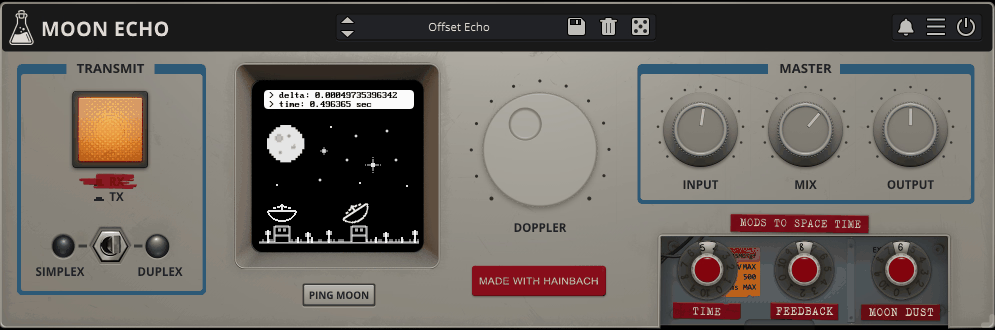
Moon Echo is free, which is surprising because it’s such a unique plugin.
AudioThing and Hainbach created this delay plugin to simulate bouncing your audio signal off the moon’s surface. It’s not just a marketing trick—the plugin actually recreates the crunchy artifacts and unusual modulation from old moon-bounce radio transmissions. The result is a sound that’s completely different from a standard clean digital delay.
I was immediately drawn to how Moon Echo handles the Doppler effect. As Earth and the moon move, radio signals change pitch, and the plugin models this. Your delays can drift and warp in subtle or dramatic ways, depending on your settings. This creates an evolving echo that feels alive instead of rigid.
The plugin runs on Windows, macOS, Linux, and iOS, and supports VST2, VST3, AU, AAX, and CLAP formats. You can use it in any modern DAW without any trouble.
- Moon Dust Noise Control
Here you can adjust transmission artifacts and surface reflections. Turning up “Moon Dust” adds crackle, dirt, and lo-fi grit to your delays, making them sound like echoes from an old space radio. It’s great if you want your delays to blend into the mix with character instead of standing out. This works well for ambient tracks, lo-fi beats, or anything that needs extra texture.
- Doppler Shift & Frequency Modulation
The Doppler control simulates pitch shifts caused by orbital movement. Turning it up makes your delays warp and bend in pitch, creating unstable, haunting echoes. I’ve made some of my favorite unusual vocal delays with this feature. It’s perfect when you want something offbeat or otherworldly, but not like a typical chorus effect.
- Ping Moon Real-Time Distance Calculation
This feature is just for fun, but it’s actually pretty cool. When you press “Ping Moon,” the plugin gets the current Earth-moon distance from NASA and changes the delay time based on real space data. It might seem like a gimmick, but it’s a creative way to add variation you wouldn’t come up with on your own.
- Simplex & Duplex Transmission Modes
Duplex mode works like a regular delay with instant echoes. Simplex mode copies one-way transmission, giving you a different rhythm. Switching between them changes how the delays return, which is useful if you want less predictable timing or want to try call-and-response effects.
7. Valhalla Supermassive (Tons of Presets)

Supermassive stands out because it goes way beyond what you’d expect from a free plugin. It’s not just a stripped-down version of another product. Instead, it’s a full creative tool that blends delay and reverb into something unique.
I use Supermassive when I want evolving textures. Its feedback delay networks let you turn simple echoes into big ambient clouds or strange, otherworldly sounds. You can get clean delays, thick reverbs, or something in between that’s hard to label.
The interface is simple, even though the plugin does a lot behind the scenes. The controls are clear, and you get quick results without having to read a manual. It’s also easy on your computer, so you can use several at once without slowing things down.
Main features:
- 22 Unique Modes for Different Sounds
Supermassive has more than 20 modes, each named after a star or constellation like Gemini, Sirius, or Andromeda. Each mode sounds different. Some give you simple, rhythmic echoes.
Others create deep, immersive reverbs that fill your mix. Some modes even blend both effects into something new that doesn’t sound like a standard delay or reverb. With so many options, you can always find the right sound, whether you want space, movement, or something experimental.
- Warp and Density Controls
The Warp knob really changes things up. It adjusts the timing of the delays, so static repeats become moving, evolving textures. When you use it with the Density control, you can go from clear, separate echoes to thick, blended sounds that turn into reverb. These controls let you shape the effect however you want.
- Modulation, Filters, and Stereo Width
You can use modulation to add shimmer and movement to your delays. The high-pass and low-pass filters help you shape the tone, so the effect fits in your mix without making it sound muddy.
There’s also a stereo width control that can make the sound wider or flip the phase for unique effects. With the filters, modulation, and width, you have all the tools you need to shape the delay to fit your track.
- Huge Preset Library
Supermassive includes tons of presets. Supermassive comes with lots of presets sorted by style and use. The Late 2025 folder highlights the new Sirius mode with ready-made sounds. You can quickly scroll through presets with the arrow buttons, making it easy to explore different options. When I need inspiration or start a new idea, I just click through presets until I find something that works. It’s a quick way to find the right vibe without starting from zero.
8. MeldaProduction MDelay

This is not just another free delay plugin. It comes with MeldaProduction’s large MFreeFXBundle, and to be honest, it feels like a paid product.
MDelay gives you two independent delay taps, which means you can layer different delay patterns and create way more interesting effects than most simple delays allow. You can run them in serial or parallel mode depending on what you’re going for.
I have used MDelay on vocals and synth leads, and it works well for both subtle timing effects and more creative sounds. The tape mode adds a vintage warmth that I often use when I want my echoes to sound less digital and more natural.
- Dual-Tap Delay Engine
You have two separate delay lines that you can adjust on their own. Each tap has its own time, gain, pan, and shuffle controls. This setup lets you create complex rhythms or wide stereo effects that single-tap delays cannot achieve. When I want delays to move across the stereo field or change over time, this feature is very helpful. The serial and parallel routing options add even more flexibility for sound design.
- Tape Mode & Saturation
MDelay includes a tape algorithm that mimics vintage delay units, complete with subtle pitch variations and character. The built-in saturation module adds harmonic warmth to your repeats, which is perfect when you want your delays to sit in the mix with some personality instead of sounding cold and digital.
- Rhythm Shaping Tools
The shuffle control on each tap lets you make rhythmic changes between your delay lines. With tempo sync to your DAW, you can set delays to match musical timing, such as quarter notes or dotted eighths.
This makes MDelay great for electronic music or any time your delays need to match the groove of the track. The ping-pong mode creates bouncing stereo effects that add width and movement right away.
- Tone Shaping with Filters
MDelay has resonant high-pass and low-pass filters that let you control the frequencies of your delayed sound. You can remove low-end rumble or reduce harsh highs that build up with many repeats. This kind of tone control is uncommon in free delay plugins and helps keep your delays clear and focused in a busy mix.
9. SuperflyDSP Flying Delay

What I like most about Flying Delay is that it keeps things simple. You get those classic tape delay sounds without having to figure out a complicated plugin. SuperflyDSP made it feel like old-school tape echo gear, but with a modern, easy-to-use interface that’s clear right from the start.
The plugin works across Windows, Mac, and Linux in VST3 and AU formats. I’ve thrown it on vocals, guitars, and synth leads, and it adds warmth without sounding overly digital. The delay range goes from 50ms all the way to 5 seconds, so you can dial in everything from quick slapback to long ambient trails.
Features:
- Tape Coloration Mode
The Tape slider is what gives Flying Delay its unique sound. Turning it up adds a warm, slightly worn character that helps delays blend into your mix instead of sounding too clean. Try it on guitars to make them sound less sharp and more vintage. You can keep it subtle or turn it up for a stronger analog feel.
- Tempo Sync with Ping-Pong
You can sync the delay time to your DAW’s tempo, so everything stays in time and musical. The ping-pong mode sends the repeats back and forth between the left and right speakers, giving you instant stereo width. I like using this on synth arpeggios or percussion to make the mix wider without needing reverb.
- Built-In High-Pass and Low-Pass Filters
Flying Delay has built-in filters for shaping the tone of your delays. The high-pass filter removes extra low end so your delays don’t make the mix muddy, and the low-pass filter softens any harshness. This means I don’t need to use a separate EQ just to tidy up my delay effects.
- Lightweight and Resizable Interface
The plugin uses very little CPU, so you can run several at once without slowing down your computer. The interface adjusts to fit your screen, and you can automate every control. Even on older laptops or in big projects, Flying Delay keeps everything running smoothly.
10. Higher Hz Delay

Higher Hz Delay stood out to me because it isn’t focused on being clean or transparent. Instead, it’s a delay plugin with real character, adding warmth, grit, and color to anything you run through it.
What makes this plugin unique is how it handles your signal. Even the dry sound gets some built-in saturation and drive, so you get analog-style color before the delay even starts. This gives you a tape echo or bucket-brigade feel without needing old hardware.
This plugin does more than just basic delay. You can use it for short slapback effects, chorus-like doubling, or turn up the feedback for reverb-style early reflections. I find it especially helpful when I want my delays to sound less digital and more natural.
- Multi-Stage Delay Architecture with Modulation
Higher Hz Delay sends your sound through several delay stages, which you can layer and route in different ways. This gives you richer and more complex echoes than a simple single-tap delay. The built-in modulation lets you add movement, from a gentle tape-like wobble to clear chorus effects. You can adjust both the rate and depth to get the exact amount of movement you want.
This means the plugin works well for both regular rhythm delays and more experimental, psychedelic sounds.
- Tone Shaping and Stereo Controls
The plugin includes high-pass and low-pass filters to shape your delay tails. I use the high-pass filter to stop bass from building up and making my mix muddy, while the low-pass filter softens harsh highs for smoother repeats.
There’s also a stereo width control that lets you adjust how wide or centered your wet signal sits. This is helpful when you want a delay that doesn’t overwhelm your mix or when you need tighter, more focused echoes. You have real control over how your delays sit in the stereo field.
- Flexible Feedback with Cross-Feed Option
The feedback section lets you send the delay output back into earlier stages for longer decay or cascading echoes. What’s cool is the cross-feed option, which swaps the left and right channels during feedback.
This creates complex stereo patterns and ping-pong effects that feel less predictable than standard delays. When you push the feedback higher, you can get reverb-like tails or even chaotic, experimental textures. It’s perfect when you want your delays to do more than just repeat the same thing over and over.
11. Kilohearts Khs Delay

kHs Delay gives you plenty of flexibility, and it’s completely free and easy to use.
I like plugins that are simple to use and don’t waste time with complicated menus or confusing routing. This one has tempo sync, stereo options, and a smart ducking feature that keeps your delays clear.
It’s included in Kilohearts’ Essentials bundle, so you can use it as a regular plugin or add it to their modular Snapin hosts if you want to experiment with your signal chains.
The interface is simple and straightforward. You won’t waste time looking for the feedback knob or figuring out how to sync it to your project tempo.
- Duck Feature for Clean Mixes
The ducking feature really makes this delay stand out. When it’s on, the delayed signal lowers automatically whenever your dry signal plays. This lets you use long or heavy delays without hiding your main sound. It works great on vocals and lead synths when you want more space and depth.
- Tempo Sync & Free-Running Modes
You have full control over timing with both tempo-synced and free-running delay options. If you’re working on rhythmic parts, syncing the delay to your project tempo keeps everything tight and musical.
If you want to experiment, you can set the delay time manually in milliseconds and create textures that don’t follow the grid. Switching between these modes is fast, so you can try new ideas without interrupting your workflow.
- Stereo & Ping-Pong Control kHs
Delay offers stereo width options and a ping-pong mode that bounces delays between the left and right channels. This is great for adding movement to guitars, synths, or percussion without making everything sound flat or stuck in the center.
The pan control lets you place the delayed signal exactly where you want in the stereo field. This helps when you’re building layered arrangements or trying to keep sounds from clashing in the middle.
12. GSi VariSpeed

This plugin closely recreates the WEM Copicat IC-400 Belt Drive VariSpeed, a classic tape echo machine that influenced many vintage recordings.
The VariSpeed VST plugin gives you real tape delay warmth without being complicated. If you want true analog character in your delays, this plugin does the job. Its variable-speed motor simulation stands out, letting you adjust the delay time by changing the virtual tape speed, just like the original hardware.
I use VariSpeed when digital delays feel too clean. It brings life to guitars, vocals, and synths in ways many modern plugins can’t. Plus, it’s completely free, which is a big bonus.
Here’s a quick overview:
- Authentic Tape Echo Emulation
VariSpeed brings back the WEM Copicat IC-400’s unique quirks and character. You get the warm, slightly worn sound of tape loops that gave vintage recordings their charm.
The plugin captures how tape naturally colors your sound, adding subtle harmonics and an organic feel you can’t get from basic digital delays. I like using it when I want delays that blend into the mix without sounding too clean.
- Variable Speed Control
The main feature is the varispeed knob, which changes your delay time by adjusting the tape speed. Slower tape gives you longer, darker delays, while faster speeds make shorter, brighter ones.
This feature creates pitch shifts and wobble effects that sound truly analog. You can automate the control for creative effects like tape slow-downs or echo swells. It’s great for dub-style sounds or adding movement to static tracks.
- Three Selectable Pickup Heads
VariSpeed gives you three tape head positions, just like the original hardware. Each head placement offers different delay times and tonal variations. This simple feature adds versatility without complicating the interface. I switch between heads depending on whether I want short slapback echoes or longer atmospheric repeats.
- Simple Vintage-Style Interface
The GUI mimics the original hardware with an animated tape loop that actually moves at different speeds. You get straightforward controls for input levels, echo swell, repeat rate, and tone shaping.
Everything is organized clearly, so you can spend more time making music and less time adjusting settings. The moving tape gives you helpful visual feedback, which makes it easier to dial in the sounds you want.
13. Valhalla Freq Echo

Valhalla Freq Echo is a free delay VST plugin that blends a Bode-style frequency shifter with analog echo emulation. This combination lets you create sounds that go far beyond standard delay effects.
What I like most about Freq Echo is how it can turn simple sounds into something new. You can take a basic vocal or synth note and change it into swirling textures, strange echoes, or gentle doubling effects, depending on your settings.
The interface is simple and easy to use. There are no endless menus or confusing options, just a few knobs that let you shape your sound quickly so you can focus on making music.
Features:
- Frequency Shifter + Analog Echo Combination
This is where Freq Echo stands out. The frequency shifter is built into the feedback path of the delay, so you get effects that standard delay plugins can’t produce.
Shifting the frequency of each repeat can create barberpole phasing, unusual flanging, endless glides, or echoes that seem to move on their own. I’ve used it for dub and psychedelic sounds, and it always works well. Even small shifts can add gentle chorus and double tracking for extra width without sounding artificial.
- Simple Controls That Encourage Experimentation
Freq Echo gives you just the basics, so it’s not overwhelming. You can control delay time, feedback, mix, and use low-cut and high-cut filters to shape your echoes. The shift knob is where you can get creative, from gentle changes to wild, unpredictable sounds.
- Tempo Sync or Free Time Options
You can set the delay time to match your DAW’s tempo for rhythmic echoes, or use free time for more experimental sounds. This flexibility makes Freq Echo great for both structured music and sound design. When I work on ambient or film tracks, free time mode gives me options that tempo-locked delays can’t.
- Lightweight and CPU Friendly
Even with all its creative features, Freq Echo runs smoothly and doesn’t use much of your computer’s power. It works with VST, VST3, AU, and AAX formats on both Windows and macOS, including Apple Silicon. You can use several instances in your project without performance problems.
14. Vox Samples Time Turtle

Vox Samples designed this plugin to be fast and simple. When I’m working on a track and need a clean delay, I don’t want to search through menus or worry about too many settings. Time Turtle gives me two main knobs, Time and Feedback, and that’s usually all I need.
Time Turtle sounds smooth. It handles echo, doubling, and slapback easily. You can use it on vocals, guitars, synths, or drums, and it fits well in the mix.
- Time & Feedback Controls
These two knobs are what make Time Turtle work. Time sets your delay length, and Feedback controls the number of repeats. I like how easy it is to use. The controls do exactly what you expect, so you don’t waste time searching for the right setting.
- Tempo Sync Time
It has a sync-to-tempo feature, so your delays stay in time with your project’s BPM. This is really helpful for rhythmic parts or when you want your echoes to sound tight and musical. Try it on synth lines or vocal chops where timing is important.
- Ping-Pong Mode
You can switch the delay to ping-pong mode, which bounces echoes between the left and right channels. This gives your sound instant stereo width and movement. I find it great for lead parts or anything that needs to feel bigger without crowding the center.
- Tone Shaping Filters
Also, it has low-cut and high-cut filters for the delayed signal. You can remove low frequencies to avoid muddiness, or reduce highs to achieve smoother, warmer echoes. It’s a small feature, but it really helps when fitting delays into a busy mix.
- Free & Cross-Platform
The plugin is free and works on both Windows and Mac in VST3, AU, and AAX formats. You get professional delay features without paying, so it’s great if you’re building your plugin collection or need a reliable backup.
How Do Delay Plugins Work?
Delay plugins take your audio and play it back after a certain amount of time. It’s similar to hearing an echo in a canyon, but you have full control over how and when it repeats.
When you use a delay plugin, your audio splits into two parts. One part stays dry and goes through unchanged. The other part is stored for a moment, then plays back after the delay time you set.
Most delay plugins have three main controls. Delay time sets how long the plugin waits before repeating the sound. Feedback controls how many times the echo repeats. Mix level adjusts how loud the delayed sound is compared to your original audio.
The delay time can sync to your project tempo or run freely in milliseconds. Tempo-synced delays lock to your BPR, which keeps rhythmic patterns tight in your mix. Free-running delays give you more experimental control when you want textures that don’t follow the grid.
Feedback is what makes the sound repeat. Turning up the feedback means each echo gets sent back into the delay, creating more repeats. Low feedback gives you just a couple of echoes, while high feedback can create long trails or even endless loops if set too high.
You can change how your delays sound by using filters and modulation. Filters remove high or low frequencies from the repeats, helping them fit better in your mix. Modulation adds movement by slightly changing the pitch or timing of each repeat.
Stereo delays send repeats to the left and right channels, making the echoes bounce between your speakers. Some plugins have a ping-pong mode, where each repeat switches sides. This adds width and space, making your tracks sound larger.
The buffer that stores your audio makes digital delay possible. Older hardware delays used tape loops or analog circuits. Now plugins do the same work inside your DAW with way more flexibility and cleaner results.
How Delay Plugins Enhance Music Production
Delay plugins add space and movement to your music by repeating sounds at different times. They can turn plain recordings into lively soundscapes and give you useful tools for both creative ideas and professional mixing.
Creative Uses of Delay Effects
Delay plugins offer many creative options beyond just simple echoes. I use them to create atmospheric textures by sending vocals or synths through long, modulated repeats that blend into ambient sounds.
Rhythmic delays that match your project’s tempo can create patterns that sound like extra instruments. Setting eighth-note or dotted-quarter delays on lead vocals adds movement without making the mix crowded. I also automate delay feedback to build tension before drops or transitions.
Ping-pong delays move the sound between left and right speakers, adding width and stereo interest. This effect works well on percussion, plucks, or any part you want to spread out. Short slapback delays around 80-120ms give guitars and vocals a classic rockabilly feel.
You can also use delay for sound design by turning up the feedback until it starts to self-oscillate, or by sending delays through distortion and filters. I’ve made full pad sounds by processing just one note with creative delay setups.
Impact on Mixing and Sound Design
Delay plugins help you position sounds in a three-dimensional space when mixing. Short delays of 20-40ms can make vocals or instruments sound fuller and more present without creating obvious echoes.
I use tempo-synced delays to keep rhythmic elements tight and musical. When delays align with your project’s grid, they enhance the groove rather than fight it. Independent stereo channel control lets you create asymmetrical patterns that add interest while maintaining balance.
Filtering capabilities built into modern delay plugins let you shape the tone of repeats separately from the dry signal. I often roll off high frequencies on delay tails so they sit behind the main sound rather than compete. Modulation options like chorus or vibrato on the delayed signal add movement and prevent repeats from sounding static or digital.

Hello, I’m Viliam, I started this audio plugin focused blog to keep you updated on the latest trends, news and everything plugin related. I’ll put the most emphasis on the topics covering best VST, AU and AAX plugins. If you find some great plugin suggestions for us to include on our site, feel free to let me know, so I can take a look!