What makes a transient shaper worth using? For me, it’s about whether it actually solves problems without causing new ones.
Plugin Alliance’s Trinity Shaper adapts to your source material intelligently instead of forcing you into threshold tweaking. Wavesfactory Quantum splits audio into attack and sustain paths, letting you process each independently with built-in effects.
Zynaptiq PUNCH uses frequency-domain processing to enhance transients even in overcompressed material where most tools fail. XLN DS-10 offers optimized modes for kicks, snares, and full buses, with a MOJO control that targets specific frequency bands. And Waves Smack Attack goes beyond basic level adjustments with dedicated Shape and Duration parameters for surgical control. These are just a few I will talk about in the list.
I’ll also talk about some great free options like VoS FeenstaubTX, Surreal Machines Crack, and Sonic Anomaly Transpire. These show you can shape transients well without spending money.I’m not here to hype every feature. I want to show you what really matters when you need drums to stand out in a busy mix, fix weak samples, or add clarity without unwanted side effects.
I’ve benchmarked these plugins, and here is what I found:
| Plugin Name | Best For | Engine Type | Key Strength | My Verdict | Pros | Cons |
|---|---|---|---|---|---|---|
| 1. Plugin Alliance Trinity Shaper | Mix buses, complex percussion, adaptive shaping | Adaptive transient detection with dual-stage processing | Frequency-dependent attack/sustain control with transparent gain compensation | Great for adaptive, mix-safe transient control | Source-aware detection, clean phase response, sidechain triggering, CPU efficient | Learning curve for users expecting minimal controls |
| 2. Klevgrand Fosfat | Drum enhancement and sound restoration | Envelope-triggered sine and noise synthesis | Adds new harmonic content rather than reshaping existing transients | Standout choice for rebuilding weak drum hits | Dual oscillator design, pitch-drop control, frequency-targeted triggering | Not intended for transparent transient reduction |
| 3. Slate Digital Transient Shaper | Frequency-focused drum shaping | Level-independent transient/sustain processor with sidechain filtering | Independent Focus bands for transient and sustain processing | Reliable option for precise frequency-aware shaping | Listen modes, Warmth saturation, clean UI, predictable behavior | Limited creative modulation compared to newer designs |
| 4. Wavesfactory Quantum | Advanced sound design and transient-based effects | Automatic transient splitting with dual effect engines | Independent multi-effect chains for attack and sustain paths | Go-to solution for experimental and hybrid workflows | Convolution reverb, Spectre enhancer, mid/side stereo tools | Higher CPU usage when stacking multiple effects |
| 5. XLN DS-10 Drum Shaper | Fast drum processing and bus shaping | Optimized transient algorithms with frequency-aware enhancement | MOJO control for band-specific transient emphasis | Best suited for speed-focused drum workflows | Kick/Snare/Bus modes, soft clipping, low CPU footprint | Limited flexibility outside drum-focused material |
| 6. United Plugins Nanopulse | Creative transient replacement and layering | Profile-based transient synthesis with multiband shaping | 64 transient profiles with pitch, tone, and resonance control | Strong choice for creative transient sound design | Three detection modes, multiband attack/sustain control, zero-latency option | Profile-based workflow may feel unconventional for corrective tasks |
| 7. Newfangled Audio Articulate | Envelope-level dynamic sculpting | ADSR-based transient and sustain separation | Four-stage envelope control applied to audio material | Excellent for envelope-driven shaping beyond drums | Stage solo/mute, sidechain mode, stereo link control | No frequency-band separation |
| 8. Zynaptiq PUNCH | Overcompressed mixes and mastering enhancement | Frequency-domain transient reconstruction | Enhances buried transients using source-separation technology | Reference tool for restoring punch in dense material | SMOOTH/CRYSTAL modes, Sub and Air enhancement, transparent clipper | Less hands-on control than traditional shapers |
| 9. Surreal Machines Impact | All-in-one drum processing chains | Multiband transient processor with saturation and EQ | Per-band attack/sustain shaping with analog-modeled drive | Well-rounded solution for complete drum processing | Flexible band modes, saturation routing, integrated EQ | Interface density may slow quick edits |
| 10. Waves Smack Attack | Surgical transient control during tracking or mixing | Zero-latency envelope-based transient processor | Shape and Duration parameters for detailed transient behavior | Solid choice for precise, low-latency shaping | Real-time waveform display, dual sensitivity thresholds | No multiband or frequency-selective processing |
| VoS FeenstaubTX (Free) | Mix bus enhancement and stereo depth | Transient-based saturation with mid/side processing | Cross-channel interaction for dynamic stereo movement | Best zero-cost option for mix bus character | Mid/side control, transient range adjustment, musical saturation | Interface lacks modern visual feedback |
| Surreal Machines Crack (Free) | Everyday drum transient shaping | Classic attack/sustain processor with output dynamics | Integrated clipper, limiter, and maximizer | Practical free tool for drum-heavy sessions | Very low CPU usage, clear metering, fast workflow | No frequency or envelope-stage separation |
| Kilohearts Transient Shaper (Free) | Clean punch enhancement with headroom control | Linear transient processor with post-transient attenuation | Pump control for perceived punch without peak increase | Efficient choice for punch without clipping | Snapin modular support, sidechain detection, CPU efficient | Minimal visual feedback |
| Sonic Anomaly Transpire (Free) | Busy percussion and ghost-note enhancement | Non-linear transient processing | Enhances low-level transients more aggressively than peaks | Excellent free option for detail recovery | Built-in clipper, controlled dynamics on dense material | Introduces small, fixed latency |
1. Three-Body Technology Trinity Shaper – Great for adaptive, mix-safe transient control
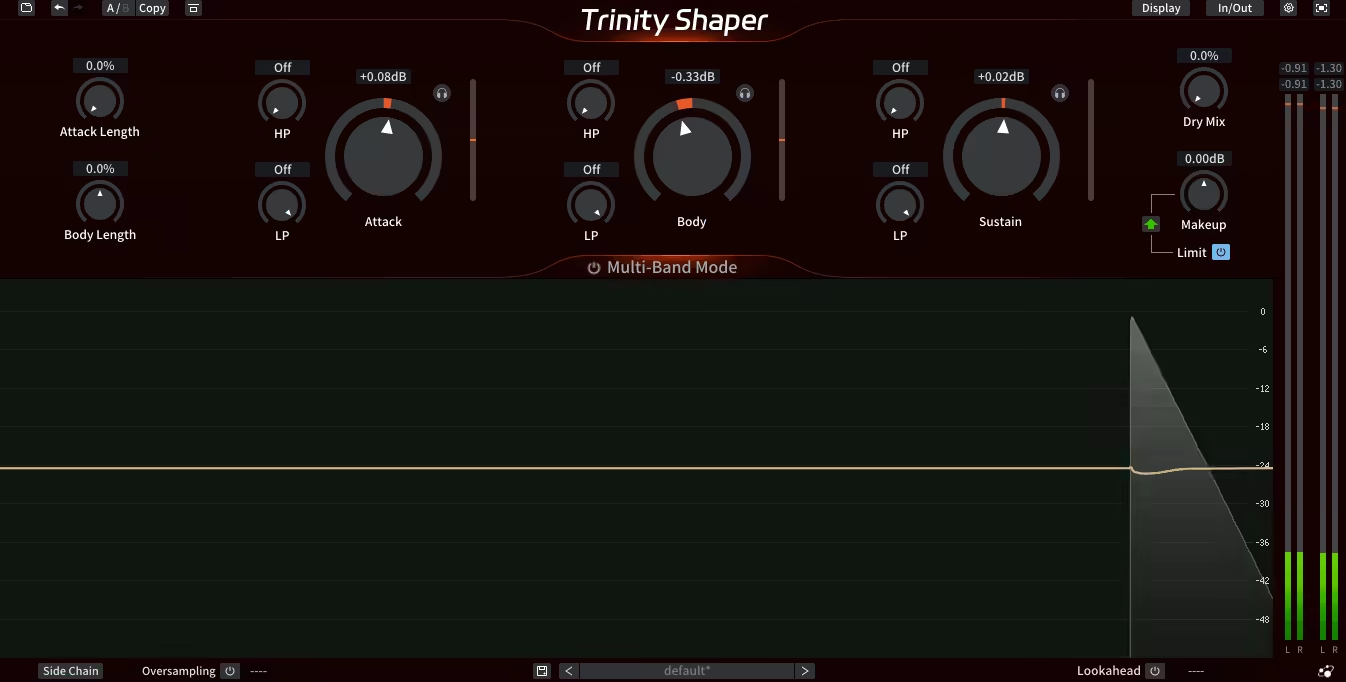
What really caught my attention is how Three Body Technology tackled the idea of transient shaping.
Rather than just giving you two knobs and stopping there, they made something that responds intelligently to your audio. It’s not trying to do everything at once. At first, it looks a bit advanced, but it’s actually focused, practical, and pretty easy to use.
- Adaptive Transient Detection
The detection engine does more than just react to peaks. It analyzes the signal and changes how it handles transients depending on what you put in. This really helps when working with complex sounds like synth bass loops or layered percussion. The algorithm adapts as you go, so your results stay consistent even when the dynamics change, which saves a lot of time on automation.
- Dual-Stage Processing Architecture
Trinity Shaper has a two-stage process that keeps attack and sustain control separate. I like that you can adjust each one on its own without them interfering. For example, you can boost the attack on a snare and reduce the body, and it won’t cause any strange artifacts or phase problems. The clean separation is what makes it work well on a mix bus, in my opinion.
- Frequency-Dependent Shaping
Not every transient lives in the same frequency range, and this plugin gets that. You can target specific frequency bands for shaping, so you’re not blindly crushing or accentuating everything. I realized that this is especially useful when working with synth pads that have percussive attacks buried in the low mids, and you can bring those out without destroying the high-end shimmer or making the low end muddy. It’s surgical when you need it to be, but it doesn’t force you into that workflow.
- Transparent Gain Compensation
A lot of transient shapers mess up your gain staging, which makes A/B comparisons hard. Trinity Shaper’s automatic gain compensation actually works.
- Intuitive Visual Feedback
The waveform display lets you see what’s happening to your transients as it happens. You can watch the attack and sustain being shaped and see exactly where the plugin is working.
- Minimum CPU Usage
- Flexible Sidechain Options
The sidechain input lets you use other sounds to trigger the shaping. This opens up creative options beyond just fixing drums. For example, you can use a synth arp to duck a pad or trigger transient shaping on a bass with a kick drum. It’s not revolutionary, but it works well, and the controls are simple enough that you don’t need a manual.
2. Klevgrand Fosfat – Standout choice for rebuilding weak drum hits
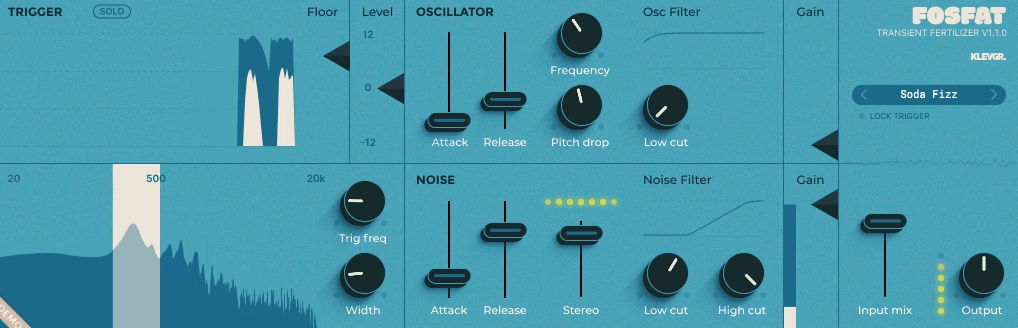
Most designers focus on enhancing what’s already in your sound, but the Fosfat plugin from Klevgrand does something different. What stands out to me is that it adds new sonic elements to your drums, not just reshaping the transients you already have. This plugin can really save weak tracks or help strong drums stand out in busy mixes without sounding unnatural.
At first, the “transient fertilizer” marketing might seem like a gimmick, but it actually makes sense once you try the plugin. Klevgrand designed it with an envelope follower that triggers two sound sources: a sine wave oscillator for low-end body and a noise generator for high-frequency attack. I found that it’s not just about making things louder. It fills in frequency gaps left by compression or bad mic placement, and it does this without overpowering your original sound.
- Dual Oscillator Architecture
The sine wave oscillator and noise generator work separately, so you can control both the low and high end. I found the sine oscillator great for adding sub-bass to kicks without making them sound like a synth. The noise section adds snap to snares and crisp detail to hi-hats. Each oscillator has its own attack, release, and filter controls, so you can fine-tune the effect. I think this separation helps the plugin stay musical instead of just being a basic tool.
- Intelligent Trigger System
The trigger system has two visual displays that show when and how the plugin reacts to your input. You can adjust the trigger frequency and bandwidth, so you can focus on certain drum sounds even in busy loops. I like the Floor control because it lets you set a threshold to ignore softer hits or background noise. This is really helpful when you want to boost the kick in a drum loop without the plugin picking up every small sound.
- Pitch Drop Feature
I quickly noticed the Pitch Drop control on the sine oscillator. It lets you add a downward pitch sweep that follows the envelope, similar to an 808 kick or classic drum synth. Even if you’re not making hip-hop or electronic music, it’s worth trying. A subtle pitch drop can keep the added tone from sounding too static or “singing” on your kicks. It adds movement without disrupting the groove.
- Frequency-Specific Processing
You can set the trigger to focus on certain frequency ranges, so it’s useful for more than just single drum hits. I found you can use Fosfat on full drum loops and still control which parts it affects by adjusting the sidechain filter. For example, you can add sub-bass to just the kick in a loop without changing the snare or toms. The filters on both the sine and noise sections help the new sounds blend into the mix instead of taking over.
- Stereo Width Control
The noise oscillator has a stereo width control that lets you spread the high-frequency boost across the stereo field. I like that this adds space to percussion without making it sound fake or too wide. You can keep your kick in the center and add some stereo sparkle to hi-hats or shakers.
3. Slate Digital Transient Shaper – Best for precise frequency-aware shaping
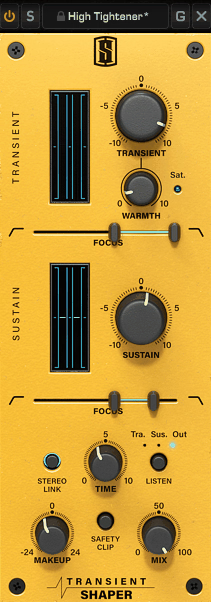
I appreciate how Slate’s Shaper lets you target specific frequencies. Most transient shapers only give you global control, but the Focus sliders here allow you to adjust different frequency ranges for both the transient and sustain parts.
With this, you can add snap to the high end of a snare without changing the low-end punch, or tighten a kick drum without affecting the cymbals in a full drum mix. It may not be groundbreaking, but it’s practical and saves time.
- Dual Focus Frequency Control
The Focus sliders in both the Transient and Sustain sections let you pick which frequencies to shape. This is especially helpful when working with complex sounds like full drum loops or layered synths. For example, you can boost the attack in the midrange of a snare or cut sustain in the low end without touching the highs.
As you drag, the frequency display shows numbers, keeping the interface clean yet precise. This makes it easier for me to layer sounds without encountering frequency-masking issues.
- Independent Transient and Sustain Sections
Each section works independently and has a gain control from -10 to +10. I also like that transient detection doesn’t depend on the input level, so you can change your input gain and the plugin still responds the same way.
The Sustain section lets you control the tail of your sound, which helps when tightening drum hits or adding body to a plucked synth bass. Each section has a visual meter showing how much boost or cut is happening, so you always know what the plugin is doing.
- Warmth Saturation Control
The Warmth knob adds harmonic saturation to the transient before any gain changes. This is a smart design because the saturation stays consistent no matter how much you boost or cut the transient.
If you boost a snare transient a lot, you can use the Warmth to reduce harshness and add some analog-style grit without making things sound brittle. It’s not a full saturation plugin, but it adds character when you need it and works well on thin or digital-sounding drums.
- Listen Mode for Precision
The Listen button lets you solo the Transient, Sustain, or full output.
- Time Crossover Adjustment
The Time knob sets the crossover point between what is considered a transient and what is considered sustain. This control looks simple but really changes how the plugin works with different sounds. Shorter times work well for fast percussion or tight drums, while longer times are better for bass notes or sustained sounds.
- Sidechain Filtering with Bandpass Mode
The Focus sliders also control the sidechain signal for detection, not just the output. If you hold Shift while dragging, you activate bandpass processing, which limits the effect to a specific frequency band. This is very useful for fixing issues like a flabby kick in a full drum loop.
4. Wavesfactory Quantum – Go-to solution for experimental and hybrid workflows
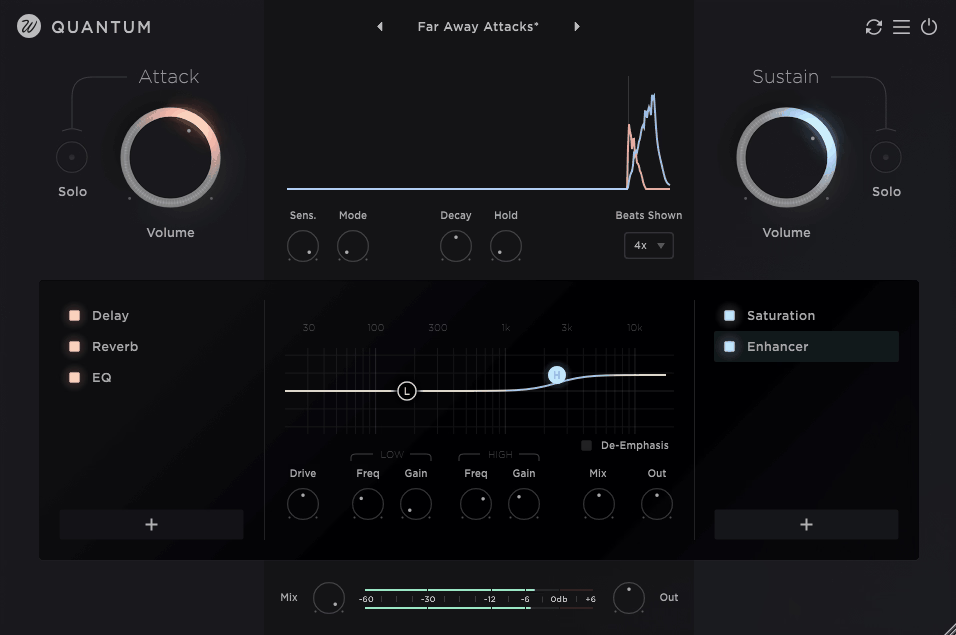
If you want more than basic transient shaping, Wavesfactory Quantum offers a fresh approach that fits today’s production needs. The plugin splits your audio into attack and sustain paths. Whether you’re chopping samples on an Arturia KeyStep or working with full mixes, you can apply up to 16 different effects to each side separately before combining them again. This isn’t just a marketing gimmick; it really does open up new ways to work.
I appreciate that Quantum removes the need for threshold settings by using automatic transient detection. You can adjust how aggressive the detection is with the Sensitivity control, so you don’t have to tweak thresholds on every track. The real-time waveform display clearly shows where the plugin splits the signal, and this visual feedback makes setup much quicker.
It might seem like a lot, but being able to EQ only the attack of a snare or add reverb just to the sustain of a vocal opens up creative options that go beyond standard transient shaping.
- Independent Effect Chains for Attack and Sustain
Each path has its own chain of up to 16 built-in effects, such as EQ, compression, saturation, delay, convolution reverb, chorus, pitch shifting, and others. I found that pitch-shifting drum sustains without affecting the attack is very helpful for tuning kicks or toms while keeping their punch.
You can add lo-fi effects only to the transients for extra crispness, or use stereo widening on the sustain while keeping attacks centered. The Mix and Output controls for each effect let you blend them smoothly, so you’re not limited to all-or-nothing processing. This is where Quantum stands out as a real sound design tool, not just a transient shaper.
- Automatic Smart Transient Detection
The detection algorithm works without needing manual threshold settings, so you spend less time adjusting and more time shaping your sound. The Sensitivity parameter lets you control how strongly it detects transients, making it easy to adapt to different dynamic ranges.
The plugin automatically analyzes your signal and adapts to whatever you’re working with, from hard drum hits to gentle synth plucks. This saves a lot of time compared to other shapers where you have to keep adjusting thresholds as levels change in a track.
- Adjustable Attack Length Control
The Decay parameter lets you set the attack length from one sample up to 500ms, giving you precise control over what counts as the transient or the sustain. This is important because different sounds need different attack times. Fast percussion may need very short detection, while bass notes or synth stabs need longer windows to capture the full transient.
The visual waveform updates in real time as you adjust the settings, so you can see exactly where the split occurs. This level of control is what sets Quantum apart from simpler transient shapers.
- Built-in Spectre Enhancer
The Enhancer effect is a simplified version of Wavesfactory’s Spectre plugin, with low and high shelf filters. This is great for adding subtle harmonic enhancement to either the attack or sustain without loading another plugin. You can brighten hi-hat transients or add low-end warmth to a kick’s sustain. Since it’s built in, you avoid extra CPU load and routing. Having this tonal shaping included makes the workflow smoother.
- Convolution Reverb with IR Library
Quantum comes with a convolution reverb that offers over 40 impulse responses and lets you import your own. You can add reverb only to the attack part of drums, creating a focused room sound without making the sustain muddy or washed out.
Normally, you would need complex routing or manual audio splitting to do this. You can also use different reverbs for attack and sustain, allowing creative choices like a tight room on transients and a longer hall on sustains. This feature alone often makes Quantum worth choosing over a standard transient shaper.
- Stereo Tools with Mid/Side Processing
The Stereo Tools effect offers mid/side processing, so you can adjust the stereo image of only the attack or only the sustain.
This is very useful for keeping drum hits centered while widening the room ambience or cymbal sustain. You can also do the reverse—widen transients for a more aggressive sound and keep the sustain mono for better low-end focus. Phase coherence remains intact, which is important for this type of processing.
Overall, this gives you control over stereo placement that most transient shapers do not offer.
5. XLN DS-10 Drum Shaper – Best suited for speed-focused drum workflows
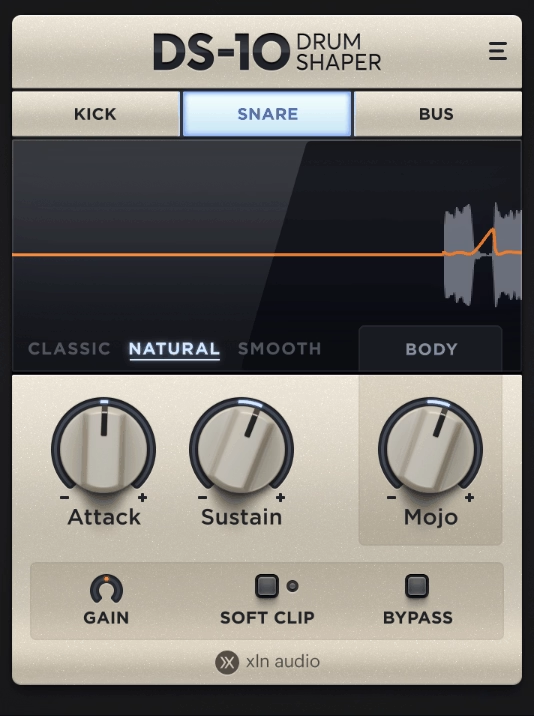
If you want a plugin that’s easy to use and just gets the job done, DS-10 is a solid choice. XLN Audio’s Drum Shaper comes from their Addictive Drums line, and it handles transients with three modes that are truly designed for different sources, not just labeled for marketing.
What really sets this plugin apart is the MOJO control. It does more than just shape attack and sustain—it lets you target specific frequency bands within the transients.
You can add snap to hi-hats, body to snares, or tighten up kicks without changing the rest of the sound. I find this much more practical than using an EQ after a transient shaper to fix things. Everything happens in one place, and the interface is simple so you don’t have to overthink it.
- Three Optimized Processing Modes
Kick, Snare, and Bus modes are more than just presets with new names. Each one has its detection and gain curves adjusted for the right frequency content and transient style.
I’ve found Kick mode works well on bass-heavy sounds, Snare mode brings out midrange punch, and Bus mode is flexible enough for full drum mixes or percussion loops.
Having these built-in optimizations means you don’t have to mess with threshold settings or force a generic transient shaper to work on every drum. Just pick the mode that fits your sound and you’re almost done.
- MOJO Frequency-Specific Shaping
The MOJO processor is what makes DS-10 different from basic transient shapers. It shapes transients in certain frequency bands based on the mode you choose. In Kick mode, MOJO controls the low end. In Snare mode, it shapes the midrange. In Bus mode, it changes the high-frequency presence.
I like this approach because you get frequency control without needing lots of bands or complex routing. Just turn one knob to boost or tame what your drum needs. It speeds up mixing without losing quality.
- Three Shaping Algorithms
There are three algorithm options: Classic, Natural, and Smooth. Classic comes from Addictive Drums 2 and gives an aggressive, pumping sound that’s great for electronic drums or bold effects. Natural is more transparent and works when you want subtle changes or need to push things hard without adding unwanted noise.
Smooth uses a longer release time, giving results like parallel processing but without extra setup. I’ve noticed that switching between these algorithms can really change your drum sound, so it’s worth trying all three.
- Soft Clipping for Harmonic Enhancement
The Soft Clip option adds harmonic distortion, which can make weak drum hits sound fuller or add some analog-style grit. I like that it’s not just a hard limiter—it’s real soft clipping that adds musical harmonics.
If you push the Soft Clip, you get saturation that makes drums sound more aggressive without making them too distorted. It might not go as far as a full saturation plugin, but for quick color and extra weight, it works well. I suggest trying it on synth drums or samples that need to stand out in a busy mix.
6. United Plugins Nanopulse – Strong choice for creative transient sound design
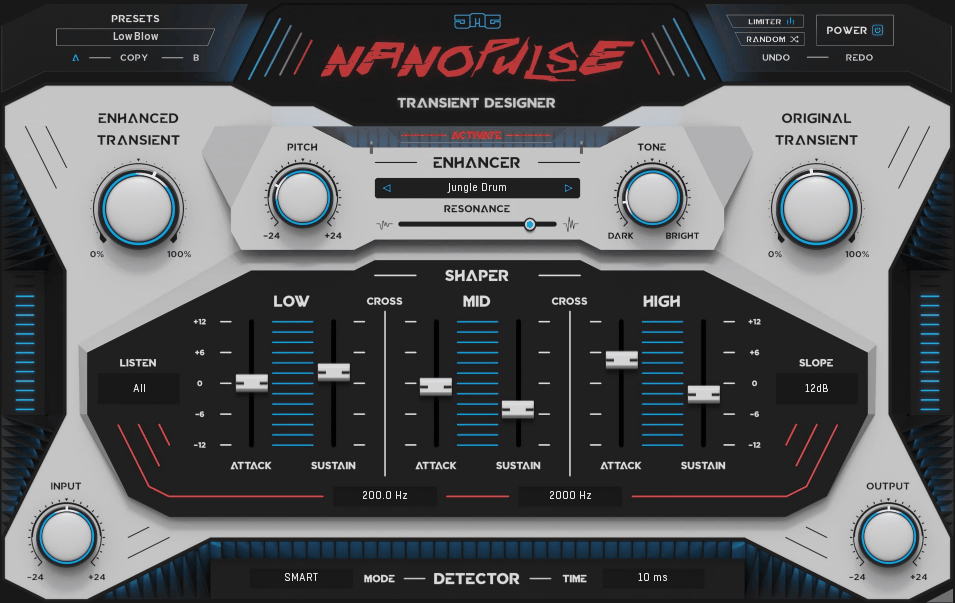
I like that the Nanopulse transient shaper plugin keeps the enhancement and shaping steps separate. First, you pick a transient profile that fits the sound you want, such as snare skin, woodblock, kick beater, glass ping, or cymbal tap.
Next, you adjust the pitch, tone, and resonance to match your source sound. After that, you use the three-band shaper to control attack and sustain separately for the low, mid, and high frequencies.
I think this workflow is easier to use than trying to handle everything with just one set of controls, especially when working with complex sounds like full drum loops or layered percussion.
- 64 Transient Profile Library
The Enhancer section lets you choose from 64 transient types taken from drums, percussion, instruments, noises, and other objects. This is where I think Nanopulse stands out from regular transient shapers. Instead of only boosting the original sound, you can mix in qualities from other sources.
For example, you can add the snap of a woodblock to a dull kick or bring in the metallic ping of a cymbal to a flat snare. The Mix control lets you blend the original transient with the enhanced one, so you can keep it subtle or fully change the attack. I think this gives you more creative options than just increasing the attack.
- Independent Pitch, Tone, and Resonance Controls
After you pick a transient profile, you can adjust how it sounds. The Pitch control moves the profile up or down to fit your source, which is important when adding low-end profiles to kicks or high-end ones to hi-hats.
The Tone control changes the frequency balance of the profile, so you can make it sound brighter or darker. Resonance brings out the natural qualities of the profile and adds more body when you increase it.
I noticed that these three controls make the profiles much more useful. Without them, you would be limited to one-size-fits-all enhancements that usually don’t work well right away.
- Three-Band Multiband Shaper
The Shaper section divides your signal into low, mid, and high bands, each with its own attack and sustain controls. I found it really helpful to boost the attack in the mids and lower the sustain in the lows to tighten up muddy kicks or boomy toms.
You can set the crossover frequencies and choose slope settings of 6, 12, or 24 dB per octave, which lets you control exactly where the bands split. This might sound technical, but it just means you can shape different parts of the sound without them interfering with each other. I usually pick steeper slopes for more control and gentler ones for smoother changes.
- Three Detection Modes
Nanopulse has three detection modes: Smart, Spectral, and Fast. Each one detects transients in a different way. Smart mode uses the least CPU and works well for simple drum tracks.
Spectral mode uses more advanced analysis and is better for complex sounds or when you need more accuracy. It does add some latency, about 1,024 samples at 44.1 or 48 kHz.
Fast mode has zero latency and responds quickly, so it’s great for live processing or when you want instant feedback. I recommend trying all three modes to see which works best for your material, since the differences can be noticeable.
7. Newfanlged Audio Articulate – Excellent for envelope-driven shaping beyond drums
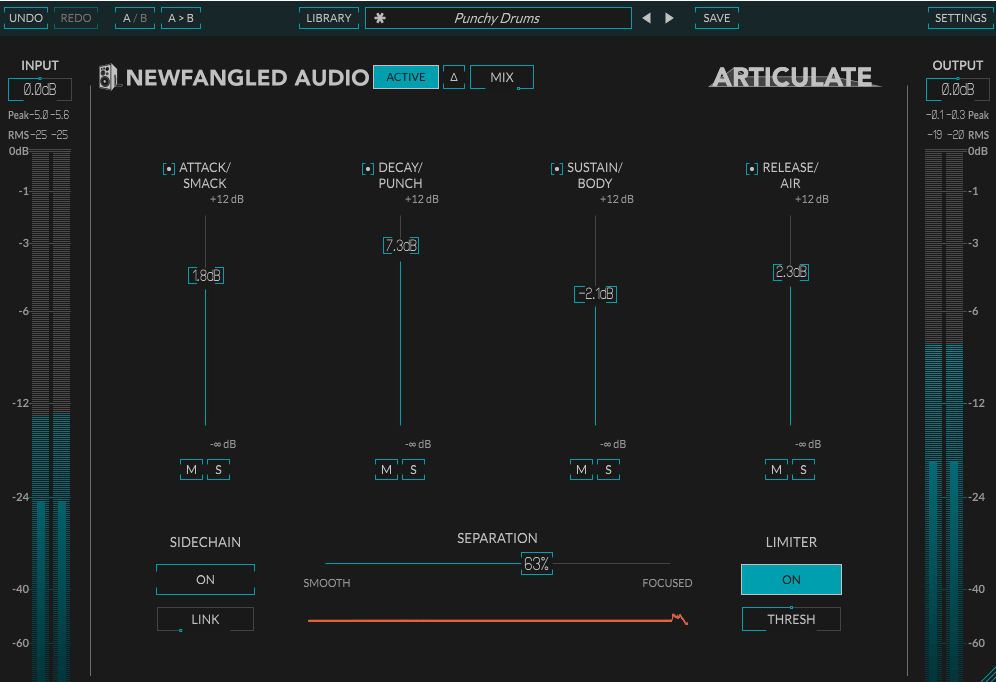
Controlling dynamics shouldn’t be complicated. Most transient shapers only offer attack and sustain controls, but Newfangled Audio’s Articulate brings the full ADSR envelope from synths into recorded audio.
You can adjust drum hits from a Roland SPD-SX or shape entire mixes, all with separate control over Attack, Decay, Sustain, and Release by simply moving faders.
I like that the plugin uses both technical names and practical labels. Attack is also called Smack, Decay is Punch, Sustain is Body, and Release is Air. These labels help you focus on your goals instead of getting lost in technical details.
You’re not just adjusting transients, you’re choosing how much snap your snare has, how much punch your kick gets, or how much air your cymbals bring to the mix. This approach feels more musical and less technical to me.
- Four-Stage Envelope Control
With ADSR separation, you get four faders that range from +12 dB down to silence. You can boost or remove any part of the envelope. This much control lets you do things that would usually need several plugins.
For example, you can boost Attack to add snap to a dull snare, lower Decay to tighten the punch, reduce Sustain to cut down on ringing, and increase Release to let cymbals breathe. You can also solo or mute each stage to hear what each part adds. Being able to isolate stages makes it quicker and easier to set your sound.
- Separation Control for Response Tuning
The Separation slider changes how sharply each envelope stage transitions, from Smooth to Focused. I found the Smooth setting gives a more natural sound, which is great for subtle changes or when you want mixes to sound unprocessed.
The Focused setting gives a stronger separation between stages, which works well for drums or percussive synths when you want more control over transients. This control really changes how the plugin sounds, so it’s worth trying different settings instead of sticking with the default.
- Sidechain Mode for Dynamic Interaction
The Sidechain input lets you shape the envelope using another audio track as a trigger. This is great for making space in busy mixes. For example, you can use a kick drum to lower the Attack of a bass line, or a vocal to reduce the Sustain of a synth pad when the singer comes in.
- Solo and Mute Per Stage
Each envelope stage has its own Solo and Mute buttons, so you can focus on specific parts of the sound. This makes it easier to hear what you’re changing. For example, you can solo the Attack to check the snap, or mute the Sustain to see if it cleans up your mix.
The Solo button works so that picking one cancels the last, but you can solo more than one by muting the other stages. It might be more flexible, but in practice, it works well for checking your sound.
- Stereo Link Control
The Stereo Link switch lets you choose between linked detection for even stereo imaging or unlinked dual-mono for separate left and right shaping. I suggest keeping it linked for most uses, especially on stereo drum buses or when you want balanced processing.
8. Zynaptiq PUNCH – Best for restoring punch in dense material
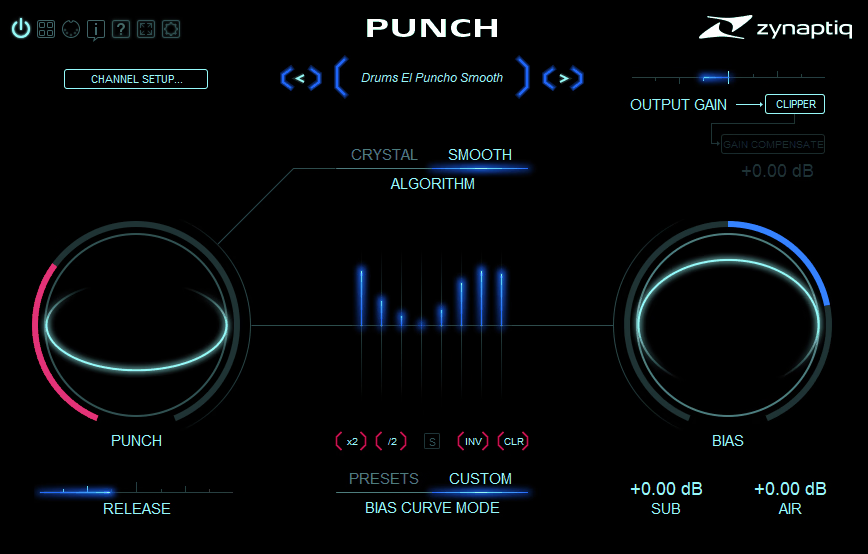
Zynaptiq PUNCH works well on material that usually confuses traditional transient shapers.
If you’ve ever tried shaping an overcompressed mix or a track that’s already been processed to death, you know most tools just give up or make things worse. This plugin uses intelligent algorithms based on source separation and frequency-domain processing, enabling it to identify and enhance transients even when they’re buried or mangled. I realized that this makes it useful not just on individual drums, but on full mixes, stems, or even mastering chains where you need to add definition without restarting from scratch.
- Two Processing Algorithms
You can choose between SMOOTH and CRYSTAL modes, and they really do sound different. The SMOOTH mode uses over 100 minimum-phase bands for detailed processing across the whole frequency range.
I think this mode is perfect when you need transparent enhancement that doesn’t announce itself. The CRYSTAL algorithm operates on 10 bands and has a more focused, aggressive character that works great on individual drum tracks or when you need a punch that’s more obvious. For the most part, I use SMOOTH on mix buses and full mixes, and CRYSTAL when I want more dramatic shaping on specific elements.
- Frequency-Dependent Contouring
The plugin processes each part of the sound separately with its multiband setup, so you’re not just boosting or cutting transients everywhere at once. This helps avoid the usual problem where making the kick stronger also makes the snare too harsh or messes up the cymbals.
Each frequency band gets its own treatment based on the content in that range. That being said, you’re not manually setting crossovers or band controls. The BIAS control lets you shape the processing frequency profile, and hovering over preset contour profiles gives you instant previews without committing. At the end of the day, this frequency-aware approach is what makes PUNCH sound natural instead of forced.
- Adjustable Release Time
The Release control lets you choose anything from a quick snap to a smooth, longer expansion, so you can shape how the transient sounds after the first hit.
- Sub and Air Enhancement
The Sub and Air controls can boost the lows and highs by up to 12 dB before the final wet/dry mix. These aren’t just basic EQ shelves—they’re built into the processing to add punch without changing the overall tone.
Adding Sub gives kicks and toms more weight in the low end without muddiness. Adding Air brings clarity and sparkle to cymbals and hi-hats without harshness. I noticed that these controls work particularly well on full mixes that require broad enhancement without detailed EQ work.
- BIAS and PUNCH Macro Controls
Rather than giving you lots of band controls, Zynaptiq made things simple with two main macro knobs. The PUNCH knob sets how strong the processing is, or how much the plugin affects your transients.
- Transparent Output Clipper
The built-in clipper uses oversampling or multiband tech to stop clipping without adding noticeable distortion.
- 16-Channel Immersive Support
- Low Latency and CPU Efficiency
9. Surreal Machines Impact – Well-rounded solution for complete drum processing
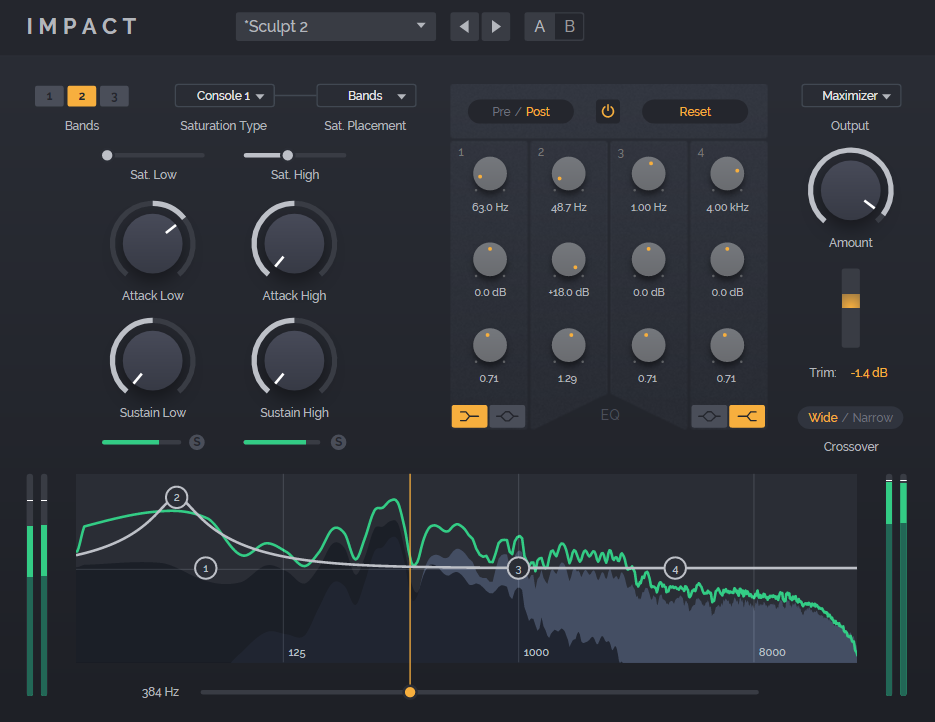
Surreal Machines designed Impact as a full drum processing channel strip that does more than just shape transients. Whether you’re playing rhythms on a Roland SPD-30 or working on finished tracks, its multiband setup with saturation, EQ, and output dynamics gives you everything you need in one plugin, so you don’t have to use several different processors.
For me, the best feature is the three-band transient processing. You can boost the attack of hi-hats in the high band and soften the attack of a heavy kick in the low band, all within the same sample or loop. This kind of frequency-specific control lets you fine-tune each element without affecting the rest.
- Switchable One, Two, or Three-Band Processing
The multiband processor lets you pick single-band, dual-band, or three-band modes, depending on how much detail you want. I found that single-band mode is great for simple jobs or when you want the same shaping across all frequencies.
Two-band mode works well for treating kicks and snares separately from cymbals and hi-hats. Three-band mode gives you full control over low, mid, and high frequencies on their own.
Each band has its own Attack and Sustain controls, along with adjustable crossover points so you can decide exactly where the bands split. This flexibility means the plugin can handle any source material you use.
- Four Analog-Modeled Saturation Styles
The saturation section offers four different algorithms, each adding its own harmonic character. You can apply saturation to the whole signal, to individual bands, or in different spots along the signal chain.
You can place saturation before transient shaping, between processing steps, or at the end for extra color. These options cover all the ways you might want to add warmth.
Maybe you want clean transient control with subtle saturation, or maybe you want aggressive harmonic enhancement that synth-like tones into your drums. At the end of the day, having these options integrated means you’re not constantly loading and unloading separate saturation plugins to find what works.
- Integrated Three-Band EQ
The built-in EQ has low, mid, and high bands, each with adjustable frequency, gain, and Q. It’s more than a simple tone shaper. You can use it before or after the transient processing, which really changes how it shapes your sound. Using EQ before the transient section lets you highlight certain frequencies so the shaping reacts more to those elements.
Using EQ after the transient section helps fix any tonal imbalances caused by strong shaping. This routing flexibility usually means you don’t need an extra EQ, so your signal chain stays simple and your workflow is faster.
10. Waves Smack Attack Transient Shaper – Solid choice for precise, low-latency shaping
Most transient shapers only offer two knobs, which is fine for simple tasks. But if you want more detailed control over your transients, you quickly hit a wall.
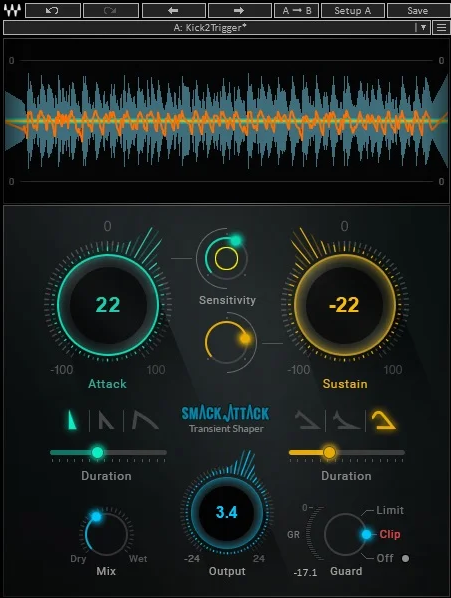
The Smack Attack plugin from Waves adds Shape and Duration controls, giving you precise control over your transients without needing to use several plugins.
I really like the real-time waveform display because it shows exactly what’s happening to your signal. You can see the attack and sustain being shaped and check the sensitivity thresholds all at once. This visual feedback makes it much faster to set your controls, especially when you want to boost weak drum samples or control harsh percussion without losing the groove. Since there’s zero latency, you can use it while recording or live without worrying about timing issues, making it more versatile than plugins that add delay.
- Independent Shape and Duration Controls
Unlike most shapers that just adjust the level, Smack Attack gives you separate Shape and Duration controls for both attack and sustain. The Attack Shape knob lets you make transients sharper or smoother, and Attack Duration sets how long the effect lasts. Using both together feels more like shaping an envelope on a synth than simply boosting or cutting.
- Dual Sensitivity Thresholds
The Attack Sensitivity and Sustain Sensitivity sliders let you choose which transients get processed. This is helpful because not every hit in a drum loop or percussion track needs the same adjustment. You can set it to affect only the loudest transients, all of them, or anything in between.
- Integrated Limiter and Clipper
The output section includes both a limiter and a clip mode to prevent your output from going over 0 dBFS. I’d say the limiter is perfect for transparent peak control when you’re adding punch without wanting distortion. The Clip mode intentionally allows clipping while keeping the final output limited to -0.1 dBFS, which can add some saturation character, similar to pushing analog gear or adding drive to a bass synth.
Freebies
1. VoS FeenstaubTX
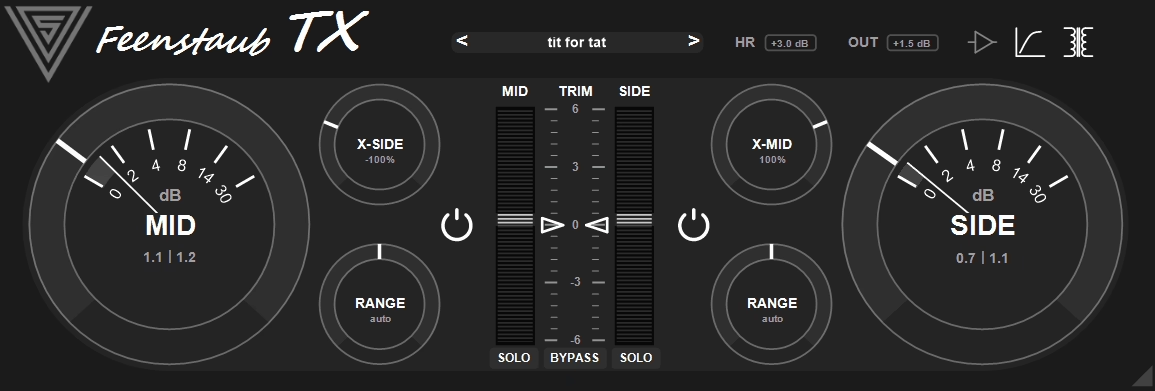
Free plugins aren’t always lacking in quality. Variety of Sound made FeenstaubTX as a mix bus exciter that uses transient-based saturation and expansion. It adds an analog-style glue without the harsh digital sound you sometimes get from other exciters.
What sets this plugin apart is its mid/side setup with cross-channel processing. You can use the mid channel’s intensity to trigger saturation or expansion in the side channel, or the other way around. This interaction adds stereo movement and depth that regular exciters can’t achieve. I found it works best on complex tracks like full drum mixes or synth layers when you want to enhance timbre, dynamics, and stereo width all together.
- Mid/Side Processing with Independent Controls
The plugin works in mid/side mode and gives you the same controls for each channel. The big Mid and Side intensity knobs let you set how much processing you want on each channel, and the TRIM controls let you adjust the level by up to 6 dB after processing. I like that you can solo either channel to hear what’s happening in the middle or on the sides. This makes it much easier to balance the stereo image. You can add punch to the center for your kick and snare, while keeping the sides light and open for cymbals and room sound.
- Cross-Channel Processing Function
The X-Mid and X-Side knobs let you use the intensity from one channel to change the saturation or expansion on the other channel. This creates dynamic stereo effects you can’t get with regular processors.
- Adjustable Transient Detection Range
Each channel has a Range knob that sets how narrow or wide the transient detection window is. This control decides what the plugin treats as a transient and what it sees as sustain. Narrow settings make detection quick and precise, which is great for sharp percussion or electronic drums. Wider settings give a softer effect, better for full mixes or sounds with longer decay. Adjusting this knob helps the plugin fit different sources without needing a new preset every time.
2. Surreal Machines Crack
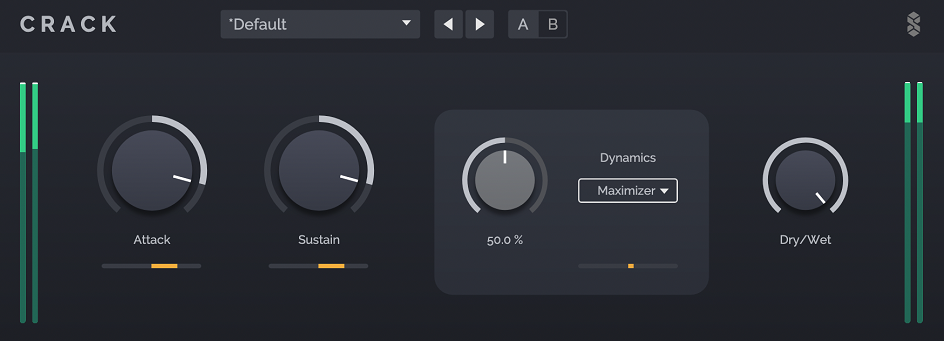
Surreal Machines released Crack as a free, reliable transient shaper that covers everyday drum shaping without unnecessary features. Whether you’re programming beats on a Novation Launchkey Mini or working with live recordings, its simple four-control layout helps you get results quickly and easily.
The output dynamics section is especially useful, offering four modes: Thru, Clip, Limiter, and Maximizer. I noticed that Clip mode adds analog-style saturation when you push transients, which helps add character to flat drum samples or synth hits. The Maximizer is designed for transient-heavy sounds, so you can achieve loudness and density without the pumping effect common with standard limiters. Having these options built in means you don’t need to use several plugins just to shape and control peaks.
- Low CPU Usage
- Attack and Sustain Controls with Visual Metering
The Attack and Sustain knobs let you boost or cut each part of the transient. Each control has real-time metering, so you can see exactly how much gain reduction or boost is happening. I like how this visual feedback makes it clear if your settings are working or need adjustment. It keeps the workflow quick since you don’t have to keep bypassing the plugin to check if it’s making a difference.
3. Kilohearts Transient Shaper
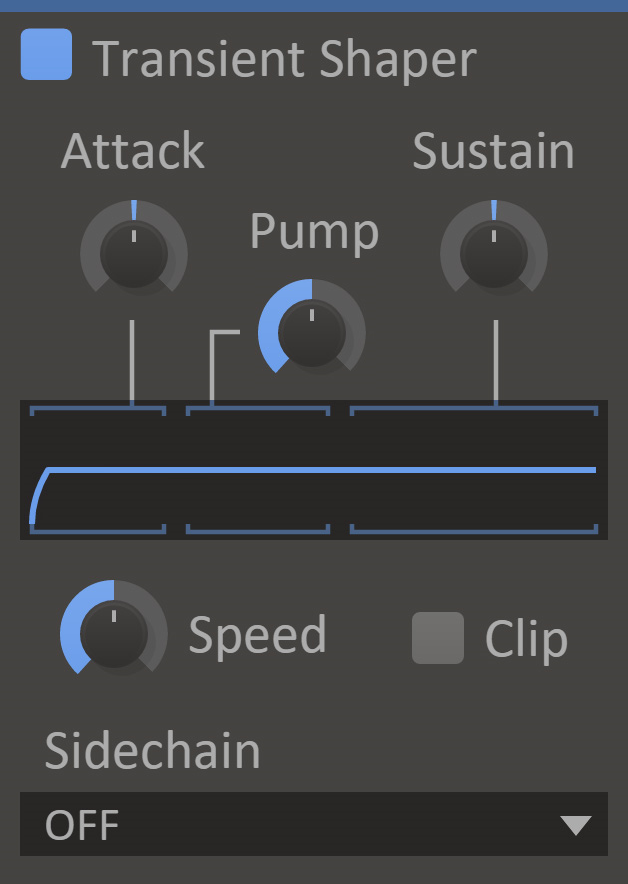
My favorite thing about kHs transient shaper is the Pump control. It lowers the signal right after the transient, so the attack stands out more without raising the overall level. This is a smart feature because it adds punch without causing unwanted peaks.
The Speed parameter lets you adjust how snappily the plugin responds, with higher values for fast, aggressive shaping and lower values for smoother, more transparent processing. I found that tweaking Speed makes a huge difference in how the shaping feels, especially on synth bass or electronic drums, where you need tight control.
- Pump Parameter for Perceived Punch
As mentioned above, Pump control lowers the signal right after the transient, making the attack stand out without raising the overall volume. This is what sets Kilohearts Transient Shaper apart. Instead of just turning up the attack and risking clipping, Pump lets you add punch by making the difference between the attack and the rest of the sound more noticeable. I found this especially useful on drums and percussive synths when you want impact but need to keep your limiter and headroom in check.
- Snapin Integration with Modular Hosts
This free transient shaper works on its own as a VST, AU, or AAX plugin, but you can also use it as a Snapin in Multipass, Snap Heap, and Phase Plant. I like that you can build multiband transient shaping setups or mix it with other effects in creative ways. For example, you can use it in Multipass to shape transients differently in the low, mid, and high bands, or stack several in Snap Heap with modulation. This modular approach gives you much more flexibility than plugins that only work by themselves.
- Sidechain Detection Mode
The Sidechain option lets you use external audio to trigger transient detection while processing your main signal. I found that this opens up creative ducking possibilities without needing a compressor. You can use a kick drum to shape the transients of a bass synth, or use a vocal to control how percussion responds. That said, the implementation is straightforward, with no complex routing, making it accessible even if you’re not an expert in sidechain processing.
4. Sonic Anomaly Transpire
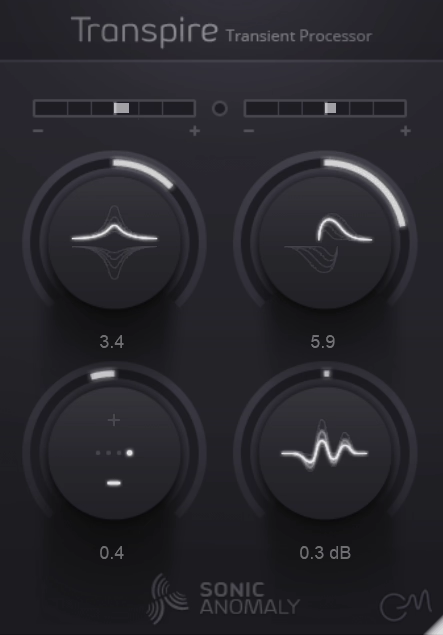
Sonic Anomaly’s Transpire VST uses non-linear processing, so it affects smaller transients more than loud hits. Whether you’re tapping out patterns on a Maschine or working with full drum tracks, you get controlled results without too many peaks.
In my experience, this non-linear approach works better on busy percussion than traditional linear shapers. The Sensitivity control lets you set how strongly the plugin reacts to transients. Lower settings work well for things like bass guitar or synth pads.
The built-in hard clipper at -0.1 dB stops digital clipping, so you don’t need a separate limiter. The plugin does add about 95 samples of latency, but for mixing, that’s a small amount and your DAW will compensate for it.
- Non-Linear Transient Processing
The plugin targets smaller transients more than bigger ones, so you hear more subtle details without making loud hits too strong. This is great for drum tracks when you want ghost notes and room sound to stand out, but don’t want the main hits to be too much. On busy percussion loops or layered synths, this non-linear processing gives you more even and controlled dynamics than standard transient shapers.
FAQs:
[sp_easyaccordion id=”10043″]

Hello, I’m Viliam, I started this audio plugin focused blog to keep you updated on the latest trends, news and everything plugin related. I’ll put the most emphasis on the topics covering best VST, AU and AAX plugins. If you find some great plugin suggestions for us to include on our site, feel free to let me know, so I can take a look!