A phaser is one of those effects that can take a flat, lifeless sound and turn it into something that moves and breathes. It creates sweeping, swooshing tones by shifting the phase of your audio signal, which adds depth and motion to guitars, synths, vocals, and pretty much any instrument you can think of.
Whether you want subtle warmth or wild, spacey textures, a good phaser plugin gives you control over how much character your tracks have. The best phaser plugins combine the rich analog sound of vintage hardware with modern features like tempo sync, stereo modulation, and customizable waveforms.
These tools let you shape everything from gentle wobbles to dramatic sweeps, and many of them model classic units that defined the sound of entire music genres. The right plugin can make your mixes feel more alive without much effort.
In this guide, I’ll walk you through both premium and free options that cover different styles and workflows. You’ll also learn what a phaser actually does and how it works, so you can get the most out of these plugins in your productions!ä
Here are the plugins I choosen for the article and here is what you get:
| Plugin Name | Best For | Engine Type | Key Strength | My Verdict | Pros | Cons |
|---|---|---|---|---|---|---|
| 1. Minimal Audio Ripple Phaser | Synths, guitars, drums, sound design | Multi-filter analog-style phasing | Dynamic response, complex spectrum creation, extensive stereo control | Best Modern | Seven filter modes, up to 24 notches, draggable visual display | Advanced textures may require careful mixing |
| 2. Softube Fix Phaser | Keys, guitars, ambient textures | Envelope-followed analog emulation | Dynamic modulation, multi-stage phasing, stereo width control | Best Vintage | 2-10 stage architecture, multiple sweep shapes, regen feedback control | Limited creative sound design beyond classic phasing |
| 3. Moogerfooger MF-103S 12 Stage Phaser | Guitar, synth, vocals | Analog-modeling digital phaser | 12-stage phasing, CV-style modulation, wide-range LFO | Best Minimal | Stereo LFO mode, built-in drive control, vintage analog warmth | Higher CPU usage on multiple instances |
| 4. Eventide Instant Phaser Mk II | Guitars, synth pads, stereo buses | Multi-source modulation with Age control | Four modulation sources, phase aging simulation, stereo width | Pro Choice | Shallow, Deep, Wide phasing modes, side-chain envelope follower, feedback control | Complex modulation setup may require learning curve |
| 5. NoiseAsh Action Phaser | Creative sound design | Double-frequency stereo phasing | Three modulation sources, pan modulation, tape-style saturation | Best for Beginners | 32-step sequencer, LFO with 5 waveforms, low CPU usage, resizable UI | May be overkill for subtle phasing needs |
| 6. Audio Damage PhaseThree | Synths, guitars, keys | MuTron Bi-Phase emulation with dual LFO | 6-Stage and 12-Stage phasing, expression pedal control, cross-platform presets | Best Dual Stage | Vector GUI, dual-channel stereo, automated modulation | Interface can feel technical for new users |
| 7. UVI Phasor | Stereo synths, experimental textures | Multimode phasing engine | Parametric LFO, stereo enhancement, frequency range control | Best Precision | Multiple phaser modes, adjustable feedback, detailed LFO shaping | Less tactile than analog-style plugins |
| 8. Apogee Clearmountain’s Phases | Drums, vocals, classic mixing | Flanger + Phaser hybrid, vintage modeling | Zero-crossing tape flange, analog aging, flexible routing | Vintage Rack Emulation | Dual effects, presets from Clearmountain sessions, BBD chip selection | May be too specialized for modern electronic styles |
| 9. Soundtoys PhaseMistress | Guitars, synths, experimental effects | 69-style multi-stage phasing | Envelope follower, multiple LFO modes, deep circuit control | Most Versatile | Rhythm sequencing, custom LFO drawing, stereo width control | Interface can be busy for newcomers |
| 10. BLEASS Phaser | Synths, pads, guitars | Notch filter phasing with dual LFO | 1-24 notch control, stereo phase offset, feedback color filter | Best Budget | Visual spectrum display, dual LFOs, extensive stereo modulation | Learning curve for multi-LFO setup |
| 11. Arturia Phaser BI-TRON | Synths, ambient textures | Dual 12-stage phaser circuits with independent LFOs | Stereo imaging, layered modulation, envelope/expression control | Cinematic Sweep | Parallel/series routing, high-pass input filter, tempo-synced LFOs | Complexity may be intimidating for beginners |
| 12. D16 Fazortan 2 | Synths, guitars, spatial effects | Multi-stage stereo phaser | Stage selection, dual LFOs, tempo sync, stereo phase offset | Best Stereo Depth | Multiple LFO waveforms, deep notch shaping, flexible modulation | Interface may feel dense for casual users |
1. Minimal Audio Ripple Phaser – Best Overall
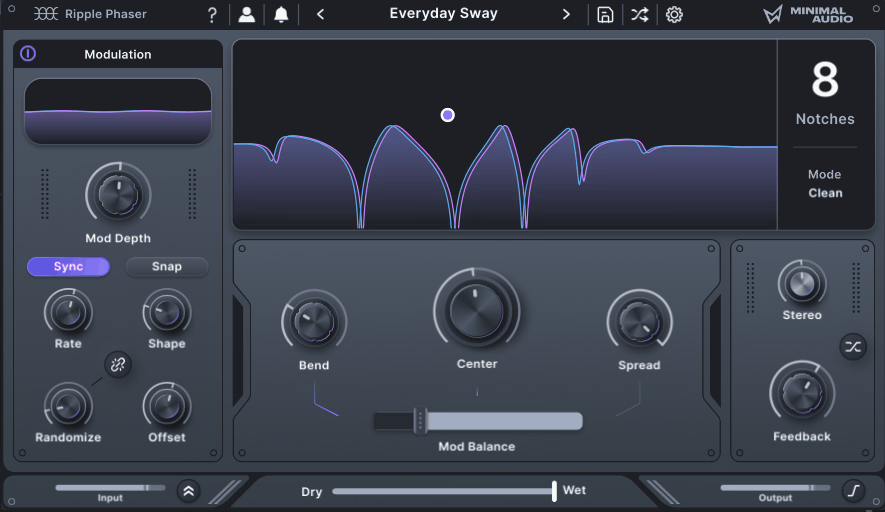
I’ve spent some time with Ripple Phaser, and what I like is how it balances simplicity with depth.
You get seven distinct filter modes that each bring their own flavor to phase manipulation, giving you everything from classic sweeps to more experimental textures. The interface feels intuitive right away. You get a draggable display that makes tweaking the effect visual and fun. I like that it doesn’t overwhelm you with options but still gives you room to explore.
The stereo control is particularly impressive. You can push the phase rotation really wide or keep things centered depending on what your mix needs.
What really sets Ripple apart is how dynamic it sounds. The phase shifting responds to your audio in ways that feel fluid and musical. I’ve used it on synths, guitars, and even drum buses, and it always adds something interesting without making the source sound processed or fake.
You get:
- Seven Filter Modes
Each mode delivers a different phasing character. You can go traditional or dive into more creative territory with modal resonators and complex spectral effects.
- Up to 24 Notches
This level of control lets you shape incredibly detailed frequency responses. More notches mean deeper, richer phase movement that cuts through dense mixes.
- Draggable Visual Display
See your phase shifts in real time. Adjust parameters by clicking and dragging, making the whole process faster and more hands-on.
- Extensive Stereo Control
Push your phase rotation across the stereo field for super-wide effects or tighten it up for focused mono movement.
- Complex Spectrum Creation
Build intricate frequency patterns that go beyond typical phaser sweeps. Great for sound design work where you need something unique.
2. Softube Fix Phaser – Best Vintage

Softube Fix Phaser stands out because it brings together vintage phaser warmth with surprisingly deep control. It’s modeled after iconic hardware units from the 70s and 80s, designed with input from Paul Wolff himself. The plugin can do everything from soft, sweeping movement on keys to full-blown psychedelic guitar swirls.
What I really appreciate is how it handles dynamic response. Most phasers just loop through an LFO pattern, but Fix Phaser includes an envelope follower that reacts to your input signal. This means louder notes create deeper sweeps, which feels natural and musical. The interface stays clean and simple, so I’m never lost in menus even though there’s serious power under the hood.
The stereo modes are a big reason I reach for this one. Normal mode keeps things centered and mix-friendly. Effect mode creates a rotating, left-right sweep that adds width without washing out the source. Wide mode goes all-in with massive stereo spread, perfect for pads or ambient textures. I also like that the stage count goes from 2 to 10, so I can dial in subtle 2-stage shimmer or thick 10-stage complexity depending on what the track needs.
- Multiple Sweep Shapes
I can choose between triangle, sine, or elliptical waveforms. This lets me adjust how the modulation moves, from smooth and even to more organic and unpredictable motion.
- Envelope Follower for Dynamic Phasing
The phaser responds to my audio signal’s dynamics instead of just cycling through an LFO. Louder transients trigger deeper sweeps, which makes it expressive for drums, plucky synths, or guitar.
- 2-10 Stage Phaser Architecture
I can switch between 2 stages for subtle movement or push it up to 10 stages for rich, complex phasing
- Three Stereo Modes
Normal keeps the phasing mono-compatible. Effect creates rotating stereo sweeps. Wide delivers huge, exaggerated stereo modulation that’s great for widening narrow sources.
- Regen (Feedback) Control
This adjusts resonance intensity. Higher settings give me sharper, more vocal-like sweeps with pronounced peaks, perfect for psychedelic or electronic textures.
- Mix and Depth Controls
I can blend the effect from barely-there shimmer to full wet phasing. The clean phase response makes it safe to use on buses without causing phase issues.
3. Moogerfooger MF-103S 12 Stage Phaser – Best Minimal

I’ve always been drawn to the warm, swirling sound of analog phasers, and this plugin brings exactly that to my DAW. The MF-103S is Moog’s digital version of their legendary hardware phaser that Bob Moog designed back in 1999.
What I love most is how it manages to capture that classic analog character while giving me way more routing options than the original pedal ever could.
This plugin works great on guitars, synths, and even vocals when I want to add some movement. The stereo capabilities mean I can create wide, evolving textures that the mono hardware couldn’t do. It runs smoothly in my sessions without eating up CPU, which matters when I’m stacking multiple effects.
- 6 or 12 Stage Phasing
I can switch between a gentler 6-stage mode for subtle sweeps or dial in the full 12-stage circuit when I want deeper, more dramatic modulation.
- CV-Style Modulation
The plugin includes CV-style inputs that let me route modulation to different parameters like sweep, resonance, and LFO amount
- Stereo LFO Mode
Unlike the original hardware, I can enable a second inverted LFO for true stereo phasing effects. This creates a really wide sound that moves differently in each speaker.
- Built-In Drive Control
Adding some grit or saturation gives the phaser more edge and helps it cut through a mix. I use this feature when I want the effect to sound more aggressive.
- Wide-Range LFO
The LFO can sweep slowly for gentle wobbles or speed up into audio-rate territory for wild, experimental sounds that go way beyond typical phaser effects.
4. Eventide Instant Phaser Mk II – Pro Choice

Eventide took their legendary 1972 hardware phaser and rebuilt it as a plugin with modern features that go way beyond the original. I appreciate how they didn’t just clone the old unit. They added things like the Age knob, which lets you dial in component drift to make the phasing sound worn-in or brand new.
Instant Phaser Mk II gives you three phasing modes. Shallow works for light movement. Deep pushes richer texture. Wide splits the phasing between left and right channels for stereo width.
What makes this stand out is how you control the modulation. You get four different sources: Manual lets you set the phase position yourself. Oscillator uses an LFO that syncs to your tempo. Envelope Follower reacts to your audio signal or a side-chain input. Remote lets you map it to a MIDI controller for hands-on tweaks while you play.
- Three Phasing Modes
Choose Shallow for subtle sweeps, Deep for fuller modulation, or Wide to create stereo separation by sending different phasing to each channel.
- Age Control
This knob simulates how the original hardware aged over time, letting you add character and slight imperfections that make the effect feel more organic.
- Four Modulation Sources
Switch between Manual control, Oscillator (LFO with tempo sync), Envelope Follower with side-chain support, or Remote for MIDI mapping.
- Side-Chain Envelope Follower
Route another track into the plugin so the phasing responds to external audio, perfect for making the effect move with drums or vocals.
- Feedback Control
Turn this up to increase resonance and make the phasing more intense and pronounced for dramatic sweeping effects.
5. NoiseAsh Action Phaser – Best for Beginners

I’ve always appreciated plugins that give you depth without overwhelming you, and Action Phaser does exactly that. It’s a stereo phase modulation processor that combines classic phasing with modern flexibility. The plugin uses a double-frequency phase engine, which means you get richer and more complex textures than you would from a basic phaser.
What really caught my attention is the modulation system. You get three different sources to work with: a custom shape envelope follower, an LFO with 5 waveforms, and a 32-step sequencer. Each one can run in sync with your DAW or operate freely. This gives you control over how the phase effect moves and evolves.
Beyond the core phasing, Action Phaser includes tape-style saturation, EQ controls, pan modulation, and filters. These extras let you shape the character of the effect without needing to load additional plugins. I found the interface easy to navigate despite all these options. It’s also resizable, which helps when working on different screen sizes.
In a nutshell, here is what you get:
- Three Modulation Sources
As I Said, you can use an envelope follower with custom shapes, an LFO offering 5 waveforms, or a 32-step sequencer. Each source can sync to your project tempo or run independently for creative flexibility.
- Double-Frequency Phase Engine
This system uses two phase paths at once to create more complex and textured phase effects than single-path designs.
- Pan Modulation
The phaser can modulate the stereo position of the effect, adding spatial movement and width to your sound.
- Analog Tape Saturation
Built-in saturation adds warmth and analog character to the phasing, making it feel less clinical and more musical.
- EQ and Filtering Tools
Low-shelf and high-shelf EQ controls plus low-pass and high-pass filters let you shape which frequencies get affected by the phasing.
- Low CPU Usage
Despite its advanced features, the plugin is optimized to run efficiently so you can use multiple instances without straining your system.
6. Audio Damage PhaseThree – Best Dual Stage

PhaseThree doesn’t just copy the MuTron Bi-Phase but actually recreates how the original hardware behaves, right down to the vactrol response. That means you get the quirky, warm character of the classic unit without needing to hunt down vintage gear.
What really sets it apart is the addition of a 12-stage phaser alongside the original 6-stage design. This gives you way more depth and sonic options than the hardware ever had.
I found PhaseThree works great for anyone chasing that vintage dual LFO phaser sound on synths, guitars, or keys. The dual-channel stereo design creates really rich, evolving textures that feel alive. Plus, the interface is vector-based and fully resizable, so it looks sharp on any screen size. The XML preset system is a smart touch too as you can move presets between desktop and iOS versions without any fuss.
- MuTron Bi-Phase Modeling
PhaseThree faithfully recreates the original hardware, including the vactrol behavior and dual LFO design that made the Bi-Phase so musical and expressive.
- 6-Stage and 12-Stage Options
You can switch between the vintage 6-stage phasing and a denser 12-stage mode, giving you both classic tones and modern, richer modulation.
- Expression Pedal Parameter
The original’s expression pedal input is modeled as a separate parameter, so you can control it with MIDI or your DAW’s automation for real-time sweeps.
- Resizable Vector GUI
- Cross-Platform Preset Manager
Uses XML-based presets that work across desktop and iOS, so you can share and copy settings between platforms easily.
7. UVI Phasor – Best Precision

This one stands out as a modern phaser that puts deep control in your hands without overwhelming you. UVI Phasor is designed around a multimode architecture that lets you shape modulation, filtering, and even distortion all in one plugin. I’ve found it works well when you need precise sweeping effects or when you’re chasing more experimental textures that evolve over time.
The plugin gives you access to a parametric LFO system that you can configure in detail. You can adjust waveshape, swing, and frequency range to match your creative vision. It also handles stereo field enhancement smoothly, which makes it useful for widening synth layers or adding space to guitars. The feedback control adds resonance when you push it, creating more pronounced peaks in the sweep.
- Multimode Design
Phasor offers multiple phaser modes that change how the effect colors your signal. You can switch between styles to find the right character for your track.
- Parametric LFO
The LFO section lets you shape modulation with custom waveshapes and swing controls. This gives you rhythmic phasing that locks to your tempo or runs freely.
- Frequency Range Control
You can set minimum and maximum frequency boundaries for the sweep. This keeps the phasing focused on specific parts of the spectrum where it works best.
- Feedback Control
Adjustable feedback adds intensity to the phasing effect. Push it higher for sharper, more resonant sweeps or keep it low for subtler movement.
- Stereo Enhancement
Built-in stereo widening helps you place the phaser in your mix. It works well for creating spacious, immersive sounds without muddying the center.
8. Apogee Clearmountain’s Phases – Best Emulation

Bob Clearmountain’s name shows up on so many classic records that when Apogee modeled his personal flanger and phaser rack units, I knew this would be something different. Clearmountain’s Phases gives you both effects in one plugin, based on his actual mid-seventies hardware. What makes it stand out is how deeply customizable it is while still keeping that warm analog character.
I can run the flanger and phaser together in series or parallel, which opens up some really creative combinations. The zero-crossing tape flange mode is a nice touch for getting those smooth, natural sweeps that digital flangers sometimes miss. There’s also an aging parameter that mimics how vintage components drift over time, adding subtle variation that keeps the sound from feeling too perfect.
The plugin includes presets straight from Clearmountain’s own sessions. That alone gives me a solid starting point when I want his signature modulation on drums or vocals without spending an hour tweaking.
Main features are:
- Vintage Flanger and Phaser Emulation
Models Bob Clearmountain’s rare rack modules from the 1970s, capturing the warmth and movement of the original hardware units.
- Flexible Routing Options
Run flanger and phaser separately, in series, or parallel to create layered modulation effects that go beyond standard phaser sounds.
- Zero-Crossing Tape Flange Mode
Simulates classic tape flanging using two virtual tape machines for smooth, organic sweeps.
- BBD Chip Selection
Switch between different bucket-brigade delay chip models to change the flanging character and delay behavior.
- Analog Aging Control
Adds component drift and wear to simulate how vintage gear changes over time, bringing realistic tone variation.
- Feedback and Sweep Controls
Adjust where feedback hits in the phaser chain and shape LFO modulation with manual sweep and phase offset for stereo width.
- Clearmountain Presets
Includes settings from his real mixing sessions, making it easy to dial in professional modulation quickly.
9. Soundtoys PhaseMistress – Most Versatile

I’ve found PhaseMistress to be one of the most flexible phaser plugins available today. It brings together the character of classic hardware phasers while giving you way more control than most vintage units ever had. The plugin models everything from simple 2-stage designs to complex 24-stage circuits, and you can switch between them quickly.
What really stands out is the modulation system. Instead of just having a basic LFO, you get multiple modes including rhythm-based sequencing and envelope following. This means the phaser can respond to your audio’s dynamics or lock into specific rhythmic patterns. I appreciate how the interface stays clean even with all these options available.
- 69 Phaser Styles & Deep Circuit Control
PhaseMistress offers 69 different style presets that modify the internal phasing “circuit,” letting you experiment from subtle 2-stage phasing up to intense 24-stage sweeps. You can also fine-tune key parameters like resonance, color, and effect intensity, giving full control over the character of the phaser.
This allows creating everything from classic hardware-inspired sounds to entirely unique, modern phase textures. This version reflects the official description and avoids overgeneralizing hardware emulations.
- Multiple Modulation Modes
Choose from LFO, Rhythm, Step, Random, and Envelope modes. Each one gives you different ways to control how the phaser moves.
- Custom LFO Drawing
The Tweak panel lets you draw your own modulation shapes instead of using standard waveforms like sine or triangle.
- Envelope Follower
This feature makes the phaser respond to your input signal’s volume. Louder hits create bigger sweeps, which works great on drums and bass.
- Groove Controls
Add swing or shuffle to your phasing rhythm to create more musical movement that fits with your track’s feel.
10. BLEASS Phaser – Best Budget

This one stands out because it gives you control over notch filters in a way most phaser plugins don’t. With BLEASS Phaser, you can set anywhere from 1 to 24 notches, which changes how thick and complex the phasing sounds. The plugin includes a visual spectrum display that shows exactly where these notches sit in the frequency range, making it easier to understand what’s happening to your sound.
I find the dual LFO system particularly useful. One LFO controls the center frequency sweep, while the second one modulates the spread between notches. This creates movement that feels more three-dimensional than a basic phaser. You can sync both LFOs to your DAW’s tempo or let them run free at their own speed.
The stereo controls deserve mention too. You can offset the LFO phase between left and right channels up to 180 degrees. This creates wide, swirling effects that work great on synth pads or guitars. The feedback path includes a color filter that shapes the resonance by rolling off high frequencies, so you can get warm phasing without harsh peaks.
- Notch Range:
Adjustable from 1 to 24 notches for different levels of harmonic complexity and thickness.
- Dual LFO System
Two separate LFOs control center frequency and notch spread independently for richer modulation patterns.
- Visual Spectrum Display
Shows real-time placement of notch filters across the frequency spectrum for easier sound shaping.
- Feedback Color Filter:
Low-pass filter on the feedback path warms up the resonance and controls brightness.
- Stereo Phase Offset
Creates wide stereo movement by offsetting LFO phase between left and right channels up to 180 degrees.
11. Arturia Phaser BI-TRON

This plugin recreates a legendary dual phaser pedal from the 1970s, but it adds modern control and routing that makes it far more flexible than the original hardware. It’s built around two separate 12-stage phaser circuits, each with its own LFO, giving you incredibly rich and layered modulation.
What makes BI-TRON by Arturia special is how it handles stereo imaging. You can run the two phasers in series or parallel, and you can even reverse the stereo field on each circuit independently. That means you can create sweeping, cinematic effects that move through the stereo field in ways that simpler phasers just can’t match. I find it especially useful on synth pads and ambient textures where I want movement without losing clarity.
The plugin also includes expression pedal and envelope follower control. This means you can make the phasing respond to your playing dynamics or external modulation, which opens up live performance possibilities. There’s also a high-pass filter on the input that helps keep low frequencies clean while still letting the phaser work its magic on the mids and highs.
- Dual 12-Stage Phaser Circuits
Two independent phaser circuits give you thick, layered modulation that sounds warm and analog.
- Two Independent LFOs
Each LFO has three waveforms, tempo sync, and adjustable rate so you can create complex, evolving sweeps.
- Flexible Routing Options
You can route the phasers in series or parallel and operate in mono or stereo for different sonic textures.
- Expression and Envelope Control
Real-time modulation control through expression pedals or envelope followers adds dynamic movement to your sound.
- Input High-Pass Filter
A 12 dB per octave filter prevents low-frequency muddiness and shapes the feedback tone.
12. D16 Fazortan 2 – Best Stereo Depth

What makes this plugin different is the stereo phase offset control. It creates space between the left and right channels, making the phasing effect feel wider and more alive. I use this feature often on synth pads and guitars when I want extra depth without cluttering the center of my mix.
Fazortan 2 from D16 Group stands out by combining the classic character of a 1970s phaser with modern flexibility and control that you just can’t get from the original hardware. Fazortan 2 models classic all-pass filter phase shifting but includes dual independent LFOs, tempo sync, and a user interface that scales to fit your screen. I found it works well for both subtle stereo widening and wild, resonant effects.
The stage control lets you pick between 2, 4, 6, or 8 filter stages. More stages give you deeper, more complex notches in the frequency spectrum. The feedback knob controls how intense those notches sound, from gentle movement to aggressive resonance that really stands out in a mix.Here are the features:
- Stage Selection
Choose from 2, 4, 6, or 8 all-pass filter stages to shape the character and depth of your phasing effect.
- Dual Independent LFOs
Two separate modulators let you layer slow sweeps with faster motion for evolving, complex textures.
- Multiple LFO Waveforms
Includes sine, triangle, ramp up, ramp down, square, and random shapes for varied modulation styles.
- Stereo Phase Offset:
Spreads the phasing between left and right channels to create wider, more immersive stereo imaging.
- Tempo Sync Options
Each LFO can lock to your DAW’s tempo or run freely for experimental results.
Freebies
1. Lunacy Audio Haze

Lovely free plugin. I’ve been genuinely impressed by what Lunacy Audio managed to pack into Haze plugin without charging a cent. This one sits somewhere between a chorus, phaser, and reverb, but it goes further by adding a spectral dispersion engine that spreads and smears your audio in ways typical modulation effects can’t.
The interface is clean and intuitive. You get six main controls that shape the character of the effect. Decay sets the tail length, Density controls how thick the modulation becomes, and Spread determines stereo width.
Scale changes the tonal size of the effect, Motion adds movement and fluctuation, and Smear introduces a filter section for extra texture. Despite being free, it doesn’t feel stripped down or limited.
I’ve used Haze on vocals, synth pads, and guitar tracks with nice results. It excels at creating evolving backgrounds and adding dimension to flat sources. The spectral dispersion element is what sets it apart from basic chorus or phaser plugins.
It resonates and colors the harmonics in your signal, giving you something closer to a creative sound design tool than a standard modulation effect.
Key Features:
- Spectral Dispersion Engine
This smears and resonates harmonics to create evolving, textured layers that work well for ambient and cinematic production.
- Decay, Density, and Spread Controls
Decay adjusts tail length, Density sets reflection thickness, and Spread controls how wide the stereo image becomes.
- Scale and Motion Parameters
Scale changes the tonal size from tight to expansive, while Motion introduces modulation and delay variations for movement.
- Smear Filter Section
Adds a filter with center frequency and Q controls for dreamy, warped textures.
- Multi-Effect Hybrid Design
Combines chorus layering, phaser movement, and reverb tails in one plugin, reducing the need for multiple effects.
- Cross-Platform Compatibility
Available in VST3, AU, and AAX formats for both Windows and macOS.
No Cost License: Completely free after signing up, making it accessible for anyone regardless of budget.
2. Adam Szabo Phazor

Phazor is designed to recreate the phaser effect from the Access Virus synthesizers, and Adam Szabo spent a lot of time making sure it sounds faithful to the original hardware. The plugin gives you control over 1 to 6 all-pass filter stages, which basically determines how thick and rich the phasing gets.
What I really appreciate is how clean it sounds. Some free plugins can be noisy or unpredictable, but Phazor phaser behaves like professional software. You get LFO control for the sweep rate and depth, plus spread and feedback knobs to dial in exactly the tone you want. I find it works great on synth pads, electric pianos, and even subtle vocal processing.
The CPU usage is almost nothing. I can run multiple instances in a session without worrying about my system slowing down. It’s available in both 32-bit and 64-bit VST formats for Windows, and Mac users get Audio Unit support too.
- LFO-Driven Modulation
The built-in LFO controls the phase sweep, letting you adjust both speed and intensity to create anything from slow, gentle movement to fast, swirling effects.
- 1-6 Stage Filtering
Choose how many all-pass stages you need, which directly affects the depth and character of the phasing notches in your sound.
- Spread Parameter
This spreads the effect across the stereo field, giving you wider modulation or keeping things more centered depending on your mix.
- Feedback Control
Adds resonance by feeding the phased signal back into itself, making the notches more pronounced and aggressive when you need them.
- Minimal CPU Load
Phazor is extremely light on system resources, so I can layer multiple instances without any performance issues.
3. MeldaProduction MPhaser

This one is indeed the most flexible free phasers you can get your hands on. It comes from MeldaProduction’s free bundle, so you don’t have to spend anything to start using it. What makes it different is the sheer amount of control it gives you over the phasing effect itself.
The plugin lets you work with up to 100 all-pass filters, which is way more than most phaser effects offer. This means you can create anything from subtle, smooth sweeps to thick, notchy modulation that really stands out. I also appreciate the adjustable oscillator shape feature because it lets me customize how the LFO moves through the phasing cycle.
Another thing that sets MPhaser apart is its built-in saturation stage. This adds warmth and character to the phased signal, which can help the effect sit better in a mix or give it a more vintage feel. The interface is resizable too, so it works well whether I’m on a laptop or a big studio monitor.
- Adjustable Oscillator Shape
You get full control over the LFO waveform, which lets you design custom sweep patterns instead of being stuck with basic sine or triangle waves.
- Up to 100 Filters
The high filter count gives you deep control over the phasing texture, letting you dial in everything from light movement to dense, complex modulation.
- Saturation Stage
Built-in saturation adds harmonic richness and warmth to the phased signal, giving the effect more presence and character.
- Fully Automatable
All main parameters can be automated in your DAW, which is perfect for creating dynamic, evolving modulation throughout a track.
- Global Preset Management
You can save and recall your own custom settings, making it easy to build a library of go-to phaser tones.
- Resizable GUI
4. Blue Cat’s Phaser

I appreciate that this free phaser handles everything from light wobbles to deep psychedelic sweeps. Blue Cat Phaser plugin uses all-pass filters to create that signature phasing sound. You can stack up to 32 stages if you want really thick modulation.
The stereo spread feature makes this especially useful for wide mixes. It lets you push the effect across the left and right channels in a way that adds space without making things sound messy. I find this works great on synth pads and rhythm guitars.
Main features I found:
- Up to 32 Phasing Stages
This determines how many filters shape the phasing effect. More stages mean a deeper and more pronounced sound. You can dial it back for subtle movement or push it high for intense modulation.
- Stereo Spread Control
The spread parameter widens the phase effect between the left and right channels. This creates a spacious sound that works well in full mixes without cluttering the center.
- LFO Wave Shape Selection
You get two waveform options for the LFO: sine and triangle. Sine gives you smooth, flowing modulation while triangle creates sharper, more pronounced sweeps.
- Feedback and Feedforward Phase Controls
These let you adjust the phase in both the wet path and the feedback loop. This adds creative options for shaping resonance and changing the character of the effect.
- MIDI Control and Automation
Every parameter accepts MIDI input and DAW automation. The plugin handles parameter changes smoothly without zipper noise or clicks during real-time adjustments.
5. Kilohearts Phaser

Another freebie, Kilohearts Phaser is a straightforward phaser plugin that gives you clean, adjustable modulation without any bloat. The interface is simple, but it includes enough control to shape the sound how you want it.
What makes this plugin stand out is how it fits into the larger Kilohearts ecosystem. You can use it as a standard VST/AU/AAX plugin in any DAW, or drop it into their modular hosts like Phase Plant, Multipass, or Snap Heap as a Snapin. That flexibility means I can route it in creative ways when I need more complex setups.
The phaser works by creating moving peaks and troughs in your signal’s frequency spectrum. You control where those notches sweep, how fast they move, and how intense the effect gets. I find it works well on synth pads, guitar tracks, and even vocals when I want subtle movement.
- Cutoff Control
This sets the base frequency where the phasing effect centers. Moving this knob shifts where the notches appear in your signal.
- Rate Adjustment
The LFO rate determines how quickly the cutoff sweeps. Slower rates give you gentle, evolving movement, while faster settings create vibrato-style effects.
- Depth Parameter
This controls how much the LFO modulates the cutoff frequency. More depth means stronger, more obvious phasing.
- Order Selection
Higher order settings add more all-pass filter stages, which creates richer notches and a more defined phasing character.
- Stereo Spread
Adds a phase offset between the left and right channels. This widens the stereo image and makes the phasing feel more three-dimensional.
- Mix Knob
Blends the dry and wet signals together. I use this to dial in subtle phasing without completely changing the original sound.
6. ChowPhaser

Laast free plugin in our list, ChowPhaser by Chowdhury DSP is based loosely on the Schulte Compact Phasing “A” and comes in two versions: Mono and Stereo. The Mono version takes a mono input and outputs stereo, while the Stereo version processes left and right channels separately.
What makes ChowPhaser different from basic phasers is how it splits the processing into two stages: modulation and feedback. This gives me more control over how the phasing effect behaves. The LFO section includes depth, frequency, and a unique “skew” parameter that mimics light-dependent resistors found in vintage analog phasers.
I can push the LFO speed with a “10×” switch when I need fast modulation. The feedback path is where things get interesting with Drive, Dirt, and Thrash parameters. These add saturation and grit to the phasing signal, which helps when I want a more aggressive sound. The Stages parameter lets me choose how many all-pass filter stages are used, which changes how thick or subtle the sweep feels.
Here is what you get:
- Mono and Stereo Processing
The Mono version sums your input to mono but outputs in stereo. The Stereo version processes each channel independently for wider spatial effects.
- Two-Stage Design
Separate feedback and modulation stages give me more flexibility than simple LFO-only phasers.
- LFO Skew Control
This parameter simulates analog LDR behavior, making the sweep feel more organic and less mechanical.
- Fast Modulation Option
The 10× multiplier boosts LFO speed by ten times for dramatic, rapid phasing effects.
- Adjustable Stages
I can select how many all-pass filter stages are used, which directly affects the density and richness of the phasing.
- Non-Linear Feedback
Drive, Dirt, and Thrash parameters let me add warmth, saturation, or distortion to the feedback path instead of just clean phasing.
What is phaser plugin?
A phaser plugin is an audio effect that creates a sweeping, whooshing sound by splitting your audio signal and shifting its phase. I find it adds movement and depth to static sounds in a really unique way.
The effect works by creating peaks and troughs across different frequencies in your audio. These peaks and troughs move up and down the frequency spectrum over time, which creates that classic sweeping effect. An LFO (low-frequency oscillator) controls how fast or slow these peaks and troughs move.
I use phaser plugins on guitars, synths, and vocals to add character and texture. The effect can range from subtle warmth to intense psychedelic warbles, depending on how you set it up.
How Phaser Differs From Other Effects
Many people confuse phasers with flangers or chorus effects, but they’re different. A phaser creates smoother, more rounded modulation. Flangers tend to sound more metallic and intense, while chorus creates a thicker, doubled sound.
Common Uses
- Adding movement to synth pads and leads
- Creating space-like textures on electric guitars
- Making vocals sound more interesting
- Building psychedelic or retro tones
- Enhancing keys and organs
The beauty of phaser plugins is their versatility. I can dial in gentle settings for subtle enhancement or push the parameters for wild, experimental sounds. Most phasers let me control the rate (speed), depth (intensity), and feedback (resonance) to shape the effect exactly how I want it.
How does a phaser effect work?
I’ve always found the phaser to be one of the most interesting modulation effects because of how it creates that distinctive swooshing sound. The process starts when a phaser splits your audio signal into two separate paths.
One path stays completely unchanged while the other goes through a series of all-pass filters. These filters shift the phase of certain frequencies without changing their volume. When you mix these two signals back together, something cool happens.
The phase-shifted frequencies interact with the original signal in specific ways. Some frequencies line up and get stronger while others cancel each other out. This creates peaks and notches across the frequency spectrum.
An LFO controls how these peaks and notches move up and down over time. That’s what gives you the sweeping, swirling motion that makes a phaser sound like a phaser. The speed of the LFO determines how fast the effect sweeps.
Key characteristics of phaser processing:
- Signal splitting – Creates two identical copies of your audio
- Phase shifting – Alters the timing of frequencies in one signal path
- Frequency interaction – Causes reinforcement and cancellation at specific points
- LFO modulation – Controls the movement speed of the sweeping effect
- Peak and notch creation – Forms the distinctive comb filtering pattern
The number of stages in a phaser affects how dramatic the effect sounds. More stages create deeper notches and a more pronounced sweep.

Hello, I’m Viliam, I started this audio plugin focused blog to keep you updated on the latest trends, news and everything plugin related. I’ll put the most emphasis on the topics covering best VST, AU and AAX plugins. If you find some great plugin suggestions for us to include on our site, feel free to let me know, so I can take a look!