
I’ve put together a list of some of the best granular plugins that work well for creative sound design and production.
Sometimes you are working on material that sounds technically correct but emotionally flat, lacking the organic movement and depth that separates professional productions from amateur ones. That’s when granular processors become essential because they don’t just modify audio, they deconstruct and rebuild it into something genuinely new with more life in it.
This list covers multiple approaches including BLEASS Granulizer, Quanta 2, Novum, Palindrome 2, and more spanning both paid and free options as well!
You might need to slice vocal recordings into microscopic fragments that reconstruct as shimmering pads, stretch drum hits into sustained atmospheric drones, or scatter synth melodies across time creating textures impossible through traditional processing.
Whatever your goal, there’s something here delivering those results. From real time grain manipulators to spectral processors, performance oriented instruments, and experimental texture generators, these tools give you granular control over every sonic detail whether you want surgical precision or complete organic chaos.
Whether you’re producing in the studio or playing live sets, you can reshape familiar sounds into unrecognizable territory, build evolving soundscapes from single samples, and push creative boundaries without technical limitations.
If you want your productions to develop depth, dimension, and constantly shifting character that keeps listeners engaged, these granular processors and synthesizers represent the current best options for microscopic sound manipulation and experimental audio design.
1. BLEASS Granulizer
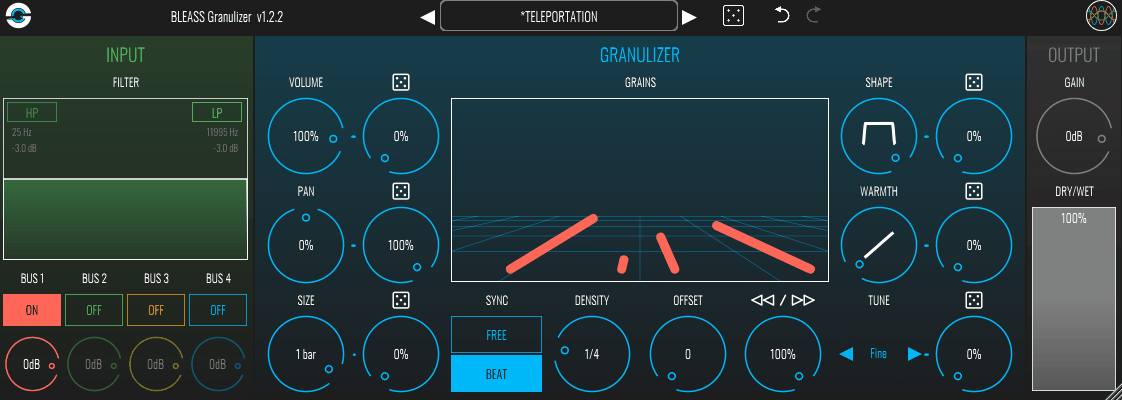
BLEASS Granulizer is a granular plugin effect and synthesizer hybrid that processes incoming audio or generates sound internally. The company designed this plugin to balance approachability with genuine capability, which shows in how the interface is organized. I’ve found it works well for both experimental textures and more rhythmic applications.
What I like about this plugin is the real-time responsiveness. Parameters react immediately when you adjust them, so you can hear changes as you move controls rather than waiting for the engine to catch up. I use it in both studio sessions and live contexts, and the workflow stays consistent across different scenarios.
BLEASS supports VST3, AU, and AAX formats, and the CPU footprint remains manageable even when running multiple instances. The visual feedback is clear enough that you can see what’s happening to your audio as you adjust grain behavior. I appreciate how this helps when dialing in specific textures without guessing what each parameter does.
What you get:
- 10 Principal Controls on Main Interface
You get Density, Grain Size, Scatter, Grain Speed, Pitch, Randomization, Volume, Spread, Freeze, and Morph visible without navigating submenus. Each control responds in real time, making parameter adjustments feel direct and interactive.
The layout groups related parameters logically, so shaping grain behavior doesn’t require hunting across different interface sections. I find this directness useful when I need to make quick adjustments during sessions.
- 16-Step Sequencer with Tempo Sync
The built-in sequencer has 16 steps that sync to your DAW tempo and can modulate density, pitch, or scatter over time. This transforms static grain textures into rhythmic patterns that interact with your track’s timing.
- Freeze Function for Real-Time Capture
The Freeze button captures whatever audio is currently playing through the plugin and holds it in memory. You can then manipulate that frozen moment with all grain controls, pitch adjustments, and scatter parameters. This function is useful when you want to isolate a specific phrase from a recording and turn it into a sustained pad or evolving texture. I’ve used it to grab interesting vocal moments and stretch them into atmospheric layers.
- Morph Control for Smooth Transitions
Morph lets you interpolate smoothly between different parameter configurations instead of switching abruptly. You set up contrasting grain states, then use Morph to blend between them gradually. This creates naturally evolving textures without manually automating individual parameters. I find it particularly useful for creating transitions in film work or cinematic risers.
2. accSone Crusher X
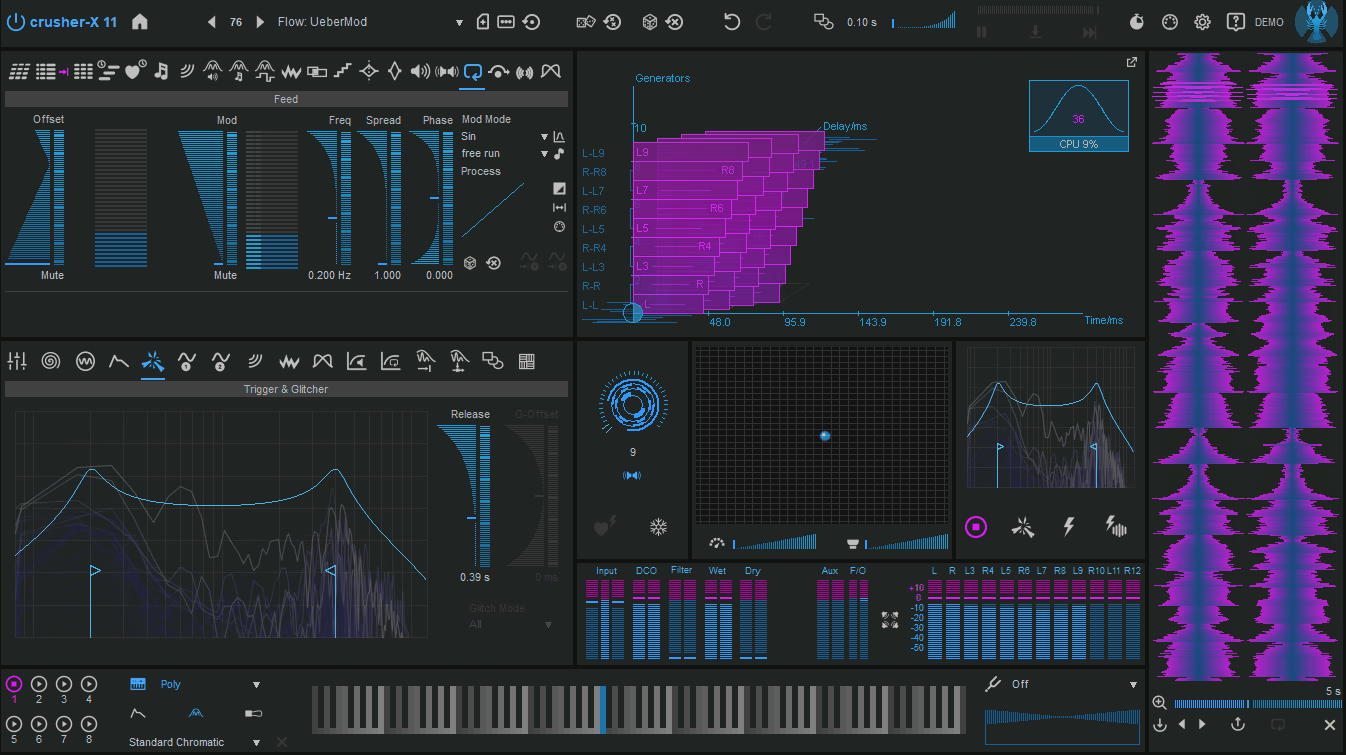
Crusher X is another granular plugin that doesn’t try to make things simple or streamlined. You get a complete sound design environment with multi-layered panels that give you access to every parameter at once.
You can use it both as an effect processor and as a MIDI instrument depending on the project (2 plugin versions). You can feed live audio through it or trigger it like a synthesizer with velocity and MPE control. The 200+ factory presets are organized into categories like pads, glitches, and cinematic textures, which help you understand what the engine can do.
The plugin supports multichannel work from stereo to Atmos configurations, with independent grain routing per channel. This makes it useful for film sound design or any project where spatial movement matters.
Features:
- Simultaneous Grains
The engine handles up to 500 grains at once, with grain size adjustable from 1 to 500 milliseconds and pitch shifting from negative 48 to positive 48 semitones. You can reverse, scatter, crush, filter, and distort each grain stream independently. Each grain can have a different envelope shape, so some fade in slowly while others attack sharply.
- Voices with Multiple Grain Layers Per Instance
Each instance supports 32 voices, and every voice can have multiple grain layers that you process individually or stack together. This lets you build dense clouds where hundreds of grains interact simultaneously, or create rhythmic patterns where different layers respond to separate modulation sources.
- Comprehensive Modulation Matrix
You get 10 LFOs, 16 envelopes, 4 step sequencers, and 3 random modulators that you can assign to nearly any parameter. I often route modulation to grain timing, filter resonance, and spatial placement at the same time. The modulation can be tempo-synced or free-running, and each grain layer responds differently, which creates polyrhythmic textures.
- Dual Functionality as Effect and Instrument
You can process live audio inputs like vocals, guitars, or percussion in real time, or generate sound internally by responding to MIDI notes, velocity, and MPE control. This means you’re getting both a processor and a standalone granular synthesizer in one plugin
- Over 30 Assignable Macro Knobs for Performance Control
These let you control multiple parameters at once, which simplifies complex patches. You can map grain density, filter sweep, spatial spread, and distortion intensity to single knobs for real-time control during performances.
3. Imaginando GRFX
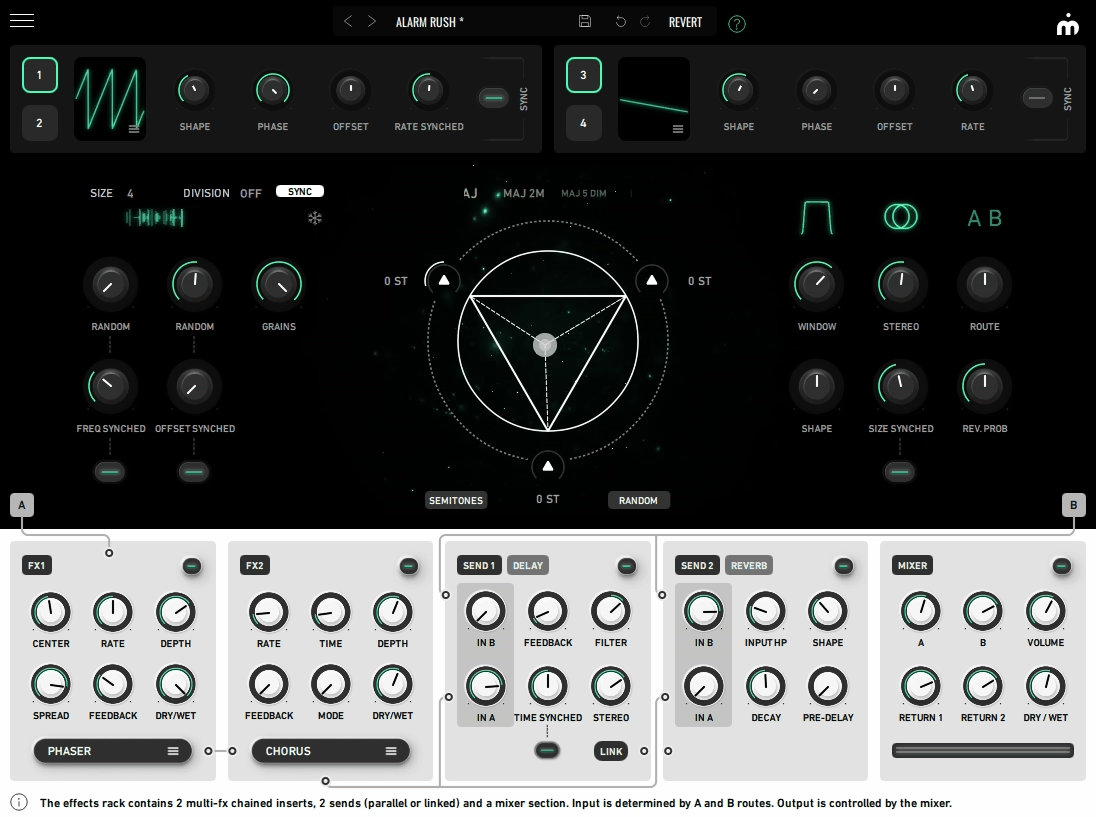
Another granular tool this time from Imaginando. GRFX is a a real-time granular audio processor designed around tactile interaction and harmonic manipulation. The plugin takes a different approach to granular processing by emphasizing musical outcomes over technical complexity. I would say, it’s good for projects where you need granular textures that maintain harmonic coherence rather than devolving into abstract noise.
The workflow prioritizes immediacy. You can manipulate grains in ways that feel responsive rather than programmed, which makes the plugin more practical for creative sessions where you’re exploring ideas. The interface communicates clearly, showing parameter relationships and modulation connections visually. The plugin handles granular processing while keeping CPU usage reasonable for running multiple instances.
- Harmonic Triangle
The Harmonic Triangle sits center in the interface as a three-point control pad that transposes grains across a ±12 semitone field. Each vertex defines a pitch region, and dragging the handle morphs textures into chords, microtonal shifts, or arpeggios. The 32 built-in triad selections range from stacked major 7ths to exotic microtonal clusters, speeding up harmonic exploration significantly. It’s useful when you need transforming raw grain clouds into melodically coherent material.
- 4 LFOs with Drag-and-Drop Modulation
You get 4 LFOs visible in the modulation rack, assignable to almost any parameter by dragging the waveform directly onto a target control. There’s no complex modulation matrix, you just see it and move it.
Modulation depth adjusts directly on parameters, and you can cross-modulate LFOs against each other for complex dynamic behavior. The dedicated Modulation Panel shows all active modulations in one place for viewing, editing, or removing assignments.
- Multi FX Slots
GRFX includes 2 multi-effect slots, each hosting any of 8 effect modules: Filter, Distortion, Delay, 2x Peak EQ, Chorus, Phaser, Bitcrusher, and Reverb. These processors run in series for tonal shaping or in parallel for layered signal processing.
- 2 Dedicated Sends for Delay and Reverb
Beyond multi-effect slots, you get 2 dedicated sends for Delay and Reverb with their own routing controls. You can send fractions of grains into long modulated reverb while keeping others dry, or build spatial effects blending granular texture with atmospheric tails. The internal Mixer section balances all paths with visible meters.
- 60 Factory Presets
The plugin ships with a factory bank of 60 presets covering textures from glitchy rhythmic patterns to pad-like harmonic clouds, providing instant access to different approaches.
4. Output Portal

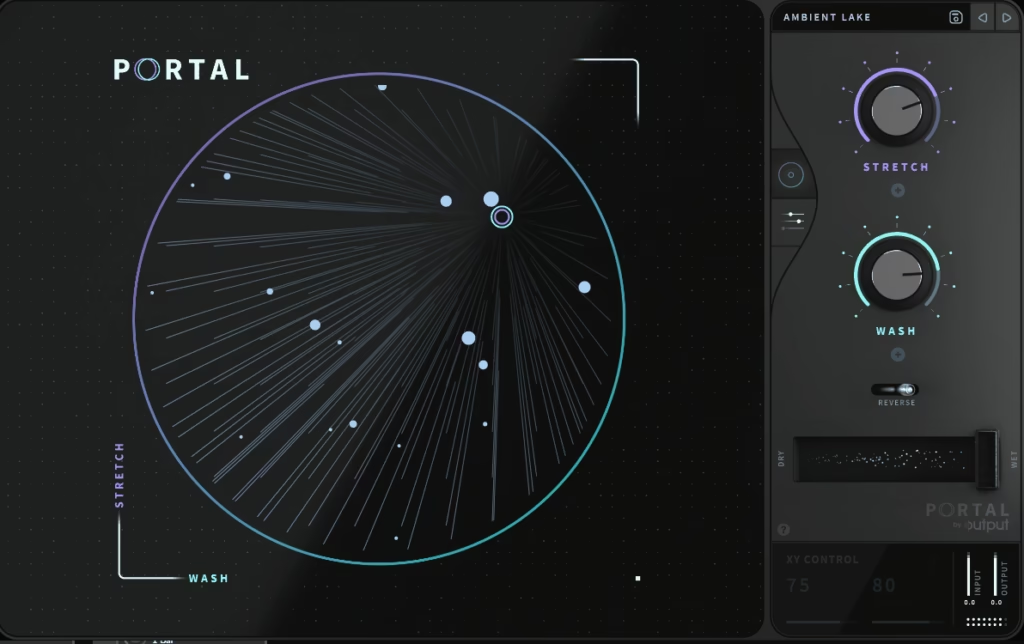
Output Portal reframes granular synthesis as something you reach for in everyday production rather than just experimental sound design.
The plugin has gained popularity among trap, hip-hop, and electronic music producers for how it handles transformative textures without demanding technical expertise. I’ve found it particularly useful when working on tracks where traditional effects don’t give me the character I’m looking for.
What makes Portal different is the workflow approach. The interface prioritizes hands-on control with clear visual feedback rather than abstract parameter menus. The plugin works well across various sources, transforming them in ways that feel musically relevant rather than academically experimental.
The CPU efficiency remains solid despite the responsive engine and integrated processing, which matters when you’re running sessions with multiple tracks. Portal supports both Intel and Apple Silicon, and I’ve had no stability issues using it in different DAW environments. The real-time responsiveness means you can tweak parameters during playback and hear changes immediately.
I find it most useful when resampling it in small bits that fit well into my tracks and add level of unpredictability or uniqueness, rather than using it as something that will take care of everything, which usually ends up being a mess.
- 4 Primary Macro Controls for Direct Manipulation
Portal centers around 4 main macro controls: Grain, Pitch, Crush, and Stretch, each with its own visual display.
Grain shapes how audio gets chopped and reassembled by the granular engine, Pitch bends the source’s pitch content from subtle shifts to extreme harmonic changes, Crush applies bit reduction and sample rate distortion for adding grit and character, and Stretch expands or condenses time to create everything from micro-rhythmic variations to sustained ambient textures. These macros respond in real time, making them practical for performance and automation.
- Hundreds of Grains with Musical Responsiveness
The granular engine splits audio into hundreds of individual grains that can be rearranged in time and reshaped according to macro and modulation settings. While Output doesn’t publish exact grain counts, the engine maintains rhythmic precision even when pushed hard. The grain behavior stays musically relevant rather than becoming chaotic noise, which keeps the processing usable in actual mixes.
- Hundreds of Factory Presets Across Multiple Categories
The plugin ships with hundreds of ready-to-play patches spanning textures, motion presets, rhythmic grain patterns, atmospheres, and tempo-synced effects. You can use presets on drums for stutters, on leads for pitch warping, and on vocals for time-stretch effects. The variety ensures you always have a jumping-off point regardless of genre.
- Integrated Effects Section with Multiple Processors
Portal includes filtering, delay, reverb, and saturation controls that interact directly with the granular core. These effects shape output within the plugin, reducing dependency on external processing chains. The routing is straightforward, and effects feel like extensions of the granular engine rather than separate additions. You can also add spatial depth or harmonic warmth as well.
- Internal Tempo Sync with LFO and Randomization
The plugin offers internal tempo sync with adjustable LFO depth and rate controls accessible from the main interface. Modulation interacts with your track’s timing immediately as you adjust parameters. Randomization options inject controlled unpredictability into grain behavior, which works well for glitch effects or evolving pads that need organic variation.
5. Imagiro Autochroma
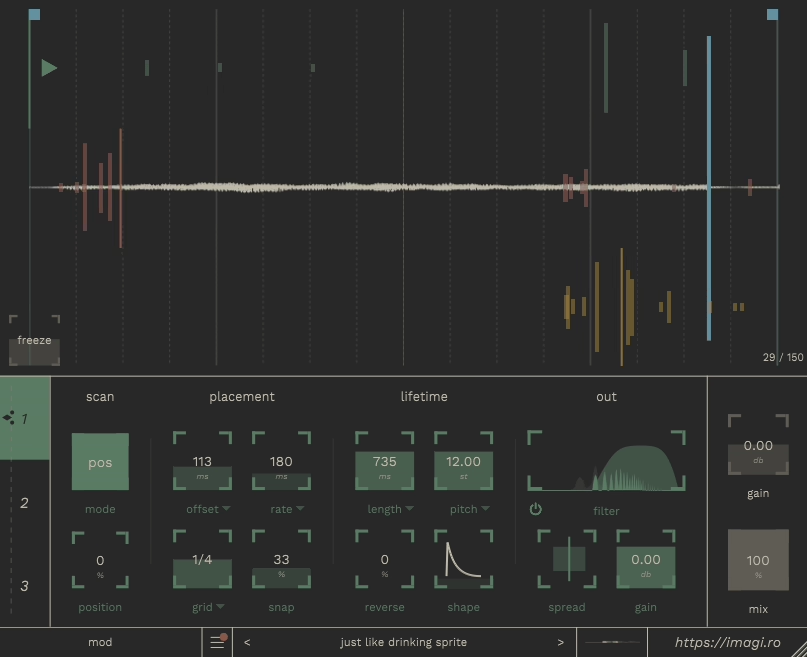
It approaches granular synthesis as a performance instrument rather than a static effect processor. The plugin emphasizes hands-on interaction, treating sound manipulation as something you play rather than program. I would use it primarily for live performance contexts where I need granular textures that respond musically to real-time adjustments.
What distinguishes Autochroma VST is the gesture-driven workflow. The interface shows activity dynamically, so you can see how parameter changes affect grain behavior as you adjust controls. This visual feedback makes the plugin more intuitive than typical granular tools that hide processing behind abstract displays.
The plugin integrates well into both studio and performance environments. The tempo-synced controls align grain emission with your project timing, and the pitch quantization keeps harmonic content coherent even when you’re stretching audio dramatically. I appreciate how this maintains musical relevance rather than devolving into noise when you push parameters hard.
- Grains
The plugin can handle up to 128 grains per instance, distributed across 4 independent layers. Each layer gives you control over pitch, density, grain size, position, and randomness separately.
This layering structure lets grains interweave in evolving textures, from lush pads to rhythmic clouds. The engine produces more than 500 simultaneous grain events across all layers combined, maintaining responsiveness even under heavy processing.
- Grain Size
Each layer offers grain size ranging from 1 to 500 milliseconds and density from 1 to 200 grains per second. You also get pitch adjustments of ±48 semitones and time stretching from 0.25× to 4×.
These parameters provide detailed control over how fragments interact with the overall sound. You can use the density control frequently to shift between sparse, scattered grains and dense clouds depending on the section.
- Modulation Sources
Autochroma features 5 modulation sources including 2 tempo-synced LFOs, 2 envelope followers, and 1 macro or performance control. These can be assigned to core parameters like pitch, size, density, position, randomness, and time stretch, allowing up to 10 simultaneous modulated parameters across layers. Linking an LFO to grain position creates rhythmic spatial movement, while envelope followers shape size or pitch dynamically in response to incoming audio.
- Freeze Function with 10 Seconds of Buffer
The Freeze function captures up to 10 seconds of audio in the granular buffer. Once frozen, you can manipulate grain parameters independently of the host track, transforming chords, drum hits, or field recordings into evolving textures. This works particularly well when I want to isolate a moment and stretch it into something completely different.
6. Sugar Bytes Graindad
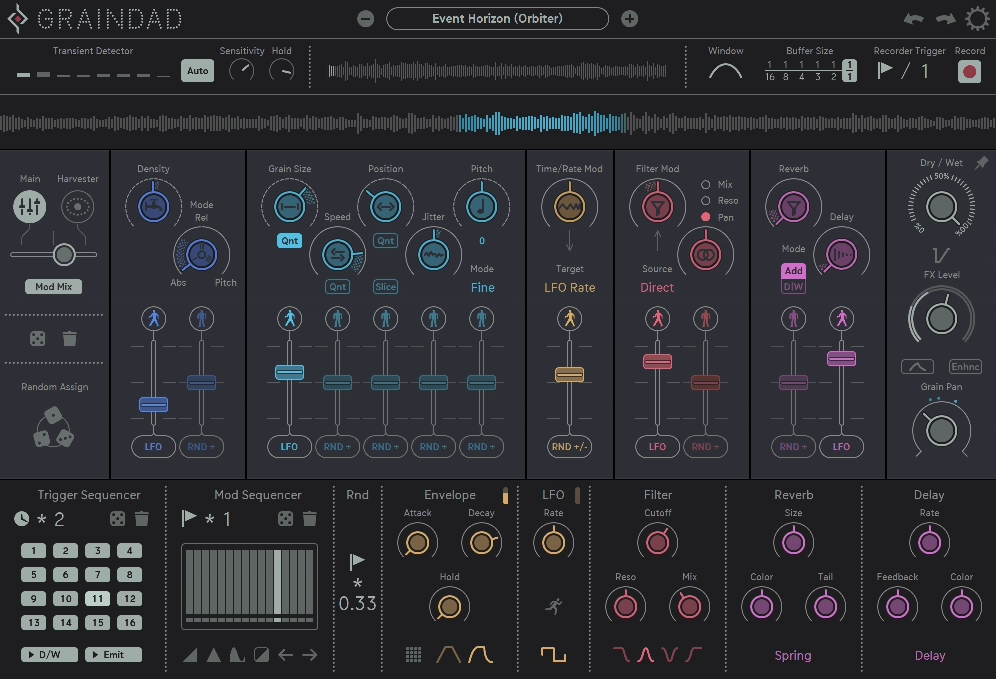
Graindad granular plugin combines granular processing with Sugar Bytes’ playful design philosophy, creating a plugin that feels more like a creative playground than a technical tool. The company built this around their signature approach to modulation and rhythm, which shows in how the plugin handles incoming audio.
What makes Sugar Bytes Graindad different is how it treats modulation as part of the core experience rather than an add-on. The plugin encourages hands-on experimentation, and I’ve found it particularly useful when I need textures that feel energetic rather than purely ambient. The workflow pushes you toward bold results quickly.
The interface resembles a hardware effect pedal with its grid of knobs and meters, but this compact appearance conceals genuine depth. Every parameter responds in real time, making the plugin practical for both studio work and live performance.
Features:
- Hundreds of Simultaneous Grain Events
The engine slices incoming audio into hundreds of micro-grains, each of which can be pitched, filtered, time-stretched, skewed, and randomized in real time. While Sugar Bytes doesn’t publish exact maximum grain counts, the plugin generates dense, multilayered textures even when multiple modulation sources are active. The grain density produces textures that feel alive and constantly evolving rather than static.
- Primary Control Sections with Multiple Parameters
I see the interface divides into 6 primary control sections: Grain, Time, Pitch, Filter, Randomizer, and Effects. The Grain controls include Size, Density, and Skew for dictating slicing and temporal distribution.
Time and Pitch sections control playback position and harmonic reshaping. The Filter section is multimode, offering low-pass, high-pass, and band-pass shaping with resonance ranging from 0 to 100%. Randomizer controls provide 0 to 100% variability for parameters, enabling chaotic or subtle motion depending on your settings.
- Harvester Modulation with 12 Simultaneous Targets
The Harvester modulation section extracts rhythmic or spectral energy from incoming audio and uses it to drive parameters like grain position, pitch shifts, and filter cutoff. The Harvester analyzes amplitude and spectral motion in real time, then assigns that data to up to 12 modulation targets simultaneously.
This creates feedback loops where input audio actively controls granular behavior, making textures groove with your track rather than float independently. I would recommend to turn sustained pads into rhythmic patterns or transform percussive loops into evolving ambiences.
- Integrated Effects
You get 5 main effects: filter, drive/distortion, delay, reverb, and bit-crushing. Delays are fully tempo-synced, allowing rhythmic echoes that interact naturally with grain patterns. Reverb provides ambient depth, while drive and bit-crush give character from warm saturation to aggressive digital edge. These effects integrate into the granular processing rather than sitting on top, enhancing and evolving the grains.
- Presets Spanning Multiple Categories
Graindad ships with a library of 80+ factory presets covering rhythmic stutters, evolving ambient textures, glitch beds, and harmonic pitch experiments. Each preset demonstrates how modulation, Harvester-driven motion, and effects combine to produce immediate results. With granular tools, even minor tweaks to parameters can produce dramatically new sounds!
7. Audio Damage Quanta 2

Audio Damage Quanta 2 positions itself as a playable granular synthesizer rather than just an effect processor. The company designed this plugin to merge deep granular synthesis with familiar synth workflows, making it practical for both composition and performance contexts. You can use it for creating textures that need to respond to MIDI input and real-time modulation.
What I like about Quanta 2 is that it structures the engine around traditional synthesizer paradigms. You get familiar elements like envelopes and voice architecture, but they control granular behavior rather than standard oscillators. This hybrid approach makes the plugin feel less abstract and more musical.
The plugin operates in two distinct modes that change how you interact with loaded audio. The workflow encourages exploration because even small parameter adjustments often produce dramatic sonic shifts. I find this particularly useful when building evolving pads or creating glitch motifs that need to stay musically relevant. The layout keeps grain shaping, envelopes, filters, and effects accessible without diving into submenus, which speeds up the creative process significantly.
Details:
- Simultaneous Voices
The granular engine can process 16 simultaneous voices, each generating layered grains you can manipulate individually. Each voice has its own envelope controlling amplitude, grain onset, and release, providing traditional synthesizer articulation within a granular framework.
You can adjust grain size from 1 to 500 milliseconds, density from 1 to 200 grains per second per voice, pitch modulation over ±48 semitones, and time stretching from 0.25× to 4×. This combination produces over 1,500 individual grain events in dense textures.
- Assignable Modulation Slots
The plugin includes multiple tempo-synced LFOs, 8 assignable modulation slots, and a multi-stage envelope generator. The modulation matrix supports routing to up to 64 destinations simultaneously, making it one of the most flexible granular synths for performance.
Grain density, size, pitch, and position can all respond to LFOs, envelopes, velocity, aftertouch, or random sources. I would recommend this to create pads that evolve subtly over time or percussive glitches that lock to project tempo.
- Full MPE Support for Expressive Performance
Quanta 2 offers full MPE support, allowing controllers like the ROLI Seaboard to influence multiple parameters simultaneously. This affects pitch, timbre, and dynamics for highly expressive live performance. Combined with traditional MIDI learn and host automation, nearly every parameter can be mapped to external hardware or DAW automation lanes.
- Multi-Mode Filters
Each voice can be routed through multi-mode filters including low-pass, high-pass, band-pass, and notch with resonance control ranging from 0 to 100%. This adds motion and tonal character to the granular output. The filters respond to modulation, creating sweeping movements that enhance textures.
- Lots of Presets
Quanta 2 offers over 100 factory presets covering evolving pads, glitch motifs, cinematic soundscapes, and organic granular textures.
8. Dawesome Novum

If there would be one plugin that I have to recommend for making pads, Novum would be that plugin. If I would have to give it a name, it would be “Pads Dream Machine” as it comes with infinite possibilites for making pads because the way its designed.
Dawesome Novum merges granular synthesis with spectral processing and additive layering techniques. The company designed this as a performance-ready synthesizer rather than just a texture generator, which changes how you approach sound design with it.
What sets Novum apart is how it integrates spectral analysis into the granular engine. Grains are analyzed and recomposed based on harmonic content, giving textures an organic quality that feels less mechanical than typical granular processing. This approach works well when building cinematic material, ethereal and atmospheric pads or experimental textures.
The workflow emphasizes layering and blending. You can stack multiple sources and shape each one independently, which allows for building complex textures from simpler elements. I use this frequently when I need pads that maintain harmonic coherence while still feeling alive and evolving.
Novum provides clear visual feedback for grain activity and spectral motion, making it easier to understand what’s happening as you adjust parameters. The interface balances accessibility with depth by keeping core controls visible while tucking advanced routing into secondary panels. This design lets you work quickly without sacrificing detailed control when you need it.
- Independent Layers
The granular engine supports up to 8 independent layers, each capable of producing up to 128 grains simultaneously. This results in dense, evolving textures with a maximum of 1,024 active grains across all layers. Each grain can be controlled across 7 primary parameters: Grain Size, Density, Position, Scatter, Pitch, Time Stretch, and Spectral Band Focus. The layering architecture lets you emphasize mid-range harmonics, shift upper-frequency content, or introduce rhythmic motion across the granular field.
- Spectral Processing with Individual Layer Control
Each of the 8 layers has individual spectral emphasis, harmonic weighting, and transient control. You can mute or emphasize certain frequency bands per layer, creating pads that shimmer in specific ranges or percussive textures that highlight particular harmonics. I would definitely recommend use this to build complex ambient pads or textures that maintain harmonic coherence while evolving naturally over time, try it out, you will love it.
- LFOs and Envelopes
The modulation system includes 4 tempo-synced LFOs, 4 envelopes, and a flexible modulation matrix that assigns up to 32 modulation targets simultaneously. Almost any parameter including grain density, spectral emphasis, layer balance, or pitch can evolve dynamically.
Envelope followers track incoming audio to influence grain position or spectral emphasis in real time, while LFOs sync to host tempo for rhythmic motion.
- Presets
The plugin ships with over 80 factory presets covering evolving pads, glitchy textures, rhythmic granular beds, and spectral experiments. These presets demonstrate the interplay between layers, spectral processing, and modulation while being immediately usable and fully editable.
9. Lese Glow
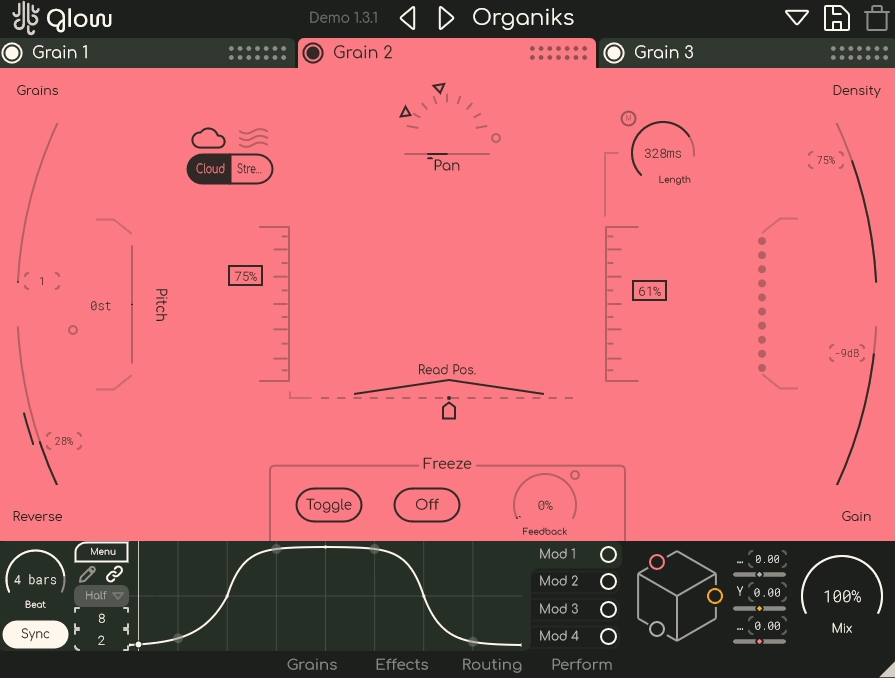
Lese Glow combines mass granulation with performance-oriented design, making it practical for both studio work and live contexts.
What distinguishes Glow is how it structures the architecture. The workflow encourages real-time experimentation during production and performance, which changes how you approach granular processing. The plugin feels more like a playable instrument than a traditional effect processor.
As with many other granulizers, the interface provides clear visual feedback with resizable panels and waveform visualization which helps you understand what’s happening as you adjust parameters. I appreciate how the design emphasizes performance without sacrificing depth, making complex patches manageable during live use.
Glow supports VST3, AU, and AAX formats for macOS and Windows, and the optimization allows running multiple instances without excessive CPU load. The preset management includes tagging and sorting, which speeds up workflow when working with complex setups.
What you get:
- Independent Granular Engines
This granular plugin provides 3 independent granular engines, each operating in Stream Mode or Cloud Mode. In Cloud Mode, each engine processes up to 50 grains simultaneously, producing 150 grains total in a fully loaded instance. I would say te mass granulation capability can create incredibly dense textures without overloading CPU. Each engine supports buffer freeze and retrigger functionality that can be triggered manually, synced to DAW, or controlled externally via sidechain.
- Customizable Modulators with 32 Control Points Each
When it comes to modulation system, it provides 4 fully customizable modulators, each drawable as freeform curves, ramps, triangles, or exponentials. You can add up to 32 control points per modulator for granular control over evolving parameter motion. Modulators assign to any granular parameter from grain size and density to feedback or filter cutoff. These also respond to tempo sync and host automation for patterns that groove with your track.
- Effect Slots Per Engine for 9 Total Effect Paths
Each instance includes 3 post-granulation effect slots per engine, hosting delay, reverb, chorus, crunch/distortion, and compression. This gives you 9 simultaneous effect paths across the three engines. Version 1.3 added flexible routing options allowing effects and engines to run in series, parallel, or multiband split mode. The multiband split assigns each engine to specific frequency bands, creating a 9-band granular matrix when combined with modulation.
- Multidimensional Macro System (Macro Cube)
The Macro Cube lets you bind 3 parameters to a single control. Each macro axis can be labeled and adjusted in real time, giving tactile performance interface for live manipulation. Combined with the modulation system and triple engines, this makes the plugin extremely playable even for complex patches.
- Diverse Presets
Glow ships with over 120 factory presets covering ambient textures, glitch beds, rhythmic granulations, evolving pads, and cinematic soundscapes. Each preset demonstrates the interplay between engines, modulation curves, and effects.
10. Sound Particles GrainDust

The company built this plugin around their spatial audio technology, which shows in how it handles immersive formats and 3D sound placement. I think it could be used for film work where spatial movement matters as much as the texture itself.
GrainDust by SoundParticles is the multi-layer architecture that treats each layer like its own independent synthesizer engine. You can load samples from the included library or use your own audio files, then transform them into evolving textures. The workflow feels more like instrumental layering than a traditional granular effect.
The plugin supports various immersive audio formats, making it practical for projects that go beyond stereo. You can place and animate grains in three-dimensional space with motion presets or draw custom movement patterns. I also like how this integrates spatial processing directly into the granular engine rather than requiring external routing.
GrainDust includes performance features that make it playable rather than just a texture generator. The interface manages to keep core controls accessible despite the depth.
- Granular Layers
The engine provides 4 fully independent granular layers, each acting like its own mini synthesizer. Every layer can load samples from the plugin’s library of over 500 curated sounds (or 1,200+ samples in bundled collections) or your own audio files. Each layer supports precise control over grain rate, density, size, continuity, detune, and playback direction. In addition, you can generate up to 100 simultaneous grains (calculated as 25 grains × 5 voices × 4 layers), creating dense, complex textures.
- MPE Support with Expressive Performance Control
The plugin offers MIDI Polyphonic Expression (MPE) support, allowing compatible controllers to influence pitch, timbre, and spatial movement with per-note expression. This makes it practical for you to create evolving drones or dynamic pads that respond to touch.
- Polyphonic Sequencer with Arpeggiator Modes
GrainDust includes a polyphonic sequencer supporting up to 128 steps with multiple operation modes like Pitch Bar, Mono, and Poly. The built-in arpeggiator offers 7 distinct modes for rhythmic content. These sequencers can influence rhythmic content, spatial parameters, and grain behaviors simultaneously, turning simple patterns into evolving structures.
- Spatial Audio Engine with Dolby Atmos 7.1.4 and 6th Order Ambisonics
The plugin features spatial audio support from stereo up to Dolby Atmos 7.1.4 and Ambisonics (including 6th order). Grain layers can be distributed across space with motion presets, or you can draw custom movement patterns and visualize them in 3D views inside the interface.
You can load your own SOFA files or use built-in HRTF datasets for tailored headphone monitoring.
- Waveform Modifiers
The modulation system includes over 70 waveform modifiers for LFOs, letting you craft complex motion shapes beyond simple sine or triangle cycles. The modulation matrix and curve editor let you map parameters extensively, ensuring evolving textures and rhythmic behaviors stay under your control.
- FX Slots with Per-Layer Filter Options
You get 4 FX slots where you can insert modules like delay, reverb, EQ, and bit-crusher. Filters including low-pass, high-pass, band-pass, peak, and shelving types can be applied globally or per-layer with independent envelopes and LFOs. Lastly, this can indeed reduce the need for external processing chains.
11. Arturia Efx Fragments
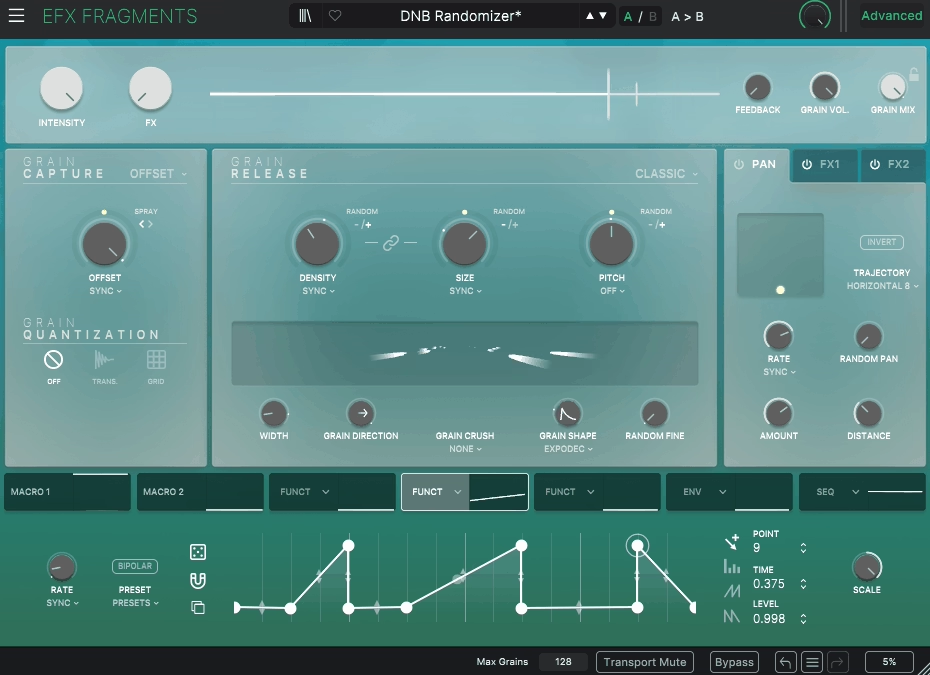
Arturia designed this granular effect to feel playable rather than experimental. The company built this around their typical approach to interface design, which prioritizes accessibility without sacrificing depth.
What makes Fragments VST plugin practical is how it integrates with DAW workflows. The plugin supports host tempo sync across its processing chain, and the pitch parameters can snap to musical keys and scales. This keeps heavily fragmented textures harmonically coherent, which matters when you’re building complex arrangements.
The workflow emphasizes performance and real-time control. You can manipulate grains dynamically during playback, and the visual feedback shows waveform activity and modulation assignments clearly. I appreciate how this makes the plugin feel interactive rather than static, especially when using it in live contexts or when building evolving textures that need to respond to musical input.
Arturia includes extensive preset coverage that demonstrates different approaches to granular processing. The interface keeps parameters accessible without requiring menu diving, which speeds up the creative process when you’re experimenting with sound design ideas.
- Grains Simultaneously
The granular engine processes up to 64 grains simultaneously per instance, providing detailed textures even at high density. You can manipulate 5 key grain parameters: Size, Density, Position, Pitch, and Retrigger Rate. Grains can be scattered in time with adjustable jitter values from 0% to 100%, controlling how tight or chaotic textures behave. The plugin also allows freeze and buffer retriggering synced to host DAW tempo or triggered manually.
- LFOs and Envelopes for Modulation
Fragments features 3 tempo-synced LFOs assignable to any granular parameter including density, pitch, or retrigger timing. The plugin has 2 envelope generators, each with attack, decay, sustain, and release stages for controlling grains expressively.
Additionally, 3 macros can each control up to 3 parameters simultaneously, meaning a single knob influences grain density, pitch variance, and filter cutoff in real time.
- Rhythmic Gating with 8 Quantization Steps
The plugin offers rhythmic gating with 8 quantization steps, letting grains lock to beats or subdivided patterns. This produces groove-aware textures ideal for live performance or beat-driven music. Combined with key tracking, velocity mapping, and MIDI modulation, grains react dynamically to how you play.
- 6 Integrated Effects with Multiple Routing Options
Fragments granular plugin includes 6 integrated effects: multi-mode filter, drive/saturation, stereo delay, reverb, chorus, and bitcrusher. The filter has 3 selectable modes (low-pass, high-pass, band-pass) and resonance control from 0 to 100%. Delay and reverb are tempo-synced with up to 16 beat subdivisions, while drive and bitcrusher modulate from subtle warmth to extreme distortion. These effects are fully routable per instance with parameters assignable to LFOs, envelopes, or macros, creating over 20 modulation destinations total.
- Patches/Presets
Arturia provides over 120 factory presets spanning glitch rhythms, evolving pads, ambient textures, and experimental soundscapes. Each preset demonstrates how the engine and effects interact musically. I can only say that the presets are fully editable and can be combined with custom macros..
12. Glitchmachines Palindrome 2
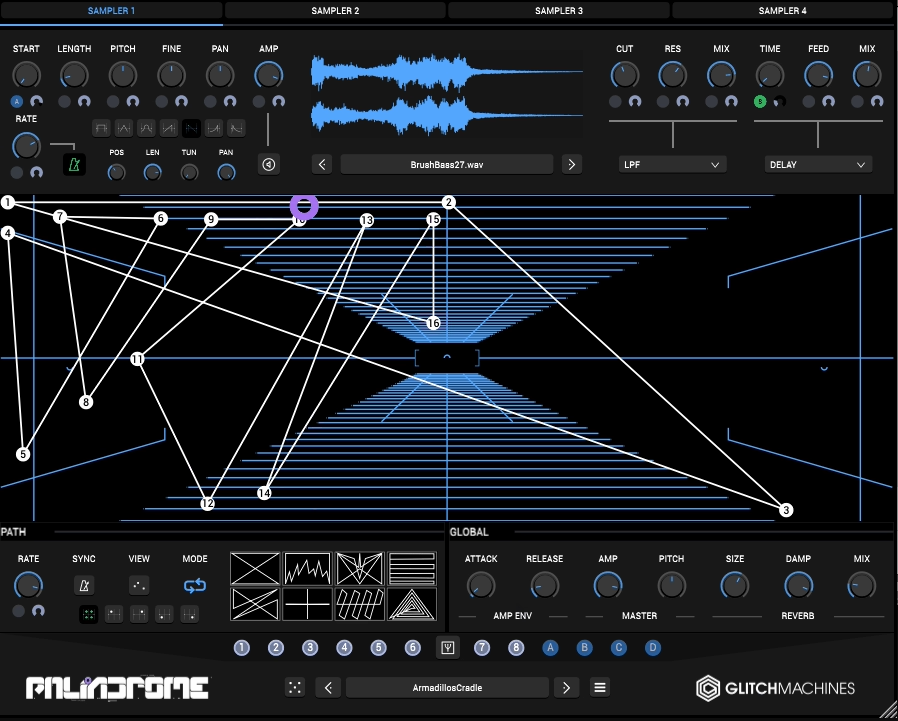
Glitchmachines Palindrome 2 is a multi-layer granular sampler that embraces experimental sound design while remaining playable.
Glitchmachines optimized the engine for performance, reducing CPU load compared to the original version. This matters when you’re building complex patches with heavy processing. I appreciate how the plugin balances experimental capabilities with practical usability, making it suitable for both live performance and detailed studio work.
When it comes to workflow, it encourages both spontaneous experimentation and meticulous editing depending on your needs, and the interface organizes controls logically despite the depth available.
- Independent Sampler Modules
The plugin provides 4 independent sampler modules, each capable of generating up to 32 simultaneous grain voices. This results in dense, layered textures whether you’re building evolving pads or glitchy rhythmic fragments. The capacity for polyphonic grain layering ensures patches feel full and immersive even in complex mixes.
- 2D Morph Plotting System
The core interface features a 2D morph plotting system where you draw paths between the four samplers. I noticed this allows real-time interpolation between samples, dynamically animating grains as they move along the plotted trajectory. The playhead can travel smoothly or chaotically depending on modulation settings, producing textures that evolve with organic complexity. As an owner of Palindrome 2 myself, I use this when building soundscapes that need to transform gradually over time.
- Effect Slots Total with Multiple Types
Each sampler module contains 2 insert effects, giving 8 effect slots per instance total. Available effect types include vowel filtering, bitcrusher, distortion, ring modulation, classic filters, and delay.
Each effect can be modulated individually, so tonal character shifts dynamically as your morph path evolves. This combination of 4 samplers × 32 grains per sampler × 2 insert effects per layer provides extensive simultaneous sound shaping.
- Independent Polyphonic Voices
The plugin is fully polyphonic with 4 independent voices that allow each note to animate separately along the morph grid. Each voice can trigger unique combinations of sampler layers, grains, and effects, creating dense multi-layered textures that respond to MIDI input. Combined with the modulation matrix, no two performances sound exactly the same.
- 1.5 GB Sample Library with Over 80 Factory Presets
Palindrome 2 ships with a 1.5 GB sample library and over 80 factory presets covering glitch textures, ambient beds, evolving hybrid instruments, and rhythmic generators. Each preset demonstrates the interplay between the morph grid, samplers, effects, and modulation.
Freebies:
1. Stone Voices PolyGas 2
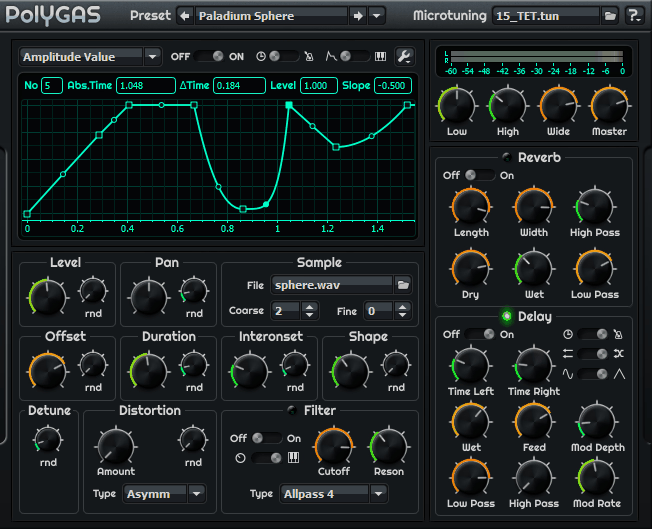
Stone Voices PolyGas 2 is a free polyphonic granular synthesizer for Windows that has been around for years but still offers genuine depth. The plugin approaches granular synthesis from a more traditional perspective, prioritizing control and modulation over modern interface design. You can use it when budget constraints matter or when you need specific envelope shaping capabilities.
What makes PolyGas 2 unusual is how it prioritizes functionality over aesthetics. The interface reflects an older design philosophy where you build sounds through detailed parameter editing rather than tweaking surface controls. This approach appeals to users who enjoy deeper sound design work.
The plugin operates as a VST2 instrument exclusively for Windows, with no macOS support available. Because development has stopped, compatibility with newer DAWs can be inconsistent. I’ve had varying results depending on the host, with some modern environments struggling with loading or stability. The manual provides detailed documentation, which helps navigate the depth available.
- 32-Note Polyphony
The engine supports up to 32-note polyphony, allowing you to create complex chords and layered pads without voice stealing or abrupt cutoff issues that affect many granular tools. This polyphony works across the full keyboard range, making the plugin practical for harmonic material.
- 18 Separate Envelopes with 40 Nodes Each
PolyGas 2 includes 18 separate envelopes, each with up to 40 nodes for precise control over sound evolution. These envelopes can shape granular parameters like grain amplitude, filter motion, and sample position. The envelope nodes can be tempo-synced to your DAW, allowing rhythmic motion to emerge from static samples. I would recommend it when building textures that need detailed dynamic shaping
- 11 Filter Types with Multimode Options
The universal multimode filter offers 11 total filter types including low-pass, high-pass, band-pass, comb, and all-pass modes. These filters can be driven manually or modulated via envelopes, and cutoff frequency can follow key pitch for harmonic consistency across the keyboard.
- 11 Nonlinear Distortion Types
You get 11 nonlinear distortion types including clipping and bit-crushing, providing everything from warm saturation to aggressive digital destruction. Combined with the filters, this shapes the character of granular output significantly.
2. IEM GranularEncoder
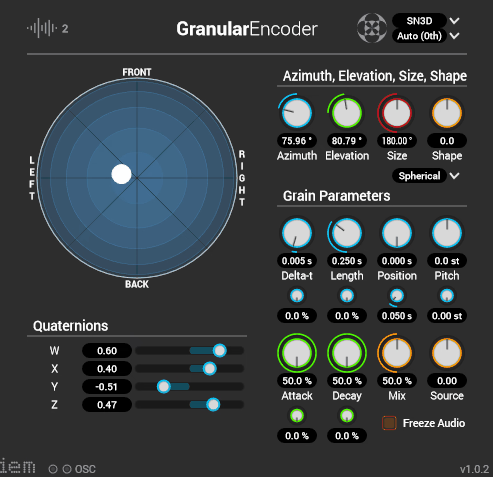
This one is part of the free IEM Plug-in Suite developed by the Institute for Electronic Music and Acoustics (IEM) in Austria. This plugin approaches granular processing from a spatial audio perspective rather than traditional stereo manipulation.
GranularEncoder focus on ambisonic workflows. In addition, the plugin treats grains as sound events you place in three-dimensional environments rather than just temporal fragments. This design philosophy makes it more useful for spatial audio practitioners than general music production.
The interface reflects its research origins with functional, utilitarian design rather than commercial polish. Once you understand the workflow, the controls make sense for spatial work. I appreciate how the plugin integrates with DAWs that support ambisonic monitoring like Reaper with Ambisonic Toolkit or Nuendo’s immersive audio setups.
Being free and open-source makes it accessible for experimental work, installations, and academic contexts where budget matters. The plugin slots easily into workflows focused on spatialization for film mixes, VR/AR soundscapes, or experimental music using spatial motion compositionally.
- Ambisonic Audio Format Support (FOA/HOA)
The plugin is built around ambisonic audio formats including FOA (first-order) and HOA (higher-order ambisonics), letting you spatialize grains in 360° sound fields. You can scatter micro-fragments across a sound sphere that surrounds the listener, creating immersive textures embedded in space. This works with Dolby Atmos, 9.1.6 configurations, and research-level higher-order ambisonics.
- 3D Spatial Coordinate Mapping
Parameters for horizontal, vertical, and distance placement of grain clusters are mapped to spatial coordinates. Instead of thinking about left-right panning, you place grains as sound events in three dimensions. I use this when building soundscapes where spatial movement matters as much as the texture itself.
- Core Granular Parameters
You get controls for Grain Size (length of each micro-fragment), Density/Grain Rate (grains emitted per second), Position & Spread (where in source audio grains are taken and how widely distributed), and Spatial Coordinates (3D placement in surround/ambisonic field). These parameters adjust in real time with numerical displays.
- Free and Lightweight
As part of the free IEM Plug-in Suite, the plugin runs efficiently without significant CPU overhead. This makes it practical for workflows where you need multiple instances for complex spatial arrangements.
3. Hvoya Audio Ribs
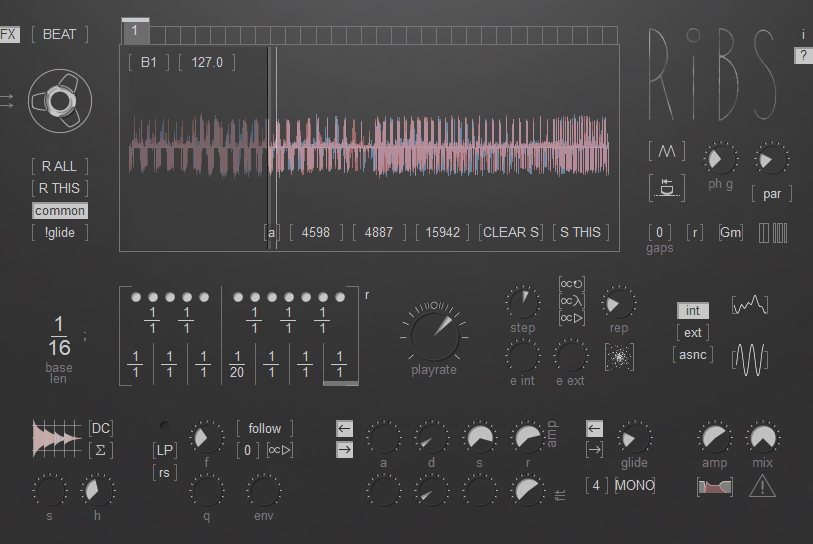
Hvoya Audio Ribs is one of the best free granular effect plugin out there (with optional donation tier) available in VST, VST3, and AU formats.
The developer designed this with a modular, experimental spirit that prioritizes quick creative results over parametric depth. I’ve used it primarily for electronic music projects where I need textural transformations without complex routing.
What makes Ribs different is the workflow philosophy. The plugin keeps everything visible and interactive. This transparency means you can drop it on a track and get musically interesting results quickly.
I can say that the interface reflects a deliberate design choice toward compactness. Controls invite hands-on exploration, and the sonic character leans toward lo-fi, glitch, and electro-acoustic territory rather than orchestral atmospheres. This makes it particularly useful for IDM, texture layers, and experimental electronic genres.
Being free makes it accessible for experimentation without financial commitment. The plugin runs efficiently across different systems, and the simplicity means it loads quickly without significant CPU overhead.
- Grain Size, Density, and Position Randomization Controls
The plugin provides control over grain size ranging from micro-fragments that add shimmer or glitchiness to large slabs that stretch audio into pulsing textures. Grain density controls the rate of fragments, with lower values creating sparse effects and higher densities generating thick immersive granulation.
The parameter interactions feel organic, where tiny adjustments can radically change the groove or perceived motion of audio.
- Spread and Scatter Controls for Temporal Deviation
The spread and scatter controls influence how grain position deviates in time, producing domain shifts that feel rhythmic or morphologically complex. Combined with other parameters, these make simple audio loops feel expansive and unpredictable. I use this frequently on breakbeat processing where I want fragments to feel improvised rather than mechanical.
- Feedback and Color Character Shaping
Ribs includes feedback controls that let fragments recirculate through the engine, creating everything from subtle resonance tails to unstable textures. Combined with grain scatter, feedback produces rhythmic swarms of sound that seem to react to one another. The color controls shift processed audio from shimmering ambience to crackly glitch effects, adding character beyond basic granulation.
- Immediate Hands-On Interface
The interface puts controls front and center without hidden matrices or cryptic parameters. This transparency rewards quick creative payoff, where you can tweak a couple of knobs and get musically interesting results within seconds. The depth emerges through parameter interactions rather than extensive menus.

Hello, I’m Viliam, I started this audio plugin focused blog to keep you updated on the latest trends, news and everything plugin related. I’ll put the most emphasis on the topics covering best VST, AU and AAX plugins. If you find some great plugin suggestions for us to include on our site, feel free to let me know, so I can take a look!