Let’s talk about some of the best physical modeling plugins available these days. They recreate the sound of real instruments by simulating the physics of how they vibrate, resonate, and produce tone. Instead of using recorded samples or basic waveforms, these tools calculate sound from scratch using math that mimics strings, metal, wood, air, and other materials..
The result is a more expressive and organic sound that responds to how you play.
Physical modeling gives you the most realistic and playable virtual instruments available today, especially if you want sounds that react naturally to velocity, pressure, and articulation.
I’ve found that these plugins feel closer to performing an actual instrument than any other synthesis method. They’re not just preset machines. You can shape tone, tension, material type, and environment in ways that feel alive and unpredictable.
So in this guide I will cover a range of physical modeling tools, from percussive synths and bass instruments to creative sound design engines and effects. Some focus on realistic acoustic emulation, while others push modeling into experimental territory. Whether you’re scoring film, producing electronic music, or just want instruments that respond like the real thing, there’s something here worth exploring!
1. Expressive E Noisy 2
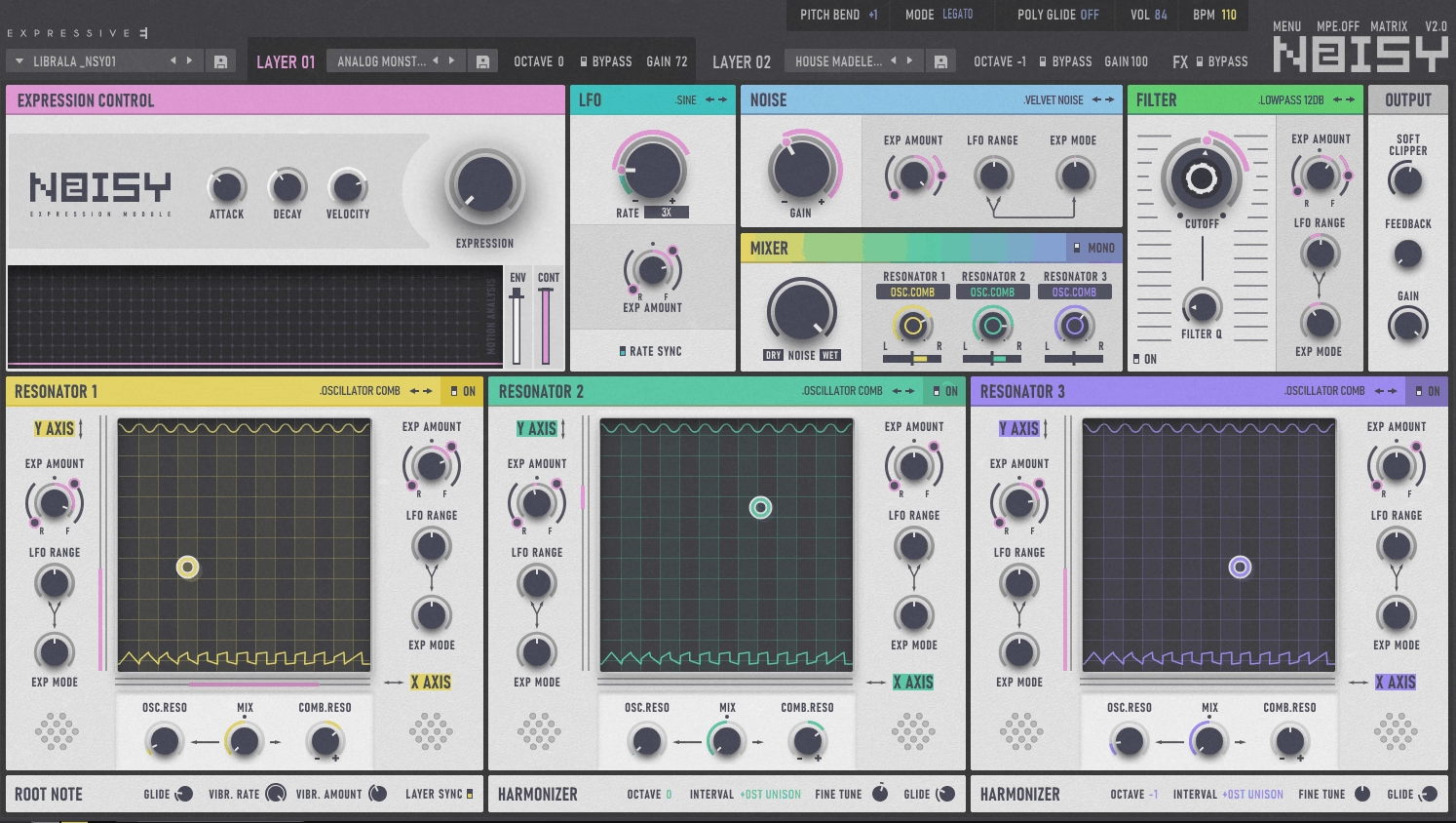
Instead of starting with oscillators, Noisy 2 physical modeling plugin uses 21 different noise types to excite a set of resonators, creating sounds that feel somewhere between acoustic instruments and electronic synthesis.
The bi-timbral engine gives you two independent layers per patch. You can mix a modal resonator with an analog-style PWM resonator in the same preset, which opens up tons of creative layering options. I would recommend this to blend percussive plucks with airy pads in ways that would take forever to set up manually across multiple tracks.
Noisy 2 comes loaded with 1,200 presets split between MPE-optimized and standard MIDI patches. Even if you don’t own an expressive controller, you still get access to evolving textures and organic movement that responds well to velocity and mod wheel.
Features you get:
- Noise-Driven Physical Modeling Engine
The core of Noisy 2 runs on noise sources instead of traditional oscillators. You get 21 noise types ranging from white and pink noise to field recordings like bubbles, interference, and frying sounds. These feed into acoustic and analog resonators that shape the final tone.
This approach gives you sounds that feel alive and unpredictable, especially useful when you want textures that don’t sound like typical subtractive synthesis. Iwould recommend it for cinematic pads and ambient layers.
- MPE Integration with Classic MIDI Support
If you have an MPE controller, Noisy 2 responds to poly pressure, slide, and lift gestures for expressive real-time control over resonators and effects. But you don’t need special hardware. The classic controller mode works perfectly with any standard MIDI keyboard, giving you modulation control through velocity, aftertouch, and mod wheel.
- Built-In Effects Chain with Real-Time Modulation
The effects section includes multimode filters, soft-clip distortion with feedback, stereo delay, and a plate reverb that goes up to 20 seconds. You also get modulation tools like chorus, phaser, ring mod, and tremolo, all routable per-voice or globally.
The visualizer shows you exactly how your gestures and modulation sources affect the sound in real time, which makes dialing in movement way more intuitive than tweaking numbers blindly.
2. Baby Audio Atoms

Atoms synth plugin doesn’t build sounds the way most synths do. Instead of traditional oscillators, it uses physical modeling based on a mass-spring network that gets excited by a virtual bow.
I can only say, what I found interesting is how this approach creates textures that feel part acoustic, part alien. The sound constantly shifts and breathes in ways that feel natural but unpredictable. When you’re stuck in the same synth presets, Atoms gives you a completely different palette to work with.
The plugin keeps things simple on the surface with six main parameters: Chaos, Force, Drive, Order, Overtones, and Filter. But these controls shape the physical model itself, not just filter or envelope settings. You can adjust bow pressure, damping, harmonic content, and non-linear behavior to sculpt sounds that range from soft pads to metallic drones.
Main features:
- Mass-Spring Sound Engine with Virtual Bowing
This is where Atoms gets unique. The engine simulates interconnected masses and springs that vibrate when triggered by a virtual bow. That simulation creates organic movement and subtle variations you don’t get from standard synthesis.
Consider using it for evolving pads that never sound static, even without heavy modulation. The textures feel alive because the physical model naturally introduces micro-variations in pitch and timbre.
- Spring-Network Profiles
Atoms includes four different profiles that change how the spring network behaves. Each profile dramatically shifts the character of your sound. One might give you clean, bright tones while another adds lo-fi grit or inharmonic overtones. Switching profiles is like getting four different instruments in one plugin, which keeps sound design sessions fresh when I need variety fast.
- Built-In Motion and Randomization Engine
You can automate almost every parameter with LFO, random drift, or MPE modulation. The randomizer button generates completely new patches instantly, which you can use when you need inspiration or want unexpected starting points.
The recycle function lets you create variations of existing sounds without starting from scratch. This makes it easy to explore sonic territory you wouldn’t find through manual tweaking alone.
- Integrated Effects Within the Physical Model
Instead of tacking on external effects, Atoms embeds reverb, filtering, and drive directly into the physical modeling engine. This keeps everything sounding cohesive, like one unified instrument rather than a synth chain. The harmonic clipping from the Drive control adds warmth and color that feels natural to the sound source itself, not like an afterthought.
3. Physical Audio Tetrad
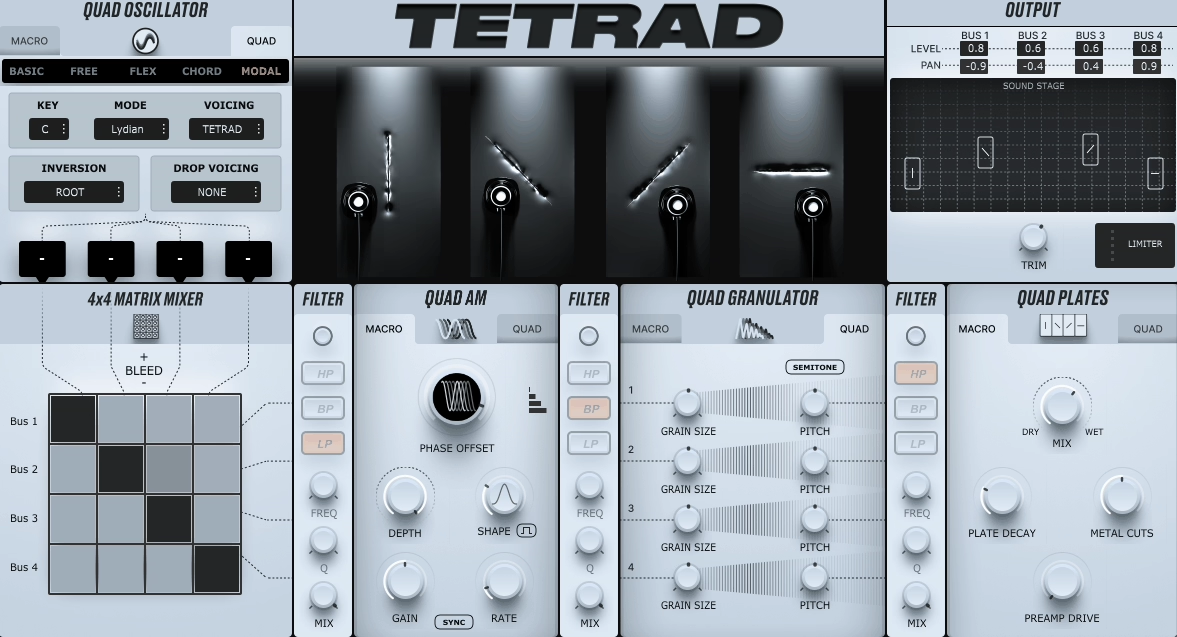
Tetrad throws physical modeling and granular synthesis into one instrument that feels more like a sound design playground. What makes Tetrad interesting is how it routes sound.
You start with four oscillators that feed into a Quad AM processor, then through a granulator, and finally into four physically modeled metal plates. That signal chain creates textures I can’t get anywhere else, especially when I want metallic resonances or evolving atmospheres that sound organic but still experimental.
The workflow takes some getting used to. But once you understand how the quad bus system works, you can layer and process each voice independently Try it on cinematic pads or glitchy percussive hits.
Features:
- Four Modeled Plates & Resonator System
The plates are what set Tetrad apart for me. These aren’t just reverb tails or basic resonators. They’re physically modeled metal surfaces that react to your input signal in ways that feel alive.
When I’m designing ambient textures or sci-fi sound effects, these plates add a dimension that sample-based synths just can’t match. You can adjust how each plate responds, which means you can go from subtle shimmer to harsh metallic clang depending on what your track needs.
- Granular Engine with Per-Bus Control
Tetrad’s granulator sits right in the signal path, and you control grain size, pitch, and feedback independently for each of the four buses. I love this because I can take a simple oscillator tone and turn it into something completely unrecognizable.
The grain parameters respond well to modulation too, so I can automate changes over time or use MPE controllers to shape grains in real-time. It’s perfect when I need movement and complexity without stacking ten different plugins.
- Full Modulation Matrix & MPE Support
You get eight LFOs plus envelope followers and MIDI sources that can target almost any parameter in the synth. I use this when I want textures that evolve on their own or respond to how I play.
The MPE support is a big deal if you use controllers like the Roli Seaboard, because you can modulate per-note pitch, pressure, and slide. It makes Tetrad feel more like a playable instrument than a static sound generator.
- Sidechain Input Processing
One feature I didn’t expect to use as much is the sidechain input. You can route external audio through Tetrad’s AM, granular, and resonator stages. Consider using it to process vocals, field recordings, and even drum loops through the plates.
4. Arturia Pigments 6
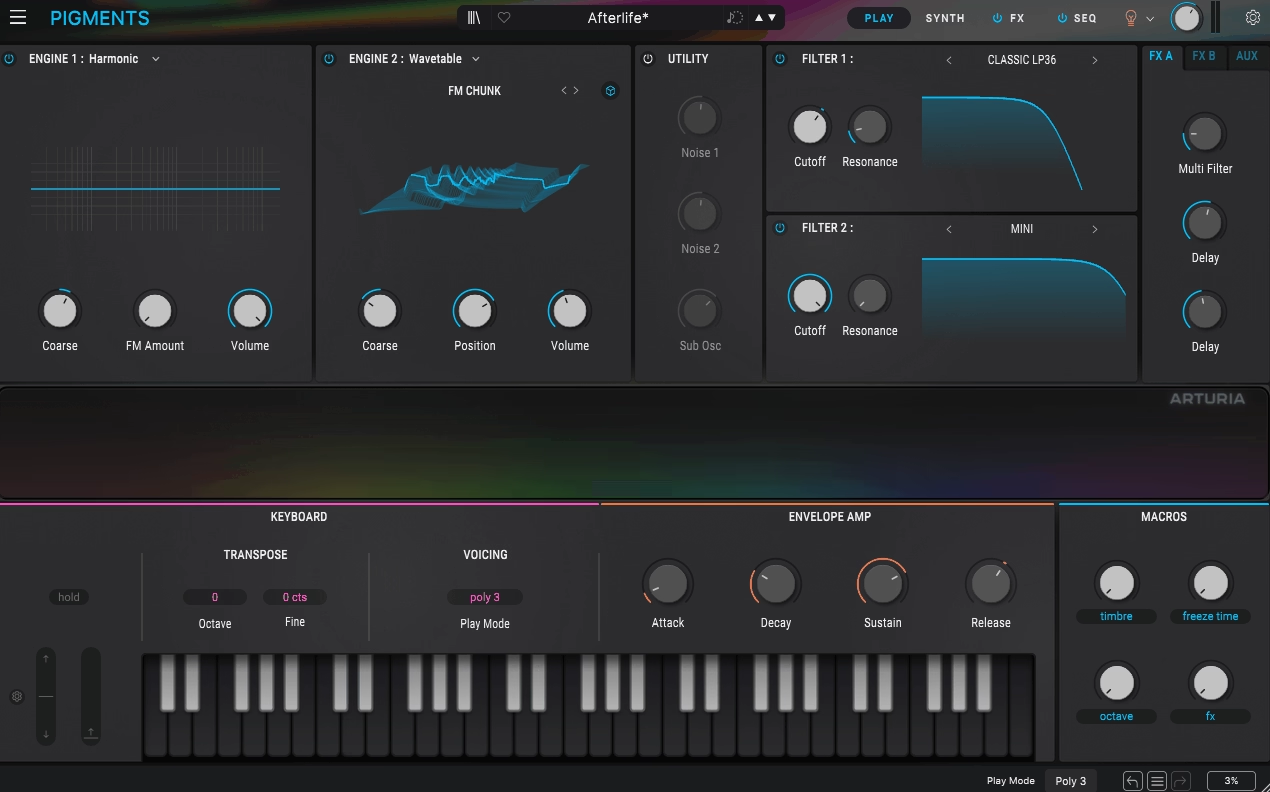
Pigments 6 (now Pigments 7)took a huge leap forward when Arturia added physical modeling synthesis to an already packed multi-engine synth.
What I like is how it doesn’t force you to pick one synthesis style. You get six different synthesis engines in one plugin: Virtual-Analog, Wavetable, Sample/Granular, Harmonic (additive), Modal (physical modeling), and a Utility engine. The Modal engine is the newest addition and it’s built around resonators and exciters that mimic physical objects like strings, beams, and surfaces.
You can run two engines at once and layer them however you want. This means I can build a Modal pluck on one side and combine it with a Wavetable lead on the other, all in the same patch. It opens up sound design in ways that single-engine synths just can’t touch.
Features:
- Modal Physical Modeling Engine
The Modal engine lets you pick a resonator type and choose from six resonator timbres: Pure, Pinch, Hollow, Nylon, Full, and Bass. You excite the resonator using either Collision (for plucks and hits) or Friction (for bowed or sustained sounds).
I can also feed external audio into it to excite the resonator, which creates some wild experimental textures. It’s perfect for metallic hits, percussive tones, or evolving pads that feel organic and alive.
- Expanded Filter Section with Cluster and LoFi Filters
Pigments 6 upgraded its filters in a big way. The new Cluster filter creates up to five peaks around the cutoff frequency, which gives you complex, shifting timbres that move as you play. The LoFi filter acts like a downsampler wrapped in a filter, adding controlled aliasing and bit-crush effects. The multimode filter now has analog/digital modes plus input drive for harmonic saturation.
- Enhanced Granular Engine with Real-Time Scanning
The Sample/Granular engine got smarter. You can now scan through a sample in real time, forward or backward, and grain playback randomizes per note for more organic variation. Grain size and density are fully morphable, which makes it incredible for evolving pads, ambient textures, and sample-based sound design that doesn’t sound static.
- Deep Modulation System
Pigments 6 gives you over 24 modulation sources: LFOs, envelopes, randomizers, voice modulators, envelope followers, function generators, and more. You can drag and drop modulation routing, use modulation side-chaining, and control everything with macros. It also supports MPE for expressive performance if you have compatible controllers.
There is soo much I could talk about Pigments but to keep the list shorter, I just continue with a Tomofon..
5. Klevgrand Tomofon
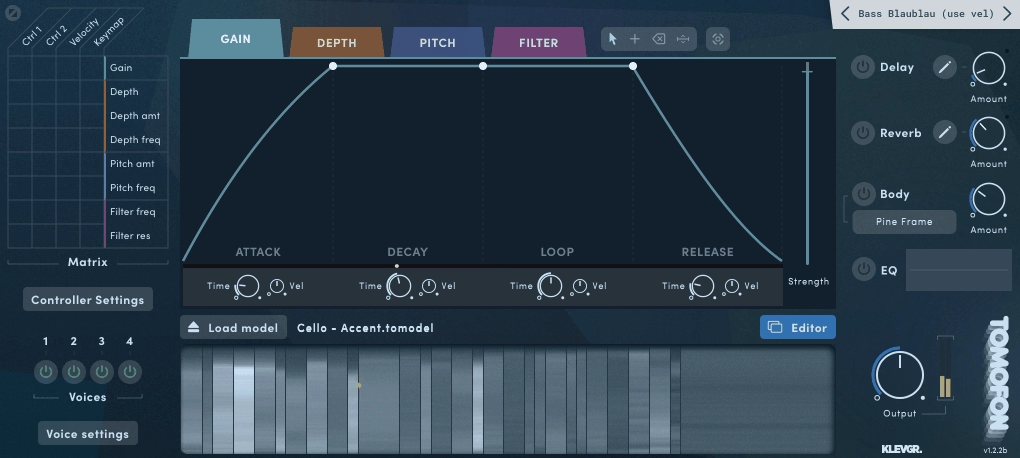
This one sits somewhere between a sampler and a wavetable synth, but it doesn’t work like either one! You feed Tomofon with audio files and it slices them into thousands of tiny waves, then maps those waves across the keyboard.
Each note you play triggers different waves depending on the pitch, so the sound morphs and evolves as you move up and down the keys. It feels more alive than a standard sample playback, and more organic than typical wavetable synthesis. You can create pads that breathe, leads that shift character across octaves, or textures that sound somewhere between real and synthetic.
- Audio Model Engine with Custom Sample Import
Tomofon’s core is its Audio Model format. You drop in your own audio or use the included library, and the plugin analyzes it, slices it into small chunks, and maps them across pitch zones. You can adjust which waves go where, clean up the slices, and control how the sound changes across velocity or modulation depth.
This gives you way more control than a sampler, but keeps the organic feel of the original audio.
- Deep Modulation System with Loopable Envelopes
What makes Tomofon interesting for sound design is how much you can modulate. You get envelopes for gain, depth, pitch, and filter, plus LFOs, sample-and-hold, and a mod matrix.
The depth envelope controls which waves play back, so you can animate the timbre over time. The envelopes support loopable sustain sections, which means you can create rhythmic movement or evolving textures that never sit still. Consider using it for pads that shift on their own without needing extra automation.
- Polyphonic Doubling with Independent Voice Control
Tomofon lets you stack up to four doubling voices per note, each with its own pitch, pan, and level. This creates wide stereo spreads, chorus-like richness, or detuned layers without loading multiple instances. It’s perfect for making pads feel huge or adding movement to leads.
- MPE Support and Resonant Body Emulation
The 1.2 update added MPE, so you can use expressive controllers for per-note pitch bends, pressure, and slides. It also includes resonant body models like metal, wood, and box, which add acoustic-style coloration to your patches. You can also load custom tuning files if you want to work outside standard equal temperament. These features push Tomofon into more expressive, experimental territory.
6. AAS Chromaphone 3
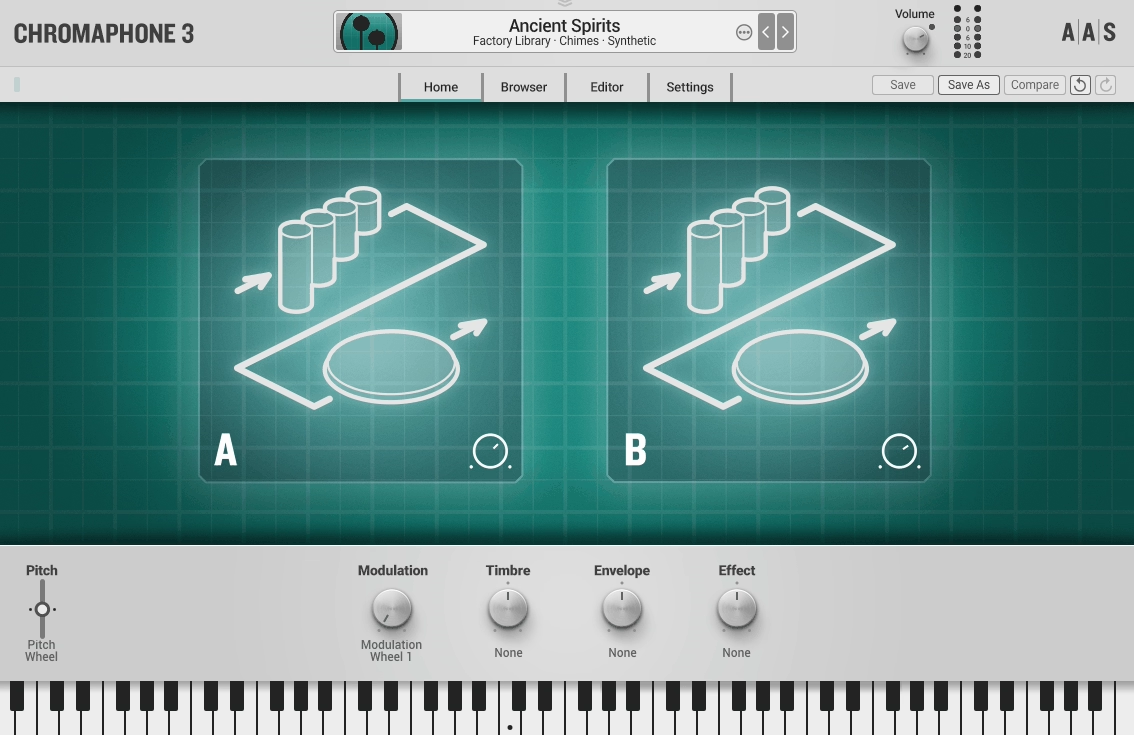
What makes Chromaphone 3 physical modeling VST plugin interesting is how it handles sound creation. You choose an object to resonate, pick how to excite it (like hitting it with a mallet or using noise), and the plugin calculates how that object would naturally vibrate and decay. The result feels organic and alive in ways that sample libraries can’t quite match.
I’ve found Chromaphone 3 especially useful when I need percussive textures that sit somewhere between realistic and synthetic. You get over 1000 presets that cover everything from metallic bells to warm marimbas, but the real value comes when you start tweaking the resonators yourself.
- Two-Layer Architecture With Resonator Coupling
Each patch can use two independent layers, and you can stack or split them across the keyboard. What sets this apart is resonator coupling. When you link two resonators together, they exchange energy like real acoustic objects do.
A string coupled to a tube behaves differently than a string alone, creating sympathetic vibrations and complex overtones that evolve naturally. This is where you find sounds that don’t exist in the real world but still feel physically grounded.
- Physical Excitation Methods
Instead of pressing play on a sample, you’re triggering a physical event. You can strike a resonator with a mallet (controlling hardness and velocity), excite it with noise, or use other impact methods. Each excitation type changes the attack, timbre, and decay behavior. Soft mallet hits on a membrane sound warm and round, while hard strikes on a metal plate give you bright, ringing attacks. It’s this velocity-responsive behavior that makes programming drums and mallet instruments feel natural.
- Advanced Modulation & Effects Chain
Chromaphone 3 includes eight effect modules (reverb, delay, distortion, EQ, compressor, chorus, and more) plus deep modulation routing. You can assign LFOs, envelopes, and four user macros per layer to control resonator parameters, effects, and more.
The macros are MIDI-assignable, so you can morph sounds in real time during performance. The plugin also supports Scala tuning files if you work with microtonal scales, and it runs light on CPU since there are no large sample libraries loading into RAM.
7. Physical Audio Preparation 2
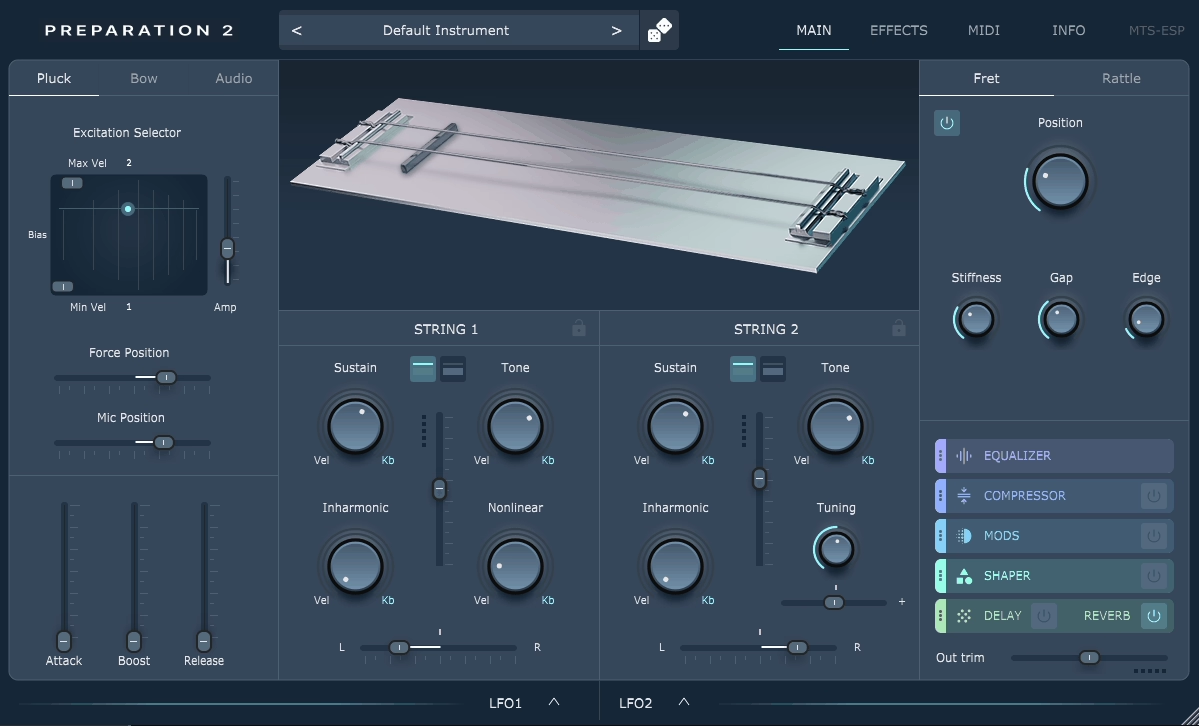
Instead of mimicking traditional acoustic instruments, Preparation 2 builds a virtual world where two strings collide with a rattle and a dynamic fret. The way these elements interact creates sounds that range from delicate prepared-string textures to wild experimental tones I’ve never heard anywhere else. It’s not trying to replace a piano or guitar. It’s creating something entirely new.
What drew me in was how deeply you can shape the physics itself. You’re not just tweaking filters or envelopes. You’re adjusting how the strings vibrate, how the rattle connects them, and how the fret interacts underneath. Each voice contains a pair of strings that you can excite by plucking, bowing, or even feeding in external audio through a side-chain input.
- String Collision Modeling with Rattle and Dynamic Fret
Preparation 2 physical modeling plugin uses mathematical modeling of three core elements: two strings (or bars), a rattle that joins them, and a dynamic fret positioned underneath. This setup lets you explore acoustic behaviors that don’t exist in traditional instruments.
The rattle and fret have adjustable properties like mass, stiffness, and gap distance, which means you control how energy moves through the system. I love using this for creating metallic percussive hits or eerie sustained tones that evolve unpredictably.
- Multiple Excitation Methods Including Audio Side-Chain
You can trigger the strings three different ways: with a customizable pluck that responds to velocity, a virtual bow where you control force and position, or by routing external audio into the model as a side-chain input. That last option is what really opens things up for me.
I’ve fed vocals, field recordings, and even drum loops through the physical model and watched them transform into resonant textures that feel alive and responsive.
- Deep Physical Parameter Control
Every string offers controls for sustain, tone, inharmonicity, and non-linearity. The fret and rattle have their own adjustable geometry and stiffness settings. This level of detail means you’re shaping how the instrument behaves at a fundamental level, not just coloring the sound afterward.
When I want something that feels organic but strange, this is where I spend my time. Small adjustments to inharmonicity or fret gap can completely change the character of a patch.
- Built-In Effects Rack and MPE Support
Preparation 2 includes a full effects suite with EQ, compression, modulation effects, drive, delay, and reverb that you can reorder however you want. It also supports MPE, which makes it incredibly expressive with compatible controllers. You get two LFOs plus modulation routing for velocity, keyboard tracking, and MIDI CC, so you can animate rattle behavior, fret position, or string properties in real time. It’s perfect for performances that need dynamic, evolving timbres.
8. Unfiltered Audio Needlepoint
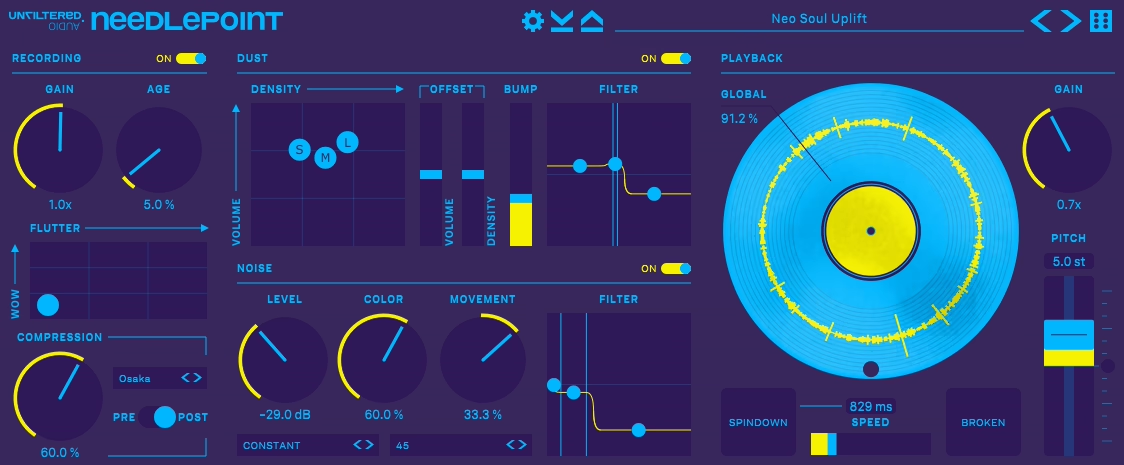
Needlepoint takes a different approach to vinyl emulation by physically modeling every detail of a turntable instead of using looped samples. That makes the noise patterns evolve naturally instead of repeating.
What stands out to me is how much control you get over the degradation. You can add light dust for warmth or push it into glitchy broken-record territory. The virtual platter rotates algorithmically, which means the crackle and imperfections never sound exactly the same twice.
I find it useful for lo-fi hip-hop, adding vintage texture to clean synths, or creating tape-stop effects without actually recording to tape. You can dial in subtle aging or completely destroy your audio in creative ways.
What you will get:
- Physical Modeling Engine
Needlepoint synthesizes dust, scratches, and warping instead of looping pre-recorded vinyl noise. You get three grain sizes for dust particles, adjustable density controls, and individual volume settings for each type of debris. This approach gives you realistic turntable sounds that stay dynamic throughout your track. Use this when you want authentic vinyl character that doesn’t become obvious or repetitive after a few bars.
- Turntable Speed & Wow/Flutter Controls
You can select 33 1/3, 45, or 78 RPM speeds plus custom rates that sync to your DAW tempo. The wow and flutter controls add pitch instability that mimics worn belts and motors. I love the spin-down effect for transitions.
There’s also a “Broken” mode that makes the needle skip and jump grooves, perfect for stutter effects or glitchy breakdowns without chopping up MIDI.
- Independent Pitch Shifting
This feature lets you change pitch without affecting playback speed, which most vinyl plugins can’t do. You can detune by semitones or cents while keeping your tempo locked. It’s great for resampling workflows or adding lo-fi character to melodic elements. The pitch shifting has a grainy quality that works well for experimental sound design.
- Built-In Compression & Coloration
Needlepoint includes a single-knob compressor with multiple flavor modes modeled after vintage hardware samplers. This adds punch and saturation that helps processed audio sit in the mix naturally. Great feature to glue drums together or add weight to thin samples without opening another plugin.
9. Madrona Labs Kaivo
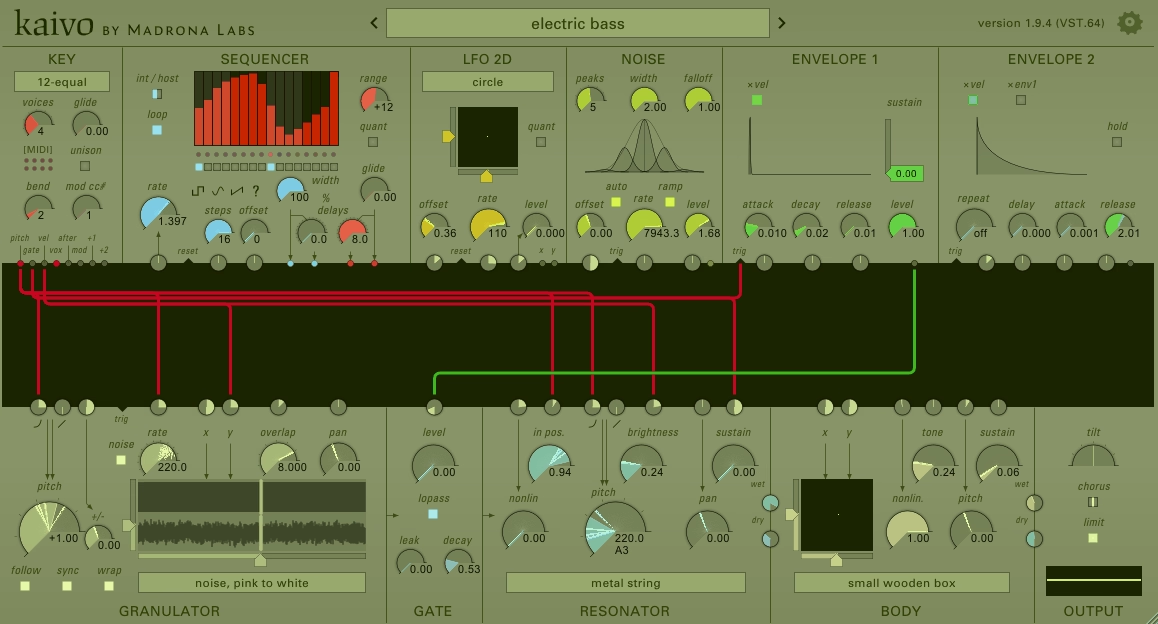
Kaivo throws granular synthesis and physical modeling into the same engine and lets you patch them together however you want.
What makes Kaivo different is its FDTD (Finite-Difference Time-Domain) method. This approach simulates how actual objects vibrate when you hit, pluck, or bow them.
But instead of using recordings or samples as your sound source, you’re feeding a granulator into physical models of strings, springs, plates, and drums. The result is something that feels alive and unpredictable in ways most synths can’t touch.
I keep coming back to Kaivo synth when I need textures that evolve on their own. It’s perfect for soundtracks, experimental tracks, or any time you want something that doesn’t sit still.
Features:
- Granulator Feeding Physical Models
The coolest part of Kaivo is how it uses granular synthesis as the exciter. You load a sample up to 8 seconds long, then feed grains of that sample into one of Kaivo’s resonators.
You control grain count, rate, pitch, and size, which means your sound source is already moving and shifting before it even hits the resonator. This hybrid setup gives you textures that are part sampler, part synthesizer, and completely unique.
- Eight Resonators and Four Body Types
Kaivo gives you 8 different resonators including strings, chimes, and springs, plus 4 body models like wooden plates, metal plates, and frame drums. These aren’t just filters. They’re actual 2D physical simulations with left and right pickups.
When you excite a spring resonator through a metal plate body, you get realistic overtones, decay curves, and spatial movement that change depending on how hard you play and where the pickups are placed.
- Semi-Modular Patchable Interface
You can route modules however you want. The Key, Granulator, Resonator, Body, Gate, and Output modules all connect through a visual patcher. Every parameter can be modulated by LFOs, sequencers, envelopes, and even a 2D LFO for movement across two dimensions at once.
This level of control means you can push Kaivo into glitchy, chaotic territory or keep it musical and expressive. It’s up to you.
- Natural Variation in Every Note
Because Kaivo models physical vibrations in real time, every note you play sounds slightly different. There’s no static sample triggering the same way twice. This gives your patches an organic feel that’s hard to replicate with traditional synths. Even simple plucks and hits feel more human and less robotic.
10. IK Multimedia MODO BASS 2

MODO BASS 2 doesn’t rely on samples like most bass plugins. It uses physical modeling to simulate how real bass strings vibrate, resonate, and interact with pickups and the instrument body.
What I appreciate most is how the bass responds to your playing in real time. You can adjust string action, pick position, playing style, and even how worn out the strings are. This gives you control that feels more like tweaking an actual bass guitar than scrolling through preset folders.
The plugin includes 22 bass models covering electric, fretless, and upright basses. You can switch any electric bass between fretted and fretless modes, and configure them as 4-string, 5-string, or 6-string instruments. That flexibility means you’re not locked into one sound or style.
Main features:
- Physical Modeling
Engine MODO BASS 2 simulates real string physics instead of playing back recordings. When you change how hard you play, where the pick hits the string, or how high the action is set, the sound changes naturally. It feels responsive in ways sample libraries can’t match, especially when you’re programming dynamics or playing with a MIDI controller.
- Customizable Playing Styles & String Setting
s You get detailed control over playing technique. Choose between finger, pick, or slap styles, then adjust where on the string you’re playing (near the bridge for tightness or near the neck for warmth). You can also change string gauge, age, and material. These settings shape tone in ways that feel intuitive if you’ve ever played or recorded real bass.
- 1000+ MIDI Groove Patterns
MODO BASS 2 includes over 1000 professionally played MIDI patterns organized by genre, tempo, and song section like intro, verse, or chorus. You can drag these grooves straight into your DAW, transpose them, or edit them to fit your track. This is helpful when you need basslines fast or want a realistic starting point to build from.
- Built-In Amp, Cabinet, and Effects Chain
The plugin also includes a full signal chain with stomp effects like octaver, distortion, chorus, compressor, and envelope filter. You also get amp and cabinet modeling with different mic positions. For upright bass, you can blend between pickup and piezo sounds. This means you can dial in mix-ready tones without needing extra plugins.
11. Physical Audio Modus
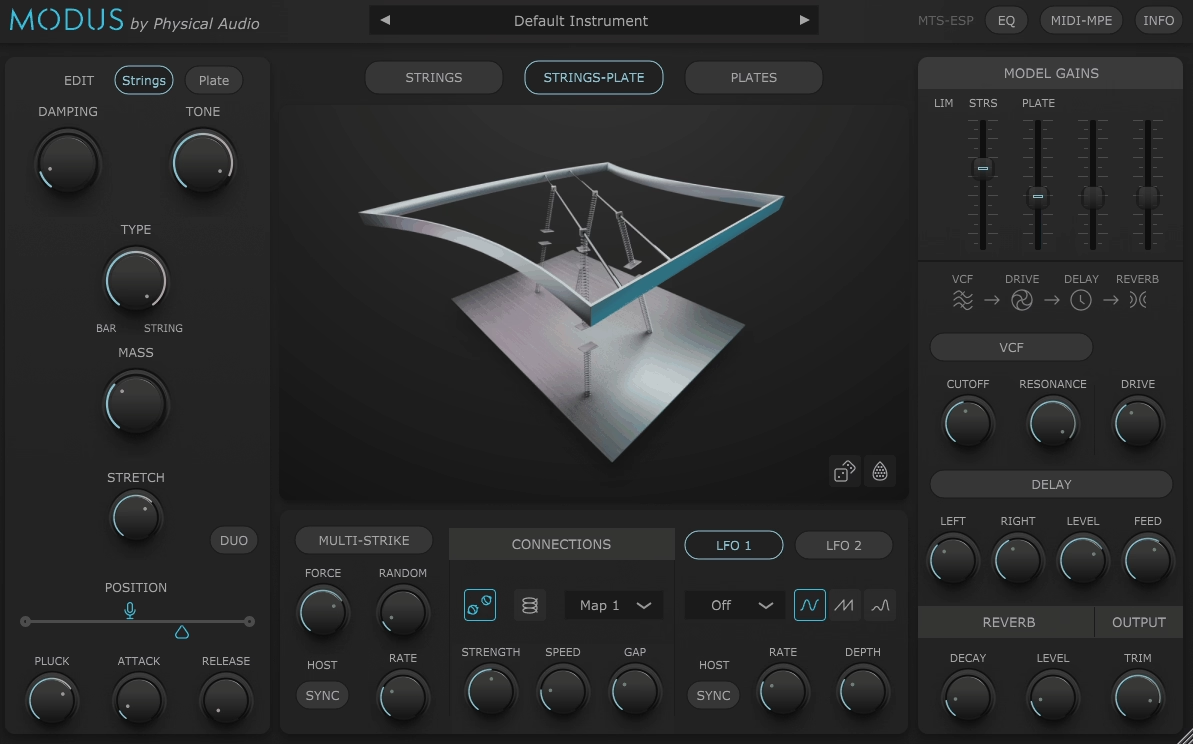
Modus VST builds sound by modeling how real objects like strings, plates, and springs physically collide and resonate. You’re not tweaking filters on a static waveform. You’re shaping the behavior of virtual acoustic objects that react and vibrate just like they would in the real world.
With this physical modeling plugin, you can adjust damping, mass, harmonic content, excitation position, and how elements connect to each other through springs or rattles. It’s not just preset browsing. You’re engineering the instrument’s physical behavior from the ground up.
Features:
- Collision Modeling & Resonator Engine
Modus uses collision modeling technology to connect acoustic elements in real time. Strings, plates, springs, and rattles interact physically inside the plugin to generate tones that evolve and respond naturally. This gives you access to metallic hits, evolving drones, impossible textures, and hybrid sounds you won’t find in sample libraries or traditional synths.
- Three Instrument Configurations
You get three different ways to build sounds. Strings mode connects up to four vibrating strings per voice. Strings-Plate mode links two strings to a resonating plate for hybrid tones. Plates mode gives you one or two metal-like surfaces that ring and resonate. Each configuration opens up a completely different sonic world.
- Deep Physical Parameter Control
You can tweak damping, mass, inharmonicity, excitation type (pluck, strike, multi-strike, oscillator-driven), connection strength, and pickup position. These controls let you shape how the virtual instrument behaves at a physical level. You’re not just turning knobs on a filter. You’re changing how the object vibrates and resonates.
- MPE Support & External Audio Input
Modus supports MPE, so pressure and aftertouch can modulate the physical model in real time. You can also route external audio into Plates mode as a driver. This means you can feed vocals, field recordings, or any sound into the physical modeling engine and have it resonate through the strings or plates.
- Custom Tuning & Modulation Options
The plugin supports Scala files and MTS-ESP for microtonal and alternative tunings. You also get two LFOs, a modulation matrix, and built-in effects like a ladder filter, drive, EQ, delay, and reverb. It ships with over 120 presets covering everything from percussive hits to abstract atmospheres.
Freebies
1. Tiagolr RipplerX
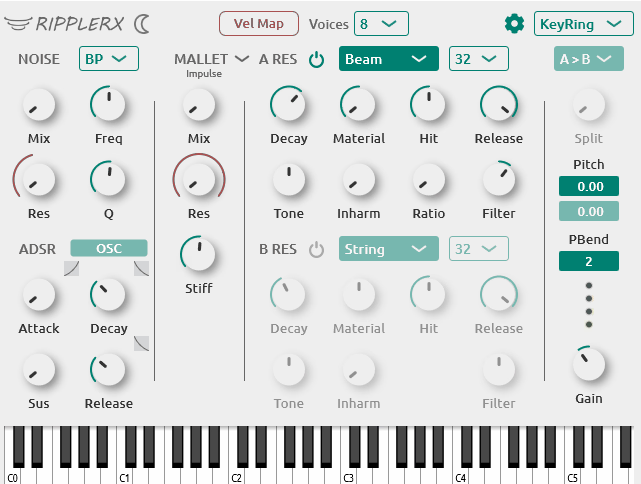
RipplerX surprised me when I first tried it because it’s completely free and open-source, yet it delivers physical modeling sounds that remind me of plugins costing hundreds of dollars.
What stands out most is how it uses modal synthesis with dual resonators to create acoustic-like sounds. You get nine different resonator types including String, Beam, Membrane, Drumhead, Plate, Marimba, and more. I can route these resonators in serial or parallel, which gives me tons of control over how the sound develops.
The mallet generator feels natural when you’re going for percussive hits. You can adjust the stiffness to change how hard or soft the strike sounds. There’s also a noise module that works great for creating sustained textures or wind-like sounds. Both of these use ADSR envelopes so you can shape exactly how the excitation behaves.
Features:
- Dual Resonator Architecture with Serial and Parallel Coupling
This is where RipplerX gets interesting. You can run one resonator into another using serial mode, which creates complex interacting sounds. Or you can use parallel mode and blend both resonators independently. I would use serial coupling when I want metallic bell tones that evolve, and parallel when I’m layering different textures like combining a drumhead with a plate sound.
- Nine Physical Resonator Models with Deep Control
Each resonator type behaves differently and responds to the inharmonicity and ratio controls in unique ways. The up to 64 partials per resonator means you get rich harmonic content. When I dial up inharmonicity on the Plate model, I get those beautiful metallic textures perfect for cinematic work. The Marimba model nails those warm mallet sounds without needing samples.
- Mallet and Noise Excitation Modules
The mallet generator simulates physical strikes with adjustable stiffness. Softer settings give you warm marimba-like attacks, while harder settings create sharp metallic hits. The noise module opens up different possibilities like bowed string effects or ambient drones. Having both exciters with independent ADSR envelopes means you can create everything from short plucks to evolving pads.
Cross-Platform and Open-Source RipplerX runs on Windows, macOS, and Linux in VST3, AU, and LV2 formats. Being open-source under GPL-3.0 means you can use it freely in any project, commercial or personal. For producers on a budget or anyone curious about physical modeling synthesis, this removes all barriers to experimentation.
2. Chowdhury DSP CHOW Kick
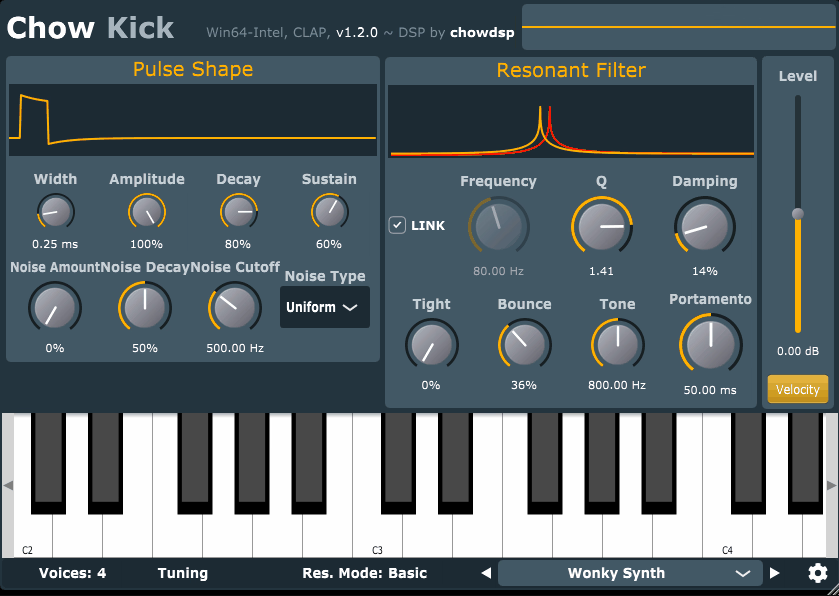
CHOW Kick caught my attention because it doesn’t clone the 808 or 909. Instead, it gives you physical modeling of drum membrane circuits from vintage machines, which means you’re sculpting kicks from actual circuit behavior rather than layering samples.
What I really appreciate is how creative the nonlinear filtering options get. You can push the resonance into different distortion modes that add grit, snap, or even unstable breakup. It’s the kind of flexibility that makes designing kicks feel more like sound design than just tweaking an ADSR.
The plugin also responds to MIDI note input for tuning, so you can match your kick to the key of your track. That’s something I would use in bass-heavy genres where the kick needs to sit perfectly with the sub.
- Pulse Shaper with Deep Control
The pulse generator is where you shape the initial hit. You get control over the pulse width, attack curve, and decay length, which directly affects how punchy or soft the transient feels. I love tweaking the pulse shape when I need a kick that cuts through dense mixes without adding extra saturation later.
The flexibility here is huge because small changes in pulse width can completely shift the character from tight and clicky to round and soft.
- Nonlinear Resonant Filter Modes
This is where CHOW Kick gets interesting. The resonant filter includes multiple nonlinear modes that add harmonic distortion and overtones as you increase the resonance. You’re not just filtering the sound, you’re actively shaping its color and aggression.
- MIDI Tuning for Musical Kicks
You can trigger CHOW Kick with MIDI notes to tune the fundamental frequency. This makes it easy to build kicks that follow your bassline or root note, which is something I rely on in techno, house, and trap. Instead of guessing or pitching samples, you just play the note you need and the kick follows. It’s a small feature but it saves me time and keeps low-end tight.
3. Chow Tape Model
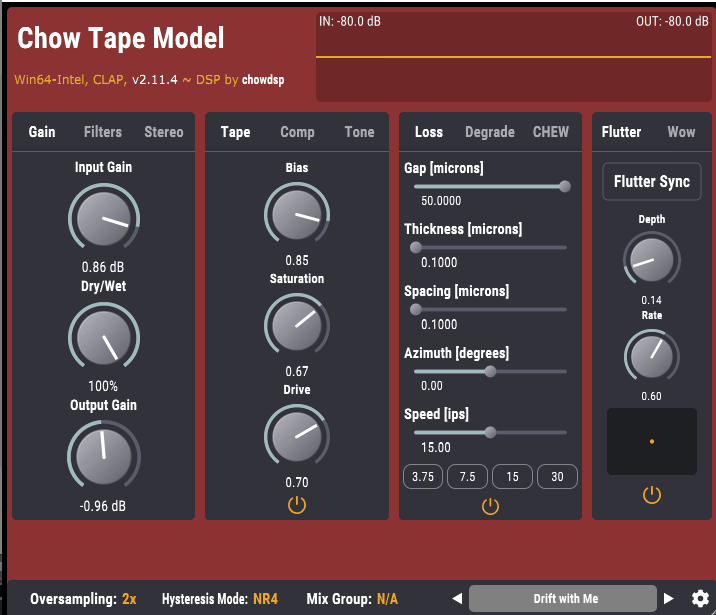
What gets me excited about Chow Tape Model is that it’s completely free physical modeling plugin and somehow outperforms plugins that cost hundreds of dollars.
This isn’t just another saturation effect with a vintage skin slapped on it. Chow Tape Model uses real physical modeling to recreate how analog tape machines actually work, starting with algorithms based on the Sony TC-260 reel-to-reel machine. It was born out of academic research at Stanford University and even has a published paper explaining the math behind it.
You can push this plugin in so many directions, but I would use it for gentle warmth on a vocal bus or play with degradation settings to get those broken, warped tape sounds for lo-fi beats or experimental transitions.
What you get:
- Deep Physical Modeling Controls
Instead of giving you three presets and calling it done, Chow Tape lets you adjust the actual physics of tape behavior. You control bias, tape thickness, playback speed, head gap, and azimuth.
These aren’t just fancy knobs, they actually change how the magnetic tape responds to your audio. When I need subtle analog glue, I keep bias low and speed high. When I want that degraded cassette vibe, I dial down the tape quality and let it fall apart.
- Wow, Flutter, and Chew Parameters
This is where things get creative. The wow and flutter controls add those speed variations you hear on old tape machines, perfect for making modern productions feel aged or unstable in interesting ways. Then there’s the chew parameter, which simulates actual tape damage. Good idea would be to use this on drum loops to create glitchy textures that sound like the tape is literally eating itself. You won’t find this level of control in most paid tape plugins
- Flexible Tape Machine Emulation
While the plugin started as a Sony TC-260 emulation, it’s grown way beyond that. You can now model different tape machines by adjusting the available parameters. Want a vintage 1967 consumer machine sound? Done. Need a cleaner studio tape character? Adjust tape speed to 15 or 30 ips and reduce noise. The flexibility means one plugin covers everything from mastering-grade warmth to completely destroyed lo-fi chaos.
How Physical Modelling Synthesis Works
Physical modelling synthesis uses mathematical algorithms to recreate how real instruments make sound. Instead of playing back recorded samples, these plugins calculate vibrations, resonance, and acoustic behavior in real time.
Think of it like building a virtual instrument from scratch. The plugin considers things like string tension, body shape, material density, and how air moves through tubes. It turns all these physical properties into equations that run when you play a note.
What makes this approach special is the level of detail you can control. When you adjust parameters like bow pressure on a virtual violin or breath intensity on a flute, the sound responds naturally. You’re not just tweaking a filter, you’re changing how the instrument itself would behave.
The process happens in three main stages:
- Excitation – This is what starts the sound, like plucking a string, striking a drum, or blowing air into a tube
- Resonance – The plugin calculates how different parts of the instrument vibrate and interact with each other
- Output– All those calculations combine into the final audio signal you hear
The beauty of physical modelling is its expressive performance response. When you play harder, softer, faster, or with different articulation, the sound changes in ways that feel organic. This works especially well with MPE controllers that give you multi-dimensional control over each note.
I find physical modelling particularly useful when I want acoustic textures that feel alive but need the flexibility of synthesis. You can push parameters beyond what’s physically possible with real instruments, creating sounds that sit somewhere between realistic and experimental.
The trade-off is CPU usage. Because your computer calculates everything on the fly rather than playing back samples, these plugins can be demanding. But the payoff is smaller file sizes and infinite variation in how each note sounds based on how you play it.

Hello, I’m Viliam, I started this audio plugin focused blog to keep you updated on the latest trends, news and everything plugin related. I’ll put the most emphasis on the topics covering best VST, AU and AAX plugins. If you find some great plugin suggestions for us to include on our site, feel free to let me know, so I can take a look!