Vocoder plugins can turn your vocals into robotic sounds, build rich harmonies, or give your music a unique synthetic feel. However, many vocoders sound too clean and digital, or they are so complex to set up that you lose inspiration before you even start making music.
I tried out many vocoder plugins to see which ones give good results without making the process difficult. I found that the best vocoders are not always the most expensive or feature-packed. The best ones let you shape your vocals easily and keep you focused on making music, not fixing technical issues.
In this guide, I’ll talk about plugins like Polyverse Manipulator, iZotope Vocal Synth 2, Antares Vocodist, Waves OVox, and Baby Audio Humanoid. I’ll also include a few others that offer different ways to process vocals, plus two free plugins at the end.
Some of these plugins focus on classic robotic effects, while others are great for formant shifting and changing vowel sounds. A few even let you turn vocals into wild, experimental textures that sound nothing like a human voice.
I tested these vocoder plugins for both sound quality and how easy they are to use. Whether you want classic Daft Punk sounds or modern, creative vocal effects, here’s what I discovered:
| Plugin Name | Best For | Engine Type | Key Strength | My Verdict | Pros | Cons |
|---|---|---|---|---|---|---|
| 1. Polyverse Manipulator | Extreme vocal transformation | Granular pitch & formant engine | Independent pitch/formant control | Best overall | Artifact-resistant pitch shifting, deep MIDI control, real-time performance | Can overwhelm beginners, dense modulation section |
| 2. iZotope Vocal Synth 2 | Layered vocal synthesis | Multi-module spectral vocoding | Parallel module routing | Most versatile | Five synthesis engines, advanced modulation, strong MIDI integration | Higher CPU usage in stacked configurations |
| 3. Antares Vocodist | Advanced Users | Band-based vocoder with internal carrier | Zero-setup workflow | Clean and efficient | Built-in carrier synth, clear articulation, low learning curve | Limited sound-design depth compared to modular systems |
| 4. Waves OVox Vocal ReSynthesis | Expressive vocal resynthesis | Resynthesis-based vocal engine | Transient-preserving processing | Performance-oriented | Polyphonic voices, scale locking, MIDI note mapping | Interface can feel busy during complex patches |
| 5. Baby Audio Humanoid | Vowel motion effects | Formant filter synthesis | Real-time vowel morphing | Fast creative tool | Very CPU-efficient, intuitive X/Y control, musical modulation | Not suitable for classic vocoder sounds |
| 6. OXYMeteor by OxyDSP | Straightforward vocoding | Digital vocoder with morphing | Quick results with movement | Workflow-focused | Built-in carrier, vowel morphing, simple modulation | Fewer advanced routing options |
| 7. Native Instruments RAZOR | Vocal-style sound design | Additive synthesis (320 partials) | Spectral precision | Sound designer’s choice | Extreme harmonic control, advanced modulation, formant shaping | Requires Reaktor, steep learning curve |
| 8. XILS 201 Vocoder | Vintage vocoder tone | Analog-modeled vocoder | Authentic hardware character | Period-accurate | Analog saturation, bucket-brigade style effects, classic warmth | Less transparent than modern vocoders |
| 9. Arturia Vocoder V | Multiple vocoder flavors | Multi-model vocoder engine | Historical flexibility | All-rounder | Several classic emulations, sample carriers, wide band control | Interface depth may slow fast workflows |
| 10. Zynaptiq PITCHMAP::COLORS | Polyphonic vocal reharmonization | Spectral pitch remapping | Chord-level pitch control | Best minimal pick | Advanced polyphonic detection, spectral morphing, formant preservation | High processing complexity, premium learning curve |
| Extra: Softube Vocoder | Balanced vocoder workflow | Hybrid analog-digital vocoder | Immediate usability | Reliable modern classic | Multiple algorithms, strong carrier synth, clear visual feedback | Less radical sound design than modular systems |
1. Polyverse Manipulator – Best overall
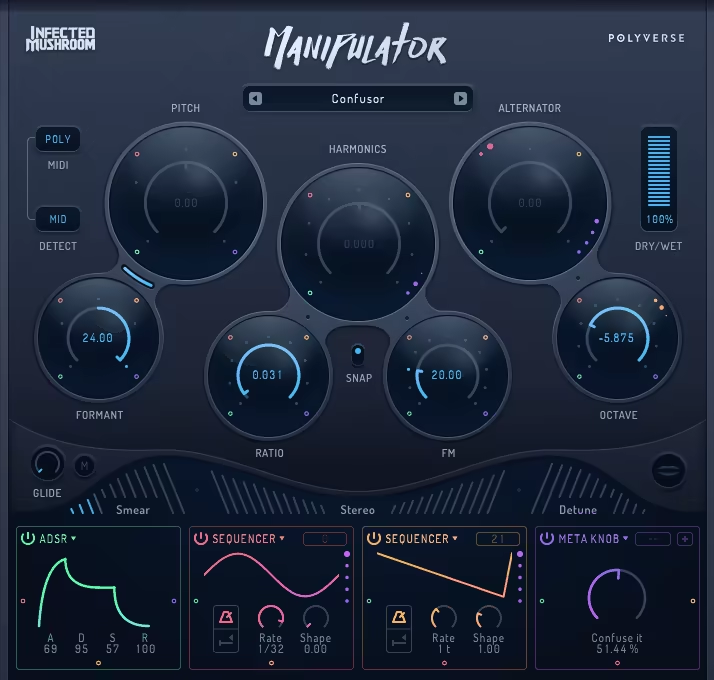
Polyverse Manipulator is the top vocoder plugin on our list, and it stands out from traditional vocoders by offering real-time vocal transformation that goes far beyond standard robotic effects. To me, it feels more like a full vocal mangling toolbox than just a single-purpose effect.
It gives you separate control over pitch and formants, and I think this is what makes the plugin so versatile for different vocal effects. You can shift the pitch up or down by several octaves while keeping the formants natural, or adjust the formants on their own to create anything from chipmunk voices to deep, demonic tones without changing the pitch.
The pitch-shifting algorithm remains smooth and artifact-free, even at extreme settings. I found this impressive because cheaper pitch shifters often add warbling or digital glitches when pushed. The formant control lets you make vocals sound more masculine or feminine, and you can create character voices that still sound natural instead of obviously processed.
The real-time response is fast enough for live performance, so you can use MIDI controllers or automation to play the effect like an instrument without any noticeable delay.
- Harmonic Generation and Voice Doubling
The plugin has harmonic generation that adds extra voices above and below your input, and I think this is where Manipulator really stands out from traditional vocoders. You can make instant vocal harmonies with up to four voices at different intervals, and each voice can have its own pitch, formant, and level settings.
The harmony voices follow your input in real time, so you don’t have to set fixed intervals that could clash with chord changes. I found that harmonic stacking creates thick, layered vocal textures that sound unified rather than like separate takes combined.
- Granular Processing and Glitch Effects
Manipulator also has granular synthesis, which breaks your vocal into small pieces and puts them back together in creative ways. This opens up sound design options that standard vocoders can’t offer. The granular engine can make stuttering, repeating, and time-stretched effects, from subtle rhythms to total vocal destruction.
Grain size and density controls decide how the audio is chopped and rearranged. Adjusting these settings can turn regular vocals into evolving pads, rhythmic patterns, or abstract textures.
- MIDI Control and Performance Features
The plugin supports full MIDI input for controlling pitch, formants, and effects in real time, which makes Manipulator feel like a performance instrument instead of just a mixing tool. You can play vocal melodies with a MIDI keyboard, and the plugin follows your notes while applying the chosen vocal effects. The MIDI learn feature also lets you map hardware controllers to any parameter.
- Modulation and Automation
Manipulator has built-in LFOs and envelope followers that can modulate almost any parameter. This adds movement and life to vocal effects that might otherwise sound flat. You can use LFOs for rhythmic pitch changes, formant sweeps, or pulsing harmonies that sync with your track’s tempo.
- Preset Library and Workflow
The plugin comes with factory presets sorted by effect type and intensity. These presets range from subtle vocal improvements to extreme robotic and alien sounds, covering many production styles.
2. iZotope Vocal Synth 2 – Most versatile
Vocal processing usually relies on reverb, delay, and sometimes chorus, but these effects only go so far when you want your vocals to stand out or try something more experimental. To get unique vocal textures, you often have to combine several plugins and hope they work well together, which can take a lot of time and interrupt your creative process.
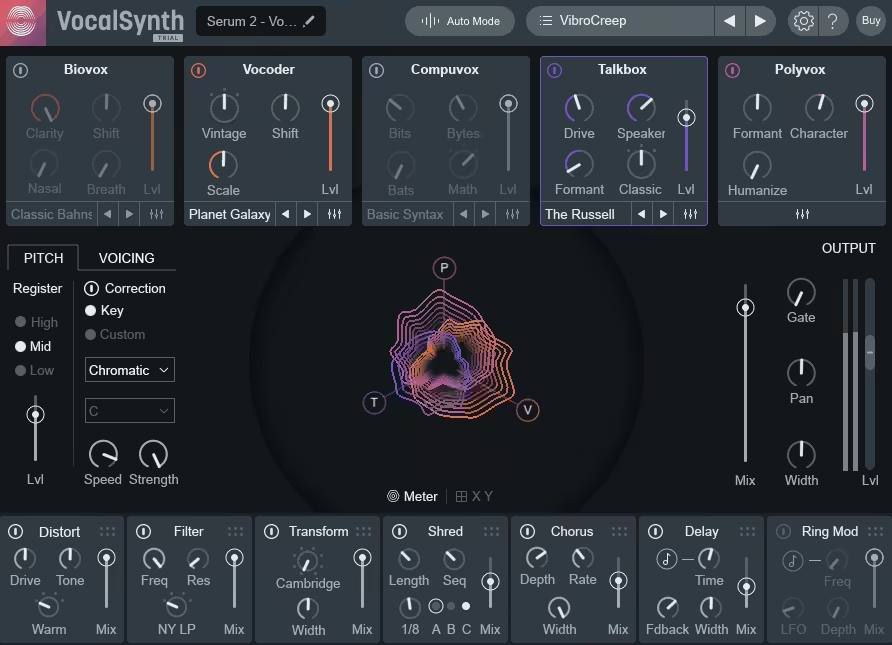
Vocal Synth 2 comes with Vocoder, Compuvox, Polyvox, Talkbox, and Biovox modules. You can use them on their own or combine them, which makes the plugin very flexible for different vocal styles. The Vocoder gives you classic robotic effects with adjustable bands and spectral controls, while Compuvox creates digital, stuttering sounds that work well for glitchy electronic vocals.
The Polyvox module creates harmonized voices that follow your input and build chord-based vocal layers. I found this really helpful for making quick backing vocals that stay in tune with the lead.
The Talkbox recreates the filtered, vowel-like sound found in funk and electronic music. Biovox adds natural, throat-like tones that can make vocals sound either more human or totally alien, depending on your settings. Each module has its own controls for tone, character, and intensity, so you can adjust exactly how much of each effect you want.
Other than that, you get:
- Built-In Effects Rack
The plugin has a full effects section with distortion, filter, transform, shred, and ring mod processors. You can use these before or after the synthesis modules, which I find really convenient. The distortion adds warmth and grit to help vocals stand out in busy mixes, and the filter shapes the tone with envelope and LFO controls.
- Advanced Modulation System
Vocal Synth 2 offers several modulation sources like LFOs, step sequencers, and envelope followers, which you can assign to almost any parameter. This is where the plugin really shines for creative sound design. The step sequencer makes rhythmic changes that sync with your DAW’s tempo, so you can create pulsing, evolving vocal effects.
The LFOs can change pitch, formants, filter cutoff, or other effect settings to add movement and make vocals feel more lively. The envelope follower lets your vocal dynamics control how much processing is applied, so louder parts get more effect and quieter parts stay cleaner. You can also combine several modulation sources on one parameter for complex, unpredictable changes that keep vocals interesting over time.
- MIDI Control and Pitch Tracking
Vocal Synth 2 works with MIDI input to control pitch and harmony, which really makes it feel like a true vocal instrument, not just an effect. You can play vocal melodies on a MIDI keyboard, and the plugin tracks your notes while adding the vocal effects you choose.
Auto mode listens to your vocal and creates harmonies based on the pitch it detects, which is great if you want harmonized backing vocals without programming MIDI. I found that MIDI control also makes Vocal Synth 2 useful for live shows, since you can trigger different effects and harmonies in real time with hardware controllers. The pitch tracking is accurate, even with vibrato and pitch bends, and the harmonies stay in tune without the drift you sometimes get from cheaper processors.
- Inter-Modular Routing and Blending
The plugin has a visual routing system that lets you arrange the five modules in any order and blend them in parallel or series. This flexibility really sets Vocal Synth 2 apart from simpler vocal processors. You can set up the modules so one feeds into the next, or run them side by side and mix their outputs as you like.
3. Antares Vocodist – For Advanced Users
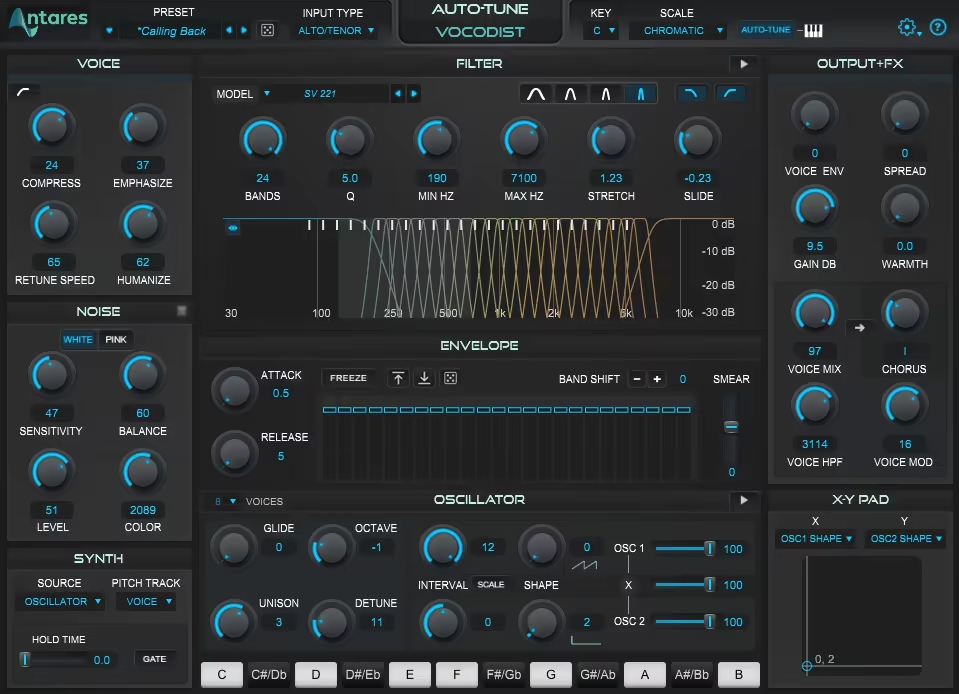
Antares Vocodist is a modern vocoder plugin that blends classic analog vocoder sounds with new workflow features. It gives you real robotic vocal effects without the usual complexity or routing hassles found in older hardware or complicated software.
Vocoders have been around for a long time, but most software versions either sound too digital and lifeless or need so much setup with carrier signals and sidechain routing that it kills your creative flow before you even start.
Vocodist gives you easy vocoder processing that works immediately thanks to its built-in carrier synthesis. You don’t have to search for extra audio sources or deal with tricky routing. Use it for Daft Punk-style robotic vocals, subtle vocal thickening, or creative textures where you want a filtered, synthetic sound but still want the lyrics to be clear. The adjustable band count lets you choose between lo-fi vintage tones and clean, modern vocoding.
- Built-In Carrier Synthesis
It has built-in carrier generators with different waveforms like sawtooth, square, and noise, so you don’t need to connect any external audio to get started. This built-in setup makes the workflow much faster than traditional vocoders, where you have to manage several tracks and sidechain settings.
The carrier waveforms shape the sound of your vocoder. Sawtooth gives you bright, buzzy robotic vocals, while square waves sound more hollow and retro. The noise carrier is good for whispered, breathy effects that still keep the vocoder feel. You can change the carrier pitch and tuning to fit your song’s key, and the MIDI input lets you play the carrier like a synth, so the vocal follows your keyboard.
- Adjustable Vocoder Band Count
You can set the number of frequency bands from 8 to 32, which helps you match the vocoder’s sound to your style. Fewer bands, like 8 or 16, give you a classic, lo-fi robotic sound, while more bands, up to 32, make the vocoding cleaner and keep the lyrics clearer.
The number of bands really changes the tone and clarity of the effect. With this control, you can get vintage vocoder sounds or go for a more modern, clear sound. The band spread and distribution settings let you highlight certain frequency ranges, so you can focus on the main vocal tones or spread the effect wider for a bigger sound.
- Formant and Throat Modeling
Vocodist also has formant shifting, which changes how big or small the vocal sounds without changing its pitch. This lets you make vocals sound bigger and more masculine or smaller and more childlike, adding variety and keeping things interesting.
Throat modeling adds resonances that mimic different vocal tract shapes, making vocoded vocals sound more natural and less robotic. You can use gentle formant shifts for subtle changes or push them further for unique, non-human vocal effects.
The formant controls are separate from the vocoder bands, so you can change the vocal character without affecting the clarity or detail of the vocoding.
4. Waves OVox Vocal ReSynthesis – Best Performance-oriented
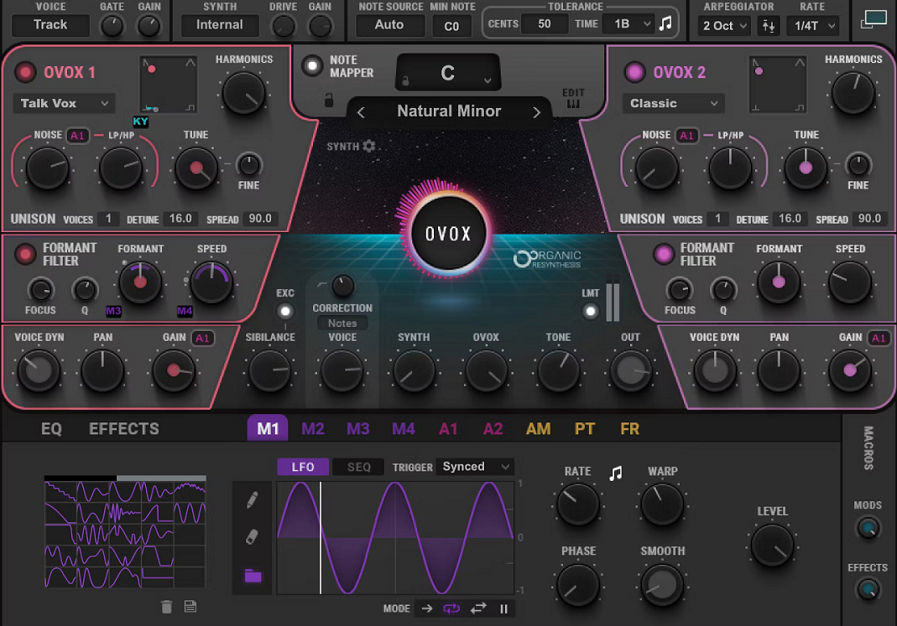
With traditional vocoders, you often have to pick between keeping vocals clear or getting cool synthetic sounds. Finding the right balance usually takes a lot of time adjusting settings and hoping it fits your mix.
OVox by Waves uses resynthesis technology that breaks down your vocal into individual components and rebuilds it with synthesis rather than just filtering the original signal, and I’d say this approach is what makes the plugin sound different from standard vocoders. The resynthesis preserves transient information and articulation better than frequency-band vocoding, so consonants and lyrical clarity come through even with heavy processing.
The synthesis options go from clean, simple tones to more complex and changing textures. You can get anything from smooth, robotic vocals to rough, distorted effects.
The resynthesis reacts to how you sing, so the effect feels musical and stays true to your performance. You can also change the sound to highlight different harmonics, making it either warm and analog or bright and digital.
- Note Mapping and Pitch Quantisation
The plugin has automatic pitch detection and correction, which can lock your vocal to certain scales and keys. I find this really helpful for making harmonies or fixing notes that are a bit off. You just set the scale or key, and OVox moves notes to the right pitch, giving you that tight, auto-tuned sound without extra plugins.
Note mapping lets you match vocal pitches to MIDI notes, so you can play your processed vocal like a keyboard. This makes OVox a real performance tool, letting you create melodies by playing instead of editing MIDI or fixing pitch by hand.
The glide and portamento controls set how the pitch moves between notes, from quick jumps to smooth slides. These are great for expressive lead vocals or bass-like vocal lines.
- Eight-Voice Polyphonic Processing
OVox can make up to eight separate voices from one vocal track, which gives you lots of creative options for layered sounds and harmonies. Each voice has its own pitch, pan, and volume, so you can build complex arrangements from a single recording.
The harmony feature works in real time, following your vocal and adding extra voices at the intervals you choose. This is great for making instant backing vocals or choir sounds without having to record more takes.
You can set the extra voices to fixed intervals like thirds, fifths, or octaves, or use MIDI to control each pitch for more complex harmonies. The voices blend smoothly, and the resynthesis keeps everything sounding together, even with lots of layers.
- Modulation and Effects Section
The plugin has built-in modulation with LFOs and step sequencers that control pitch, filter, and other settings. I like having these tools included because they add movement and variety. The step sequencer makes rhythmic patterns that match your DAW’s tempo, which is great for gated or stuttered vocal effects.
The LFOs can modulate virtually any parameter to add wobbles, sweeps, or pulsing effects that make static vocals feel more dynamic. The effects rack includes distortion, delay, and filtering that are calibrated specifically for processed vocals, and I found they enhance rather than muddy the resynthesized sound. You can use effects subtly for polish or push them hard for more experimental, degraded textures. Modulation and effects can be saved in presets, so complex setups are instantly recallable.
5. Baby Audio Humanoid – Great for wowel motion effects
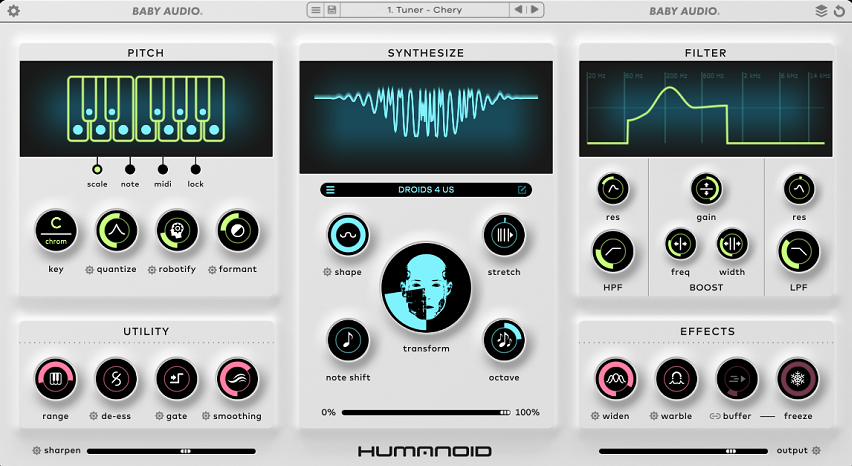
Baby Audio Humanoid is a vowel filter and formant processor that creates talking, vowel-morphing effects without the usual robotic sound of standard vocoders. In my experience, it does a great job making any audio source sound like it’s singing or speaking through different vowel shapes.
You get real-time vowel morphing that you can control manually, with automation, or using LFO modulation. This lets you create anything from subtle formant movement to bold talking synth effects. Try it on synth pads for vocal-like expression, on guitars for wah-style filtering with more character, or on drums to add rhythmic interest that standard filters can’t match. The X/Y pad interface makes it easy to morph between vowel combinations by moving a single point on the screen.
- Vowel Filter with Five Formants
Humanoid uses five vowel formants at once, which you can blend and morph in real time. I think this multi-formant setup is what gives the plugin its expressive, voice-like sound. The vowels are arranged on an X/Y pad, where each position represents different combinations like “ah,” “oh,” “ee,” “oo,” and more.
You can control the X/Y position by hand to morph between vowels, or use automation and modulation to create movement that changes over time. In my experience, the formant filtering stays musical and resonant, not harsh or fake like some cheaper processors. The five-band design gives you complex, natural vowel shapes that really sound like human speech, instead of just sweeping frequency peaks.
- LFO and Pattern Modulation
The plugin has built-in LFO modulation that can move the vowel position in rhythmic patterns. I think this is where Humanoid really stands out for making dynamic, evolving effects. The LFO rate syncs to your DAW’s tempo, with standard, dotted, and triplet note options, so the vowel movement matches your track’s groove.
The LFO shape controls how the vowel changes over time. Smooth sine waves give gentle transitions, while sharp square waves create stuttering, rhythmic talk effects. I found that syncing the LFO to eighth or sixteenth notes gives you that classic talking synth sound like in Daft Punk tracks. Slower rates add subtle movement to keep sustained sounds interesting. The LFO depth sets how far the vowel position moves, from small shifts to big sweeps across the whole range.
You can also use step sequencer patterns to make custom vowel sequences instead of just using LFO shapes. This gives you precise control over complex rhythmic effects.
- Preset Library and Performance
The plugin includes factory presets that show off different vowel effects and modulation patterns. I found many of them are actually useful starting points, not just wild demos. The presets are sorted by effect type, so you can easily find talking synth sounds, subtle formant movement, or rhythmic gating effects.
You can save your own presets with all your vowel positions, modulation settings, and routing. This makes it faster to reuse your favorite sounds. The interface is clean and visual, with the X/Y pad as the main focus. Humanoid is also very light on CPU, so I’ve used several instances on different tracks without any performance issues.
The plugin loads fast and responds in real time, so you can keep your creative flow when trying out different vowel effects and modulation patterns. Honestly, I think Humanoid deserves a spot on any list of the best vocoder plugins.
6. OXYMeteor by OxyDSP – Straightforward vocoding
Most vocoder plugins either focus only on the classic robotic sound or pack in so many features that you end up reading the manual instead of making music. It’s surprisingly tough to find one that offers great vocoding without extra complexity, especially when you’re on a deadline and need something that sounds good right away.
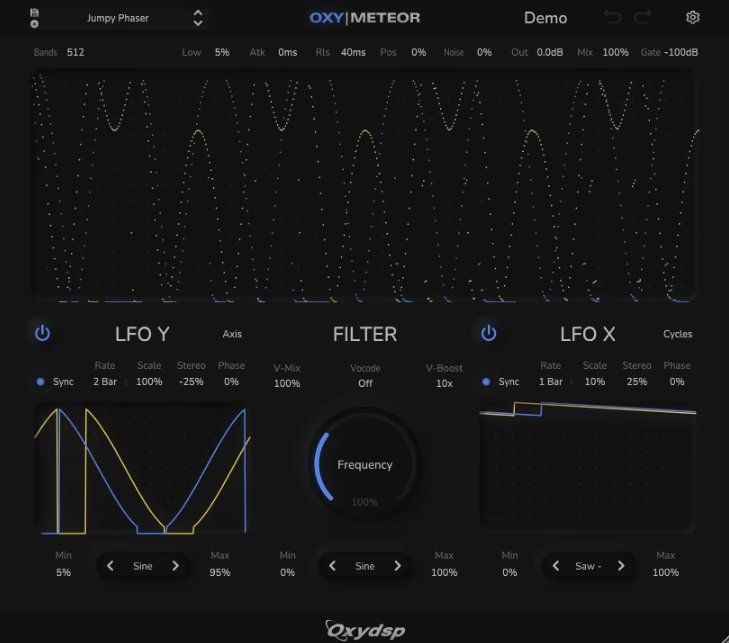
OXYMeteor by OxyDSP is a modern vocoder with built-in carrier synthesis and morphing features. In my experience, it strikes a good balance between being easy to use and offering creative options, without feeling too basic or too complex.
You get straightforward vocoding that works right away with built-in sound sources, so you don’t have to deal with external routing or complicated sidechains. The morphing and modulation features also add movement, keeping vocoded vocals interesting throughout a whole song instead of sounding flat.
- Built-In Carrier Synthesis Engine
OXYMeteor has built-in carrier generators with several oscillator types, which makes the workflow much faster than using traditional vocoders that need separate tracks for carrier signals. You can choose from sawtooth, square, triangle, and noise waveforms, each giving your vocoded sound a different texture.
The sawtooth waveform gives you the bright, buzzy robotic vocals found in classic electronic music. Square waves sound more hollow and retro, like old video games. The noise carrier is great for breathy, whispered effects that are still clear. Blending different waveforms creates richer tones than using just one. You can also tune the carrier to match your track’s key, which saves a lot of time compared to loading separate synths just for the vocoder.
With this integrated setup, you can get usable sounds in seconds instead of spending ten minutes on routing and setup.
- Variable Band Count and Resolution
The plugin lets you choose how many vocoder bands you want, from low to high resolution. This flexibility helps you match the effect to different production styles. Fewer bands, like 8 or 16, give you a classic, lo-fi robotic sound with clear frequency separation, which works well for retro or intentionally synthetic vocals.
- Morphing and Modulation System
OXYMeteor has vowel morphing that adds formant-like movement to the vocoded sound. This feature helps the plugin stand out, as it creates smooth transitions between vowel shapes, making the vocals feel more expressive and less robotic.
The LFO modulation controls morphing, band balance, and carrier pitch, letting you create rhythmic movement that syncs with your DAW’s tempo. Syncing modulation to eighth or sixteenth notes gives you pulsing, talking effects that fit your track’s groove, while slower rates add subtle changes to sustained notes. The modulation system is simple and doesn’t overwhelm you with complex routing, so you can quickly add movement and get back to making music.
I’ve noticed that the morphing feature keeps vocoded vocals from sounding too static or mechanical, which often happens with simpler vocoders that use the same filtering all the way through.
- Spectral Processing and Filtering
The plugin has built-in filters, including high-pass, low-pass, and band-pass options. These are essential for shaping the vocoded sound to fit your mix. The filters let you remove unwanted low-end rumble or control harsh highs without needing extra EQ plugins.
7. Native Instruments RAZOR (for Reaktor) – Sound designer’s choice
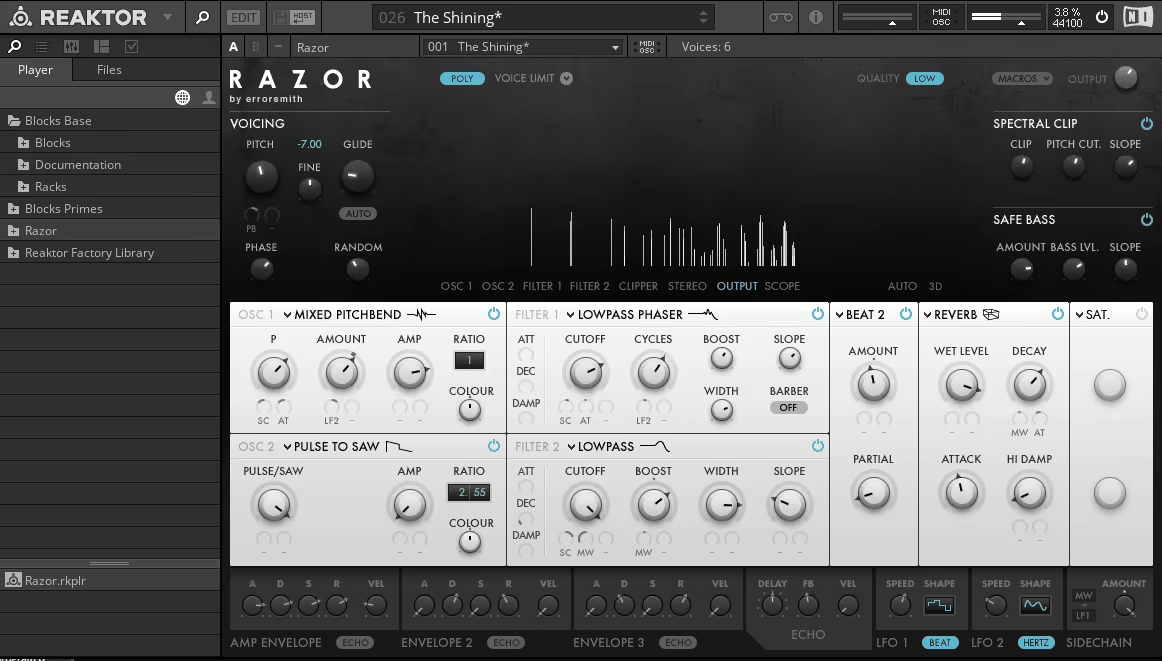
RAZOR for Reaktor uses additive synthesis to build sounds from the ground up. In my experience, it’s more of a sound design powerhouse than a typical vocoder, but it still excels at vocal-style filtering and formant effects.
RAZOR generates sound from hundreds of individual sine-wave partials, a different approach from the usual oscillator-plus-filter model most synths use. With 320 partials per voice that you can shape independently, you get much more control over the harmonic structure than you would with subtractive synthesis.
I’m impressed by how the additive engine creates detailed, complex sounds right away, without extra processing to make them interesting. You can control the partials with different waveform shapes and spectral settings, and tweaking these lets you get anything from pure, bell-like tones to harsh, aggressive textures full of harmonics.
With additive synthesis, you build sounds from scratch instead of filtering down from rich oscillators. That’s why RAZOR sounds so different from regular synths. I like that it lets you create timbres that are hard, or even impossible, to achieve with traditional subtractive methods.
- Dissonance Effects and Vocal Formants
The plugin has a Dissonance effect that detunes and spreads the partials, both musically and chaotically. This is where RAZOR really stands out for making vocal-like and experimental textures. The dissonance can give you anything from subtle richness to total harmonic destruction, depending on how much you use it.
Formant filtering adds vocal-like resonances to the additive sound, making it easy to create tones with human vocal qualities, even though it’s not a traditional vocoder.
The formant controls let you shape vowel-like filters, making synth sounds feel more organic and expressive. This is especially helpful for pads and leads that need to stand out in a busy mix.
When you combine dissonance with formant filtering, you get sounds that fall between robotic vocals and aggressive synth leads – a unique spot that’s hard to find in other plugins. You can also modulate the formant movement to make talking synth effects like a vocoder, but with the clarity and punch of additive synthesis.
- Dual Filter Section
RAZOR has two independent filters that can process the additive signal in series or parallel. This is where you can really shape the harmonic content for different musical uses. The filters include waterbed, lowpass, highpass, bandpass, and comb modes, and each one changes the partials in its own way.
The waterbed mode stands out because it redistributes spectral energy instead of just removing it, creating unique tonal changes you won’t get from standard filters. This keeps sounds full and present, even with heavy filtering, while traditional lowpass filters can make things sound thin or hollow.
You get lots of filter modulation options, including envelopes, LFOs, and MIDI control, so you can add movement and expression. In my experience, syncing filter modulation to your track’s rhythm creates pulsing, breathing textures that bring static synth parts to life.
- Comprehensive Modulation System
The plugin also has several LFOs and envelopes you can route to almost any parameter. The modulation options are deep but not overwhelming. The LFOs sync to your tempo, including triplet divisions, which is great for adding rhythmic movement that fits your track’s groove.
8. XILS 201 Vocoder – Best Vintage
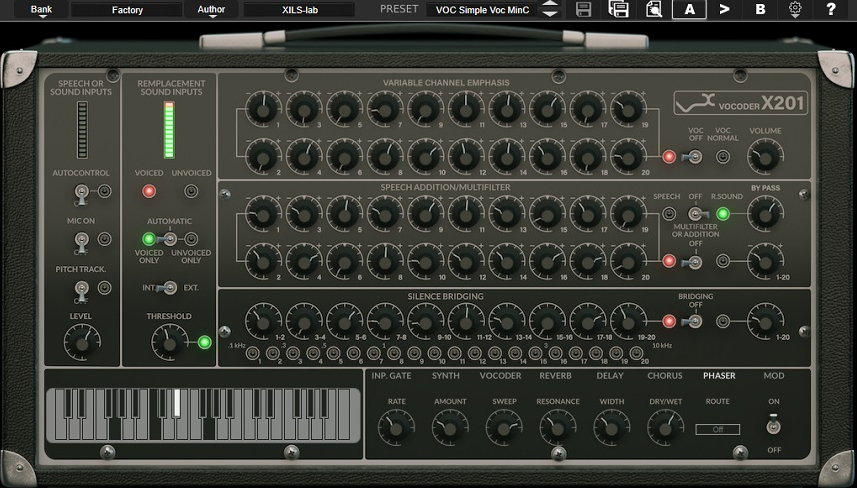
Vocoder hardware from the 1970s and 1980s had a unique warmth and character that most modern software versions can’t quite match. They often sound too clean or digital, which doesn’t always work for retro-inspired music. The XILS 201 Vocoder is designed to capture the quirks, imperfections, and tonal qualities of classic analog vocoders. In my experience, it really delivers that warm, slightly gritty sound you hear on records by Kraftwerk, Herbie Hancock, and other early electronic artists.
This plugin uses analog modeling to recreate the sound of vintage bucket brigade delays, analog filters, and the unique circuits that made classic vocoders stand out. I’ve used it in retro electronic tracks where modern vocoders sounded too polished, and I think it really captures that vintage feel. You get the authentic vibe without having to buy expensive hardware or deal with maintenance.
In my view, XILS 201 is perfect for producers who want an authentic, period-accurate vocoder sound instead of the cleanest or most transparent processing. It’s a great choice if you’re making music inspired by classic electronic or disco styles.
- Vintage Analog Modeling
XILS 201 is based on a detailed emulation of analog vocoder circuits, and I believe this focus on circuit-level modeling gives the plugin its unique character and warmth. The modeling captures the nonlinearities and imperfections of vintage parts, so you get subtle saturation, changes in frequency response, and the unpredictable qualities that made old hardware vocoders sound lively and musical.
The bucket brigade delay emulation brings back the warm, chorused sound of early analog delays found in vintage vocoders. I noticed this adds depth and movement that modern digital delays often miss, helping create that thick, swirling sound heard on classic vocoder tracks. The modeling sticks to the original hardware’s limitations, so you get a true vintage experience instead of a polished, modern version.
What I really notice is how the analog sound makes vocoded vocals feel warm and musical, not cold or robotic like some digital versions. The imperfections are what make vintage vocoders special, and XILS 201 keeps those qualities instead of removing them.
- Integrated Carrier Synthesis
XILS 201 comes with built-in carrier synthesis, offering several oscillator types based on vintage analog synths. I like that this means you don’t need extra sound sources. The carrier oscillators include sawtooth, pulse, and noise waveforms, and they have analog-style drift and instability that add character and realism.
Pulse width modulation on the pulse wave creates moving, evolving textures that sound more natural than static waveforms. I found this movement is key for getting an authentic vintage vocoder sound. You can also play the carrier synthesis with MIDI, so the vocoder becomes a performance tool where you control the harmony and melody of the robotic vocal effect in real time.
In my experience, the carrier oscillators have the slightly imperfect tuning and warmth you find in real vintage hardware, which adds to the analog feel. The synthesis section is simple and doesn’t overload you with modern features that would take away from the vintage vibe.
- Vintage Effects and Processing
The plugin has built-in chorus, ensemble, and delay effects based on classic analog gear. I think these effects are tuned just right for vocoded sounds. The analog chorus adds width and movement, giving vocals that warm, swirling feel of vintage bucket brigade circuits and making them sound fuller and more three-dimensional.
9. Arturia Vocoder V – Best All-Round
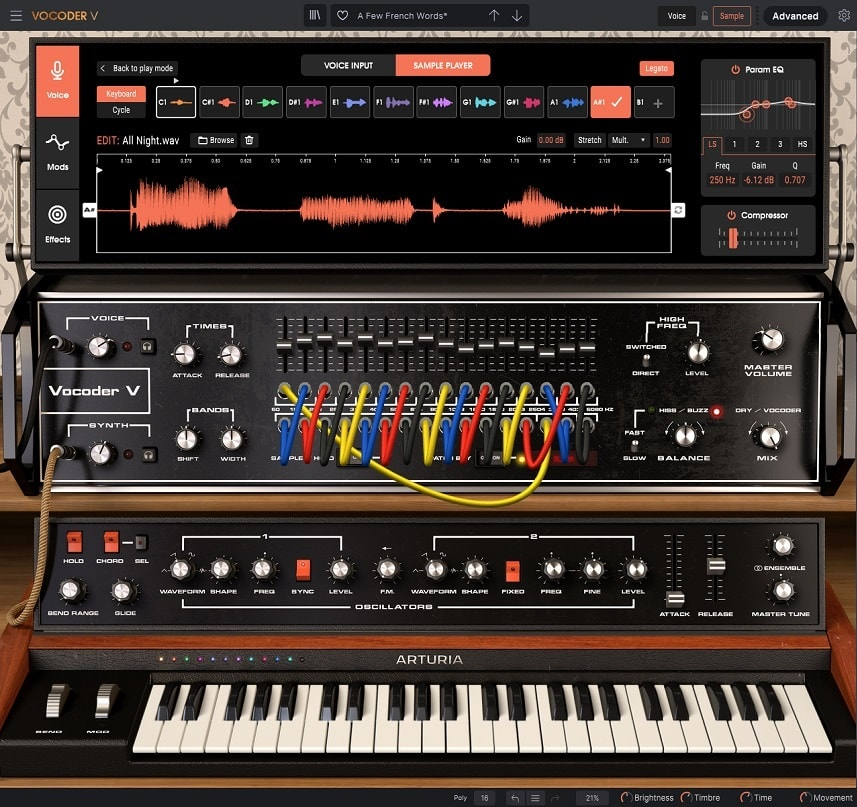
In my opinion, this is one of the best vocoder plugins out there. Vocoder V by Arturia brings together emulations of classic vocoders like the Roland VP-330, Korg VC-10, and Arturia’s own models, all in one interface with built-in carrier synthesis, effects, and modulation. I’ve used it for everything from classic robotic vocals in electronic tracks to experimental sound design when I wanted a specific vintage vocoder sound. Being able to switch between different vocoder types in one plugin has saved me a lot of time compared to setting up several separate tools.
I think Vocoder V strikes a good balance between staying true to classic vocoders and offering modern features. It’s a great choice if you want more than a basic vocoder but don’t want to buy several different plugins.
- Multiple Vocoder Models
Vocoder V offers emulations of several classic vocoders, and I think this variety is its biggest strength. Each model has its own sound and works best in different situations. The VP-330 emulation gives you that warm, smooth analog tone with 10 bands, which shaped many records from the ’70s and ’80s. The VC-10 model has its own unique filter and frequency response for a different vibe.
The Arturia models give you modern vocoding options with cleaner and clearer processing, which is great when you don’t want a vintage sound. Having several models lets you pick the right vocoder for your source material and style, instead of trying to make one algorithm fit everything.
I’ve noticed that each model reacts differently to different input sounds. For example, the VP-330 works well for smooth, musical vocoding, while the VC-10 is better for more aggressive and distinctive effects.
You can switch between models with one click and keep all your other settings, which really speeds up your workflow. In my experience, this kind of flexibility is rare, since most vocoder plugins only emulate one piece of hardware.
- Advanced Carrier Synthesis
The plugin has a full set of carrier synthesis options, including different oscillator types, noise generators, and sample playback. I like that it goes beyond just sawtooth and square waves. You can stack and detune waveforms with the multi-oscillator setup, which gives you thicker and more complex vocoded sounds than using a single oscillator.
The noise generator gives you several noise colors, from white to pink. I’ve found that each type of noise creates a different vocoded sound, which is especially useful for breathy or whispered vocals. You can also use audio files as carrier sources, so you can try things like vocoding vocals with drum loops, synths, or even field recordings for unique effects.
I like that the carrier synthesis is deep enough for serious sound design but still easy to navigate, so you don’t get lost in menus. The synthesis section also responds to MIDI, so you can play harmonies and melodies in real time with a keyboard controller.
- Adjustable Band Count and Resolution
Vocoder V lets you choose the number of vocoder bands, from 8 to 20. I think this flexibility is important for getting different sounds and matching different production styles. Lower band counts, like 8 or 10, give you that classic, lo-fi robotic sound with clear frequency separation, which is perfect for retro tracks.
Higher band counts, up to 20, give you smoother and more natural-sounding vocoding. Lyrics stay clear, and the effect sounds more polished and modern. I’ve noticed that the band count really changes both the clarity and character of the sound, so you can go from robotic voices to subtle, natural-sounding processing.
The band distribution and spacing can be adjusted to emphasize different frequency ranges, which lets you focus the vocoding on vocal fundamentals or spread it across a wider spectrum. From what I can tell, this level of control over the vocoder architecture sets Vocoder V apart from simpler plugins that lock you into fixed-band structures.
10. Zynaptiq PITCHMAP::COLORS – Best Minimal
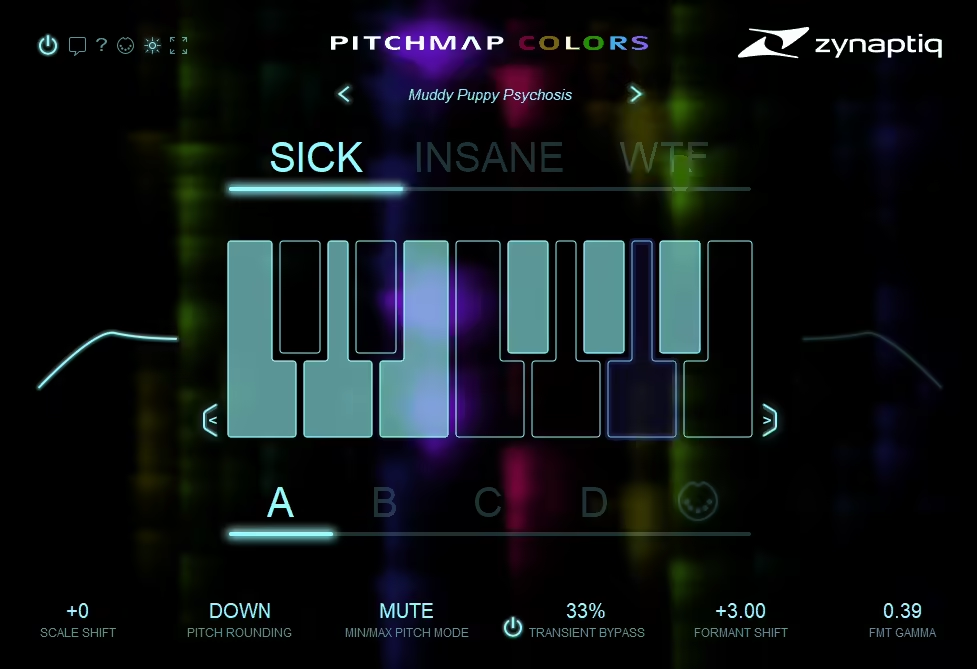
Most vocoders and vocal processors filter or resynthesize your audio in predictable ways, creating robotic effects or harmonized layers that sound good but rarely break new ground. If you want to experiment and turn vocals into unrecognizable textures or entirely new instruments, traditional tools usually aren’t enough.
PITCHMAP::COLORS uses advanced polyphonic pitch detection to identify multiple notes in complex audio. This is the core feature that enables everything else. The plugin can analyze chords, harmonies, and layered vocals, then separate them into individual pitches you can adjust on their own.
With pitch remapping, you can assign detected pitches to different notes or scales. This means you can turn a single vocal line into a full chord progression. I found it works well for making harmonized backing vocals or turning simple melodies into complex arrangements without extra takes. The pitch detection stays accurate, even with vibrato, vocal fry, and other natural imperfections that often confuse polyphonic algorithms.
What stands out is that remapping keeps the original timbre and character while changing the harmony, so the results still sound musical instead of just digital or messy. You can also push the processing further for more extreme, artificial effects if your production calls for it.
- Spectral Morphing and Transformation
The plugin offers spectral processing that does more than just shift pitch. It reshapes the harmonic content and texture of your audio. The COLORS engine can make vocals sound like synthesizers, strings, brass, or even abstract textures that don’t match any real instrument.
Spectral morphing is what sets PITCHMAP::COLORS apart from regular pitch correction or harmony tools. You’re not just changing notes—you’re changing the whole sound. The transformations can be subtle, adding richness and depth, or extreme, creating otherworldly textures that sound nothing like the original vocal. In my experience, this is great for sound design in film, game audio, or experimental music when you need unique textures that traditional methods can’t create.
I’ve noticed that the spectral processing keeps the sound clear and defined, even with heavy changes. You get interesting results instead of muddy, over-processed noise.
- Scale and Chord Mapping
PITCHMAP::COLORS lets you set custom scales and chord progressions for detected pitches. This is where the plugin really shines for creative reharmonization. You can choose a target scale, and the plugin automatically moves detected pitches to the closest notes in that scale. This is great for fixing off-key performances or making intentional tonal changes.
Chord mapping takes it further by letting you set exact chord voicings for your audio. You can sing or play a simple melody and have it turned into jazz chords, orchestral voicings, or any harmonic structure you choose. This opens up creative options that would be hard or impossible to achieve with traditional recording and editing.
The mapping works in real time, so you can make changes live or while recording, instead of spending hours editing MIDI or audio later. This makes PITCHMAP::COLORS useful for both studio work and experimental performances.
- Formant Preservation and Voice Character
The plugin has formant preservation, which keeps the vocal character even when you change the pitch. This is important for making sure transformed vocals still sound natural and recognizable. Without formant correction, vocals can end up sounding like chipmunks or monsters, but formant preservation keeps the voice consistent.
Extra: Softube Vocoder – Reliable classic
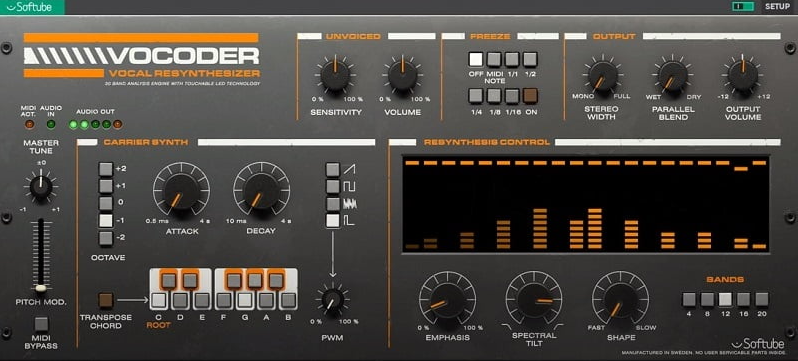
Softube Vocoder is a modern plugin that blends vintage character with up-to-date workflow features. It’s made for producers who want classic vocoder sounds without the hassle of complex routing or the limits of older hardware and software. Usually, getting good vocoder tones means either using modern plugins that sound too digital or struggling with vintage emulations that need external carrier signals and tricky sidechain setups, which can slow down your creativity.
Softube Vocoder offers a simple setup with built-in carrier synthesis, several vocoder modes, and integrated effects. You can load it and start making robotic vocal sounds in seconds, instead of spending a lot of time on signal routing.
- Multiple Vocoder Models and Character
Softube Vocoder features several algorithms that span both vintage and modern vocoding styles. This variety helps you match the effect to different production needs. The algorithms range from clean, clear vocoding that keeps lyrics understandable to lo-fi, vintage-style processing with more character and grit.
The vintage modes capture the warm, slightly imperfect sound of classic hardware vocoders without sounding too clean or digital. The modern modes give you clear, precise vocoding when you need it. Having both options in a single plugin means you don’t need multiple vocoder tools. The character control lets you choose how much vintage color or clean processing you want, so you can match the vibe of your track.
I’ve noticed that the different algorithms work better with different input sources. You might like one mode for lead vocals and another for backing harmonies or sound design. The visual feedback shows the vocoder bands and their activity, helping you see what’s happening to your signal, even with more extreme settings.
- Built-In Carrier Synthesis
The plugin has built-in carrier generators with several oscillator types, like sawtooth, pulse, and noise. This means you don’t need to set up external carrier routing. The carrier oscillators sound warm and musical, not harsh or too digital, which improves the overall quality of the vocoded sound.
Pulse width modulation on the pulse wave creates moving, evolving textures that make sustained vocoded notes more interesting and dynamic. This movement is important for keeping robotic vocals from sounding too flat or mechanical.
- Adjustable Band Count and Resolution
Softube Vocoder lets you choose how many vocoder bands to use, which is important for getting different tones and classic vocoder styles. You can pick anywhere from 8 to 32 bands, depending on whether you want a classic lo-fi robotic sound or a modern, clear vocoding effect.
Lower band counts, like 8 or 12, give you a vintage, frequency-separated sound with clear band transitions, similar to early electronic music. Higher band counts make the vocoding smoother and more natural, keeping lyrics clear and the effect polished. Band count changes both clarity and the overall vibe, so picking the right setting helps you get the sound you want.
The band distribution controls let you highlight different frequency ranges. This is helpful for focusing on vocal fundamentals or spreading the effect across a wider range for more dramatic sounds. These controls are easy to use and don’t require deep technical knowledge to get good results.
- Integrated Effects and Processing
The plugin comes with built-in effects like delay, reverb, and chorus, all tuned for vocoded signals. Having these included means you don’t need to load extra plugins to finish your vocoder sounds. The chorus effect adds width and movement, making mono vocoded vocals feel more three-dimensional and interesting.
Freebies
TAL Vocoder
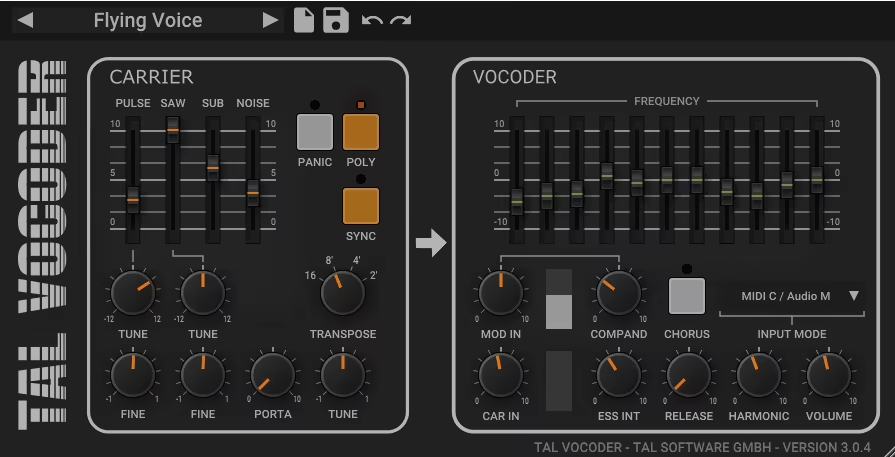
Most free plugins cut corners to save money, so their results are usually just okay. That’s why people often pay for premium tools. But sometimes, you find a free plugin that really stands out. TAL Vocoder is one of the best free vocoder plugins I’ve tried. It gives you solid, usable robotic vocal effects without the usual limitations of freeware. Honestly, I think it holds its own against paid vocoders that cost a lot more.
- 11-Band Vocoder with Clean Sound
TAL Vocoder uses an 11-band vocoder engine that balances vintage lo-fi character with modern clarity. I think this number of bands is perfect for classic robotic vocal effects. The 11 bands give you enough frequency detail to keep lyrics clear, while still keeping that unique, synthetic sound that makes vocoding stand out.
In my experience, the vocoder algorithm sounds clean and free of unwanted artifacts, but it doesn’t feel too sterile or overly digital. The band processing keeps the sound clear across all frequencies, so you get defined vocoded output instead of muddy robotic noise. I’ve also noticed that the band structure works especially well for mid-range vocals, which is where most vocoding is used in real productions.
- Built-In Carrier Synthesis
The plugin comes with built-in carrier generators that use sawtooth and noise waveforms. This built-in feature makes TAL Vocoder really practical for quick vocoding. You don’t have to set up external synths or audio sources to get started, so you avoid the setup time and complicated routing that many other vocoders require.
The sawtooth carrier gives you that classic, bright robotic vocal sound found in electronic music from Kraftwerk to Daft Punk. The noise carrier creates breathy, whispered effects that still sound vocoded. You can also tune the carrier to match your track’s key. Having pitch control built into the interface means you don’t have to use extra tuning tools or transposition plugins.
Full Bucket Vocoder
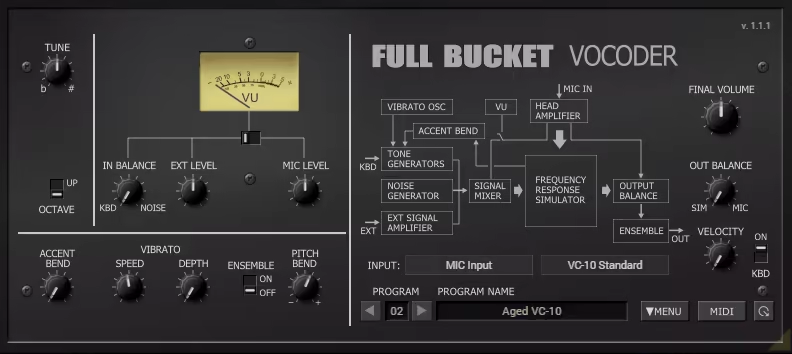
Full Bucket Vocoder is designed to closely emulate the Roland VP-330, and I think this focus on one classic piece of hardware gives the plugin its unique character and workflow. The VP-330 was a famous vocoder and string synthesizer from the late ’70s, used on many records. This plugin captures the warm analog filter sound and the slightly imperfect band structure that made the original stand out.
The vocoder section keeps the smooth, rounded sound of classic analog vocoders, instead of the sharp, precise tone of modern digital ones. It uses a 10-band vocoder setup, just like the original hardware. This band count gives you clear robotic vocals with enough detail, while still keeping that vintage, separated sound.
I’ve noticed that this emulation includes the frequency response and unique quirks of the original analog circuits. This adds to the warm, musical quality that makes vintage vocoders feel lively instead of sterile. Full Bucket really got the details right, setting this plugin apart from more generic vocoders.
- Built-In String and Choir Synthesis
The plugin comes with built-in string and choir sounds, just like the original VP-330. This feature makes Full Bucket Vocoder more than a simple vocoder. The string section creates rich, ensemble sounds with the classic VP-330 warmth and chorus, great for those ’70s and ’80s textures.
The choir sounds can be used as carrier sources for the vocoder, and they create beautiful, airy vocoded effects that are very different from the usual sawtooth or noise carriers. You can use the strings and choir on their own or mix them with the vocoder for layered sounds. In my experience, having these built-in sounds really captures the spirit of the original hardware, where vocoding and synthesis were combined in one instrument.
I like that the string and choir sounds aren’t just added as extras; they are true recreations that sound like the VP-330, not just generic copies. The chorus effect on the strings gives them that swirling, full quality that made the original famous for lush pad sounds.
- Authentic Vocoder Controls
Full Bucket Vocoder uses the same control layout as the original VP-330, and this focus on authentic design makes the plugin feel like real hardware. The controls include ensemble depth, release time, and the balance between vocoded and dry signal, just like on the original unit.
The ensemble effect is based on the VP-330’s analog chorus circuit, which is key to getting that thick, dimensional sound of the original. The release control changes how fast the vocoder bands fade after you stop playing, shaping how the notes sound and last. Adjusting the release time really changes whether vocoded vocals are tight and punchy or smooth and flowing.
I like that the controls are simple and focused, instead of adding lots of modern features that would take away from the vintage feel. You get the same parameters as the original hardware, which encourages you to work within those limits and often results in a more authentic sound.

Hello, I’m Viliam, I started this audio plugin focused blog to keep you updated on the latest trends, news and everything plugin related. I’ll put the most emphasis on the topics covering best VST, AU and AAX plugins. If you find some great plugin suggestions for us to include on our site, feel free to let me know, so I can take a look!