
Let’s talk about some of the best mastering EQ plugins you can get today for finalizing your mixes and music production.
Sometimes a mix sounds great in your studio but falls apart on other systems. That’s when I reach for mastering EQs that don’t just fix frequencies, they refine them with surgical precision, transparent processing, and visual feedback that helps you make confident decisions without second-guessing yourself hours later.
There are many solid picks in this list, just to name a few – FabFilter Pro-Q 4, Pulsar MP-EQ, Brainworx AMEK EQ 200, Tomo Audiolabs LISA, and more.
Whether you want to smooth harsh high-end without dulling detail, tighten low-end weight without losing body, carve out midrange mud while preserving vocal presence, or match the spectral balance of reference tracks, there’s a mastering EQ here that gives you that final polish. From linear-phase processors with mid/side control to analog-modeled passive EQs with harmonic saturation, dynamic EQs that respond intelligently to your audio, and transparent digital tools with spectrum grab functionality, these plugins let you shape tonal balance with precision, preserving the musicality that makes your masters feel alive rather than just technically correct.
Whether you’re working in a bedroom studio or refining tracks on headphones, you can turn unbalanced mixes into polished productions, transform thin recordings into full-bodied masters, and achieve clarity across all playback systems.
If you want your tracks to sound balanced, transparent, and professionally mastered, the following EQ plugins are solid picks for final-stage mixing and mastering work. Let’s get started:
1. Pulsar MP-EQ
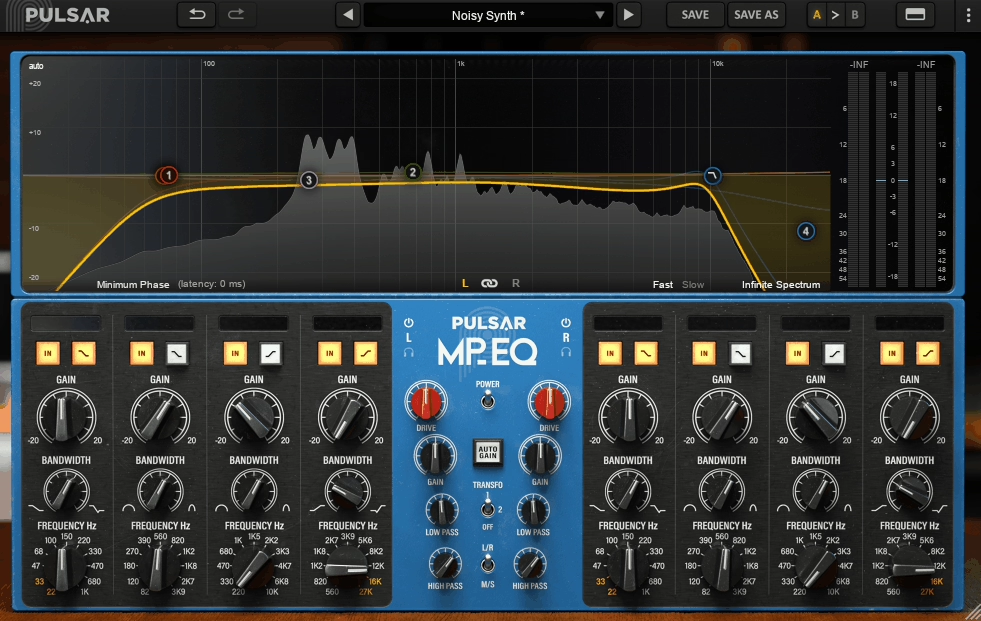
I just grabbed the photo I had in the library, it says “noisy synth”, because it works on mixing too!
When it comes to Mastering EQs, they typically force you to choose between surgical digital precision or musical analog character, but rarely deliver both in a workflow that makes sense for modern production. Pulsar MP-EQ mastering equalizer plugin bridges that gap by recreating classic passive analog EQ topology while adding practical digital enhancements like curve-based editing, optional linear-phase correction, and Mid/Side flexibility.
It models true parallel band interaction rather than the series approach found in most parametric EQs, which means your boosts and cuts recombine rather than stack cumulatively. That being said, parallel architecture produces smoother, more musical tonal adjustments that stay clean even when you’re pushing multiple bands simultaneously.
The interface combines analog warmth with visual feedback you’d expect from modern tools. You get a full graphic curve editor and real-time spectrum analyzer showing exactly how your moves affect frequency content, which becomes invaluable when you’re learning to trust your ears during mastering decisions.
Also, I see that it includes three transformer options (Original, Enhanced Warmth, and Clean) that let you dial in saturation from subtle glue to richer harmonic coloration and you can enable oversampling for maximum fidelity, use the Auto-Gain feature to maintain consistent output levels during A/B comparisons, and toggle linear-phase correction when you need transient clarity without phase artifacts.
- True Parallel Topology for Musical Shaping
Unlike series EQs where each band’s changes stack sequentially, MP-EQ uses genuine parallel topology where bands are recombined rather than summed. This design produces noticeably smoother results when adjusting multiple frequency ranges, particularly in mastering contexts where you’re often making broad tonal moves.
For instance, you can add low-end weight without the bass getting boxy because the filters don’t fight each other the way they do in typical digital parametrics. High-shelf boosts feel airier and less brittle, maintaining openness even with significant gain adjustments. This behavior mirrors hardware like Pultec-style shelving but with modern curve visualization that shows exactly what’s happening.
- Drive Control with Three Transformer Characters
In addition to that, Drive parameter adds analog-style saturation through virtual transformers, tubes, and inductors, giving you control over harmonic enrichment. The three transformer modes offer distinct sonic personalities:
- Optional Linear-Phase Correction
Now, when it comes to linear-phase correction, it realigns all frequencies after the EQ stage, eliminating phase shifts that many analog emulations introduce. This maintains better transient clarity on drums and percussive material, keeps low-end punch consistent without phasing artifacts, and produces cleaner Mid/Side recombination that reduces odd stereo anomalies.
- Mid/Side Processing with Channel Isolation
In the end, Built-in Mid/Side mode lets you EQ center and stereo information independently, with solo buttons for each channel so you can audition changes in isolation. You can smooth harsh side-image highs while maintaining center clarity, tighten stereo room reverb without dulling kick and bass, or subtly adjust spectral balance between mono and stereo elements.
2. Tomo Audiolabs LISA

The combination of EQ and dynamics in a single plugin usually feels like a marketing gimmick, but LISA dynamic mastering EQ plugin actually delivers on this promise through intelligent implementation.
You get a six-band equalizer where each band features fully adjustable frequency, gain, and Q controls plus the ability to switch between static and dynamic response modes. What separates this from typical mastering EQs is how the dynamic sections interact with the EQ bands, letting you set thresholds so frequency adjustments only engage when needed rather than constantly affecting your signal.
This plugin handles Left/Right and Mid/Side processing with clean visual feedback showing both your EQ curves and how dynamic adjustments respond in real time. I appreciate how the filters maintain clarity when multiple bands are active simultaneously, avoiding the phase artifacts that plague some digital EQs when you stack several frequency adjustments. The transparency means you can do detailed corrective work and tonal refinement without imposing strong character unless you deliberately push the dynamic features.
- Per-Band Dynamic Response with Threshold Control
Each of the six bands can operate as static EQ or switch to dynamic mode where behavior responds to incoming audio level. You can smooth resonances only when they spike, tame harsh transients without dulling entire frequency ranges, or let spectral peaks stand when musical while reducing them only when problematic.
For instance, if a troublesome 2-3 kHz resonance only appears on loud passages, the dynamic band reduces energy when it exceeds your threshold while preserving presence during quieter sections. This level of control preserves natural attack and fullness better than static cuts that affect the entire track uniformly.
- Integrated Mid/Side and Left/Right Stereo Processing
The plugin doesn’t treat stereo field control as an afterthought but integrates it deeply into the EQ and dynamic workflow. You can focus EQ and dynamic behavior on center content like kick, bass, and vocals separately from side content like ambience and width.
I would use it when mixes feel wide but unfocused, as tightening the center without sacrificing side air makes tracks feel both punchier and wider simultaneously. The implementation feels natural rather than forcing you to think in abstract stereo terms.
- Musical Transparent Curves Across Full Spectrum
The EQ curves sit in mixes without sounding forced, whether you’re cleaning up 300-500 Hz muddiness or lifting air above 12 kHz. The filters don’t interact awkwardly when multiple bands are active, maintaining clarity and balance through the processing chain. Lastly, this transparency becomes crucial in mastering where subtle changes have major perceptual impact and any harshness or phase weirdness gets immediately exposed across playback systems.
3. Knif Audio Soma
Passive tube EQs sound beautiful but historically came with unpredictable behavior where adjusting bandwidth also changed boost/cut amounts in ways you couldn’t anticipate.
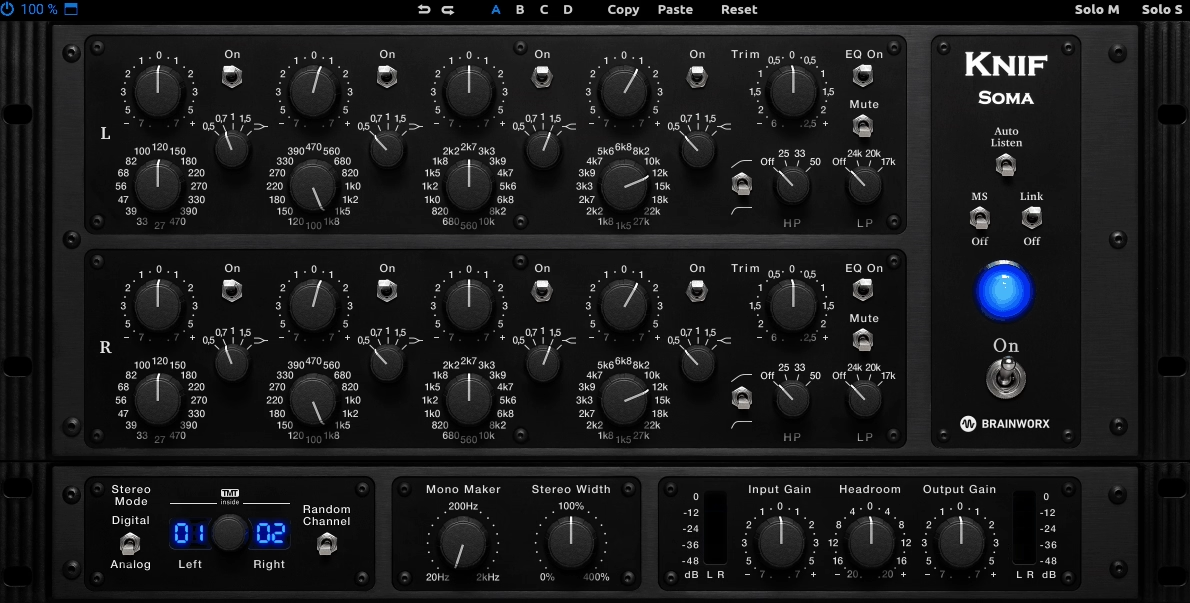
Knif Audio Soma passive EQ VST addresses this through Real Q Adjustment technology that makes bandwidth behavior predictable while maintaining the warm, harmonically rich character of tube and transformer circuits. The plugin models a boutique passive tube hardware EQ but adds modern precision that makes it genuinely useful for mastering work rather than just hoping for vintage vibe.
You get stepped controls for frequency, gain, and Q that speed up consistent settings, Auto-Listen for soloing EQ changes, plus Mid/Side processing, Mono Maker, and Stereo Width control built directly into the interface.
The tube stages and transformer behavior deliver natural warmth even before you start adjusting frequencies, and you can dial input and output drive independently to control how much saturation colors your signal.
- Real Q Adjustment
Traditional passive EQs had a major flaw where changing bandwidth also unpredictably altered boost/cut amounts, making precise tonal shaping difficult. Soma’s Real Q Adjustment system eliminates this problem by making bandwidth behavior consistent and predictable.
You can dial in tonal changes without second-guessing whether the filter is doing more than intended or accidentally shifting low-mid balance when you’re targeting midrange. In mastering work where subtle decisions matter enormously, this predictability means you’re shaping tone on purpose rather than wrestling with quirks that force compromises.
- Independent Input and Output Drive for Tunable Warmth
The plugin emulates both tube stages and transformer behavior, delivering natural harmonic richness that you can control precisely. On gentle settings, Soma behaves like a transparent EQ with smooth curves, but cranking input drive adds tube-like saturation with harmonics and fullness.
The output drive lets you balance or enhance that coloration without muddying your mix. This flexibility means you’re not choosing between “clean” or “warm” as binary options but finding the exact amount of character your master needs. I appreciate how the saturation feels musical rather than gimmicky, adding depth that helps glue elements together.
- Integrated Mid/Side Processing with Stereo Width Control
Rather than requiring external routing, Soma includes Mid/Side processing and Mono Maker functionality directly in the interface. You can focus EQ energy on center content like kick, bass, and vocals independently from stereo ambience and spatial elements.
The Stereo Width control helps manage spatial content without additional plugins, letting you tighten or expand the stereo field as needed. This integration turns what would be a vintage curiosity into an actual mastering workhorse where you’re controlling both tonal and spatial balance from one interface.
- Organic Band Interaction for Musical Shaping
The bands interact in ways that feel natural rather than mathematical, meaning you can set two boosts near each other without creating weird humps between them. The passive-style design handles overlapping frequency adjustments more gracefully than many parametric EQs.
On full mixes, the high-shelf smooths top-end harshness without dulling detail or introducing digital bite, and low-end adjustments add weight without boominess. Users report the plugin can even tame excess reverb or ambience gracefully, which isn’t something every EQ handles well.
4. Brainworx AMEK Mastering EQ 200
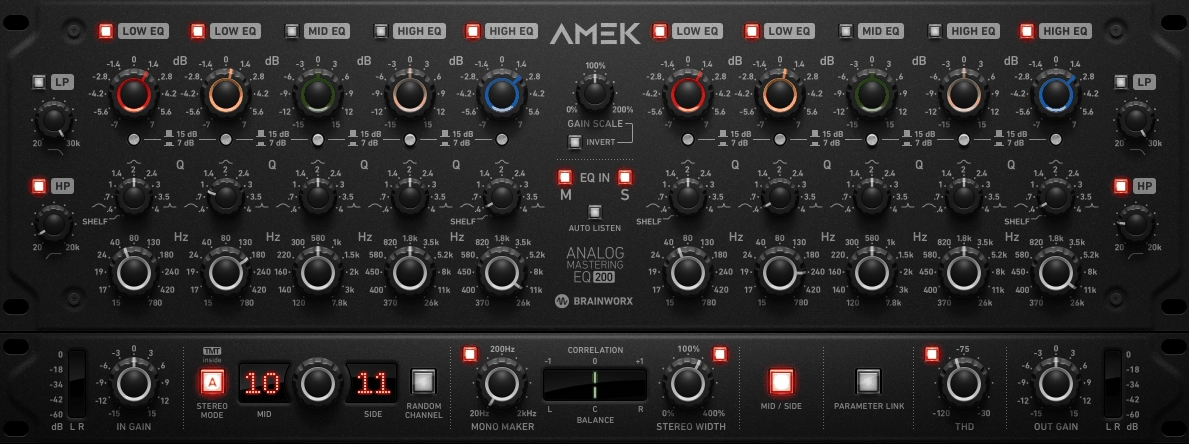
Most EQs either give you clinical digital accuracy or vintage color, but AMEK EQ 200 dynamic eq manages to straddle both worlds by modeling classic 1970s-80s parametric hardware behavior while adding genuinely useful modern workflow features.
This mastering EQ plugin delivers a 7-band parametric structure with 5 fully adjustable bands offering up to ±15 dB boost/cut and Q ranging from 0.4 to 4, plus dedicated 12 dB/octave high-pass and low-pass filters. What separates this from typical analog emulations is how Brainworx integrated tools like Auto-Listen, which automatically solos frequency ranges as you adjust them, and Tolerance Modeling Technology (TMT) that simulates real component variances between left and right channels for less sterile results.
- Wide-Range Parametric Bands with Shelving Options
The five main parametric bands span the full spectrum with overlapping frequency ranges that interact musically rather than clashing. Each band’s Q control moves from gentle broad shaping at 0.4 to focused adjustments at 4, letting you adapt the tool based on whether you’re doing subtle tonal balance or addressing specific frequency buildups.
The lowest and highest bands can toggle to shelving mode, which becomes essential for mastering work where you’re often adjusting overall low-end weight or top-end air without targeting narrow frequencies. This range flexibility means you’re not locked into bell curves when broad spectral moves make more sense.
- Auto-Listen for Isolated Frequency Auditing
When you adjust any band, Auto-Listen automatically solos that frequency range so you hear exactly what you’re changing rather than inferring from the full mix. This eliminates guesswork during subtle mastering moves where changes can be too small to identify clearly in context.
You can quickly determine whether a low-mid adjustment is actually cleaning up muddiness or just changing the overall tonal balance in ways that might not be improvements. The feature speeds up decision-making significantly because you’re not constantly bypassing and re-engaging bands to understand their impact.
- Integrated Mid/Side Processing with Mono Maker
The plugin includes built-in Mid/Side mode for independent center and stereo processing, plus a Mono Maker that sums low frequencies below a settable threshold to mono. You can tighten bass in the center channel while leaving side ambience untouched, which prevents dull centers while preserving width.
The Mono Maker addresses unfocused low end that clashes in mono playback without affecting the entire frequency spectrum.
- Tolerance Modeling Technology and Variable THD
Rather than perfect digital cloning, TMT simulates realistic component variances found in analog hardware, creating slight differences between left and right channels that make the EQ feel less sterile. The adjustable Total Harmonic Distortion control lets you dial in everything from near-transparent operation to richer saturation that adds warmth and body.
5. FabFilter Pro-Q 4
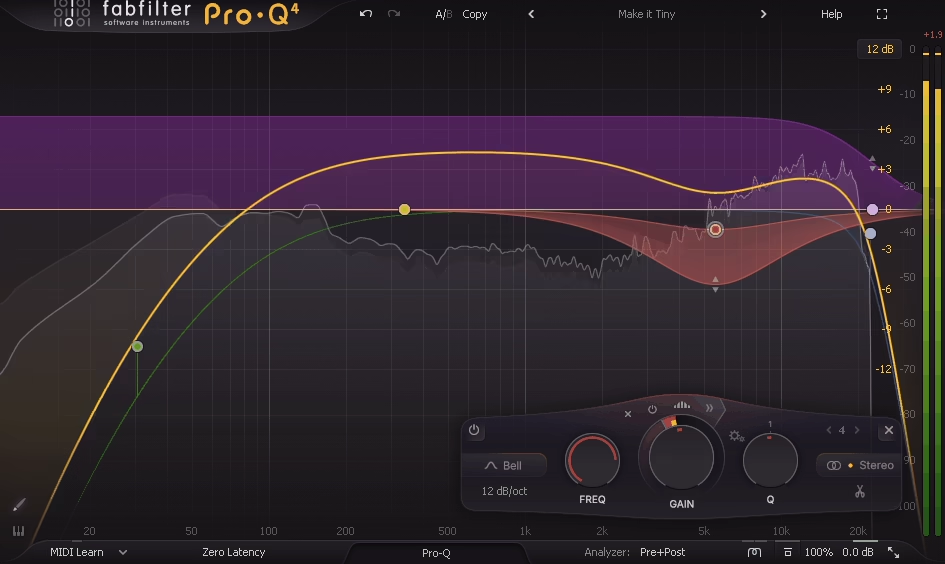
I’ve watched Pro-Q evolve through four versions, and what makes this release quite significant isn’t just incremental improvements but how it fundamentally changed what’s possible in a single EQ plugin.
You get per-band dynamic EQ VST built into every one of the bands, meaning each frequency range can respond intelligently to your audio rather than applying static cuts and boosts. The plugin includes 23 different filter types per band, from standard peaking curves to tilt shelves and specialized air bands designed for refined high-frequency control.
What really sets Pro-Q 4 apart is how it integrates real-time spectrum analysis with adaptive scaling, Mid/Side display highlighting, and spectrum grab functionality that lets you click spectral peaks and drag them directly into EQ bands.
The interface shows you average and peak frequency content simultaneously, which helps distinguish persistent tonal issues from transient spikes. You can process Left/Right or Mid/Side independently for each band, and the plugin offers multiple processing modes including Natural Phase, Zero Latency, and Linear Phase with adjustable slopes and oversampling.
I’ve found the auto-gain matching particularly valuable because it calculates per-band level compensation, preventing you from making decisions based on loudness perception rather than actual tonal quality.
- Intelligent Per-Band Dynamic Response
Every band includes built-in dynamic EQ that responds to incoming audio levels, letting you set thresholds so processing only activates when frequencies cross specific points. You can configure dynamic curves as positive expansion or negative compression-style reduction, with each band responding independently based on content.
This means you can reduce harsh resonances only when they become problematic rather than applying constant attenuation that dulls the overall mix. For mastering work, this eliminates the compromise between fixing problems and maintaining musicality.
You might smooth vocal presence peaks without flattening the entire frequency range, or enhance clarity only when the mix needs it rather than forcing static tonal changes across every moment.
- Real-Time Spectrum Grab with Visual Editing
The spectrum grab feature lets you click any spectral peak in the analyzer and drag it directly into an EQ band, eliminating the guesswork of hunting for problematic frequencies. The visual engine adapts to incoming audio with both average and peak displays that help you understand whether energy buildups are consistent issues or momentary transients.
- Many Filter Types
Rather than limiting you to standard peaking bands, Pro-Q 4 provides 23 different filter shapes including high and low shelves with adjustable slopes, tilt shelves for broad tonality shifts, band pass and notch filters, plus dedicated air bands for smooth high-frequency enhancement.
- Comprehensive Mid/Side and Left/Right Processing
Unlike EQs that treat Mid/Side as an afterthought, Pro-Q 4 integrates stereo processing deeply into every band. You can assign individual bands to Left/Right or Mid/Side independently, letting you tame harsh cymbals in the sides without affecting center vocal presence, or control low end tightness in mono content while leaving stereo ambience untouched.
The Side bands can use steeper slopes to refine stereo information without affecting mono elements. This eliminates needing separate stereo splitter plugins in your mastering chain and keeps all processing consolidated in one interface where you can see how stereo adjustments interact with frequency shaping.
6. Lindell Audio EQ825
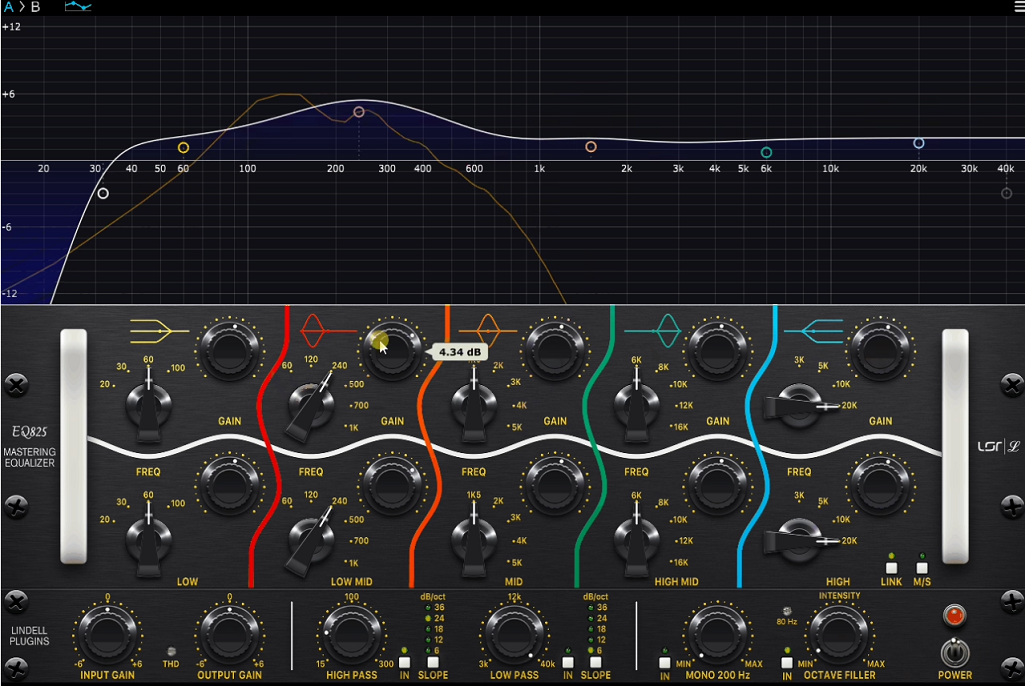
Lindell Audio EQ825 occupies an interesting middle ground that most mastering EQs avoid: it delivers analog-inspired musicality without sacrificing modern control. The plugin features four main parametric bands with continuous frequency and gain adjustment, but what makes it different is how those bands behave.
Instead of sterile digital curves, you get filter responses modeled after classic console EQs with built-in harmonic saturation and transformer modeling that react to your signal. The bands produce slightly rounded, harmonically rich curves that add perceived fullness and smoothness even with small adjustments.
I’ve noticed this particularly in the low midrange around 120-250 Hz where warmth lives, and the high frequencies between 8-12 kHz where presence emerges without harshness.
The saturation isn’t just a color switch tacked on. It’s integrated into how the EQ responds, emulating the subtle nonlinearities that real analog gear exhibits when you push it. This means broader boosts interact with the saturation stage to add thickness without muddiness, or soften harsh top-end transients without smearing detail.
The plugin includes Mid/Side processing where you can tune how the analog-modeled filters respond differently to center and stereo channels, which helps tighten mono low end while preserving side ambience.
- Musical Filter Curves with Analog Transformer Modeling
Rather than aiming for surgical precision, EQ825’s filter design philosophy centers on musical tonal curves that enhance mixes. The bands use transformer and analog console-inspired circuitry models overlaid with parametric control, giving you energy and flow that goes beyond merely tweaking frequencies.
- Harmonic Saturation
The built-in saturation modeling isn’t separated from the EQ stage but integrated into how filters respond to incoming audio. This emulates the nonlinearities and transformer interactions found in real analog gear, becoming especially prominent when you make broader adjustments.
The harmonic behavior adds warmth and thickness without muddiness, tightens low end in a way that feels glued together rather than sliced apart, and can soften harsh transients while maintaining detail. This dual functionality means EQ825 serves as both an equalizer and subtle tone shaper, giving masters cohesive energy that purely clinical tools sometimes miss.
- Channel-Specific Mid/Side Tone Shaping
Beyond simple Mid/Side splitting, EQ825 lets you tune how the analog-modeled filters respond differently to mid and side channels.
- Listening-Focused Interface Design
The interface presents detailed control over frequency, gain, Q, and character strength without overwhelming you with tiny knobs and nested menus. It encourages listening and adjusting rather than tweaking blindly, which matters significantly in mastering where trusting your ears over your eyes usually produces better results.
The curves are visually representative of how sound changes in real time, letting you decide whether broad smile curves or narrow cuts make sense for your material. While it doesn’t include large spectral displays like some competitors, the feedback ties directly to the sonic behavior of the filters.
- Broad Tonal Balancing for Final Polish
EQ825 excels at tonal balancing moves that help masters feel right rather than just be correct. You can warm up cool or thin mixes by boosting low mids with gentle slopes, add air around the high frequencies with gentle upward curves, or reduce boxiness by cutting in the 300-600 Hz range with broad Q settings.
Because of the analog character modeling, even cuts that technically reduce energy can leave mixes feeling fuller and more cohesive. This becomes valuable when the mix already sounds close but needs that final layer of polish and presence to feel complete.
7. Relab Maselec MEA-2
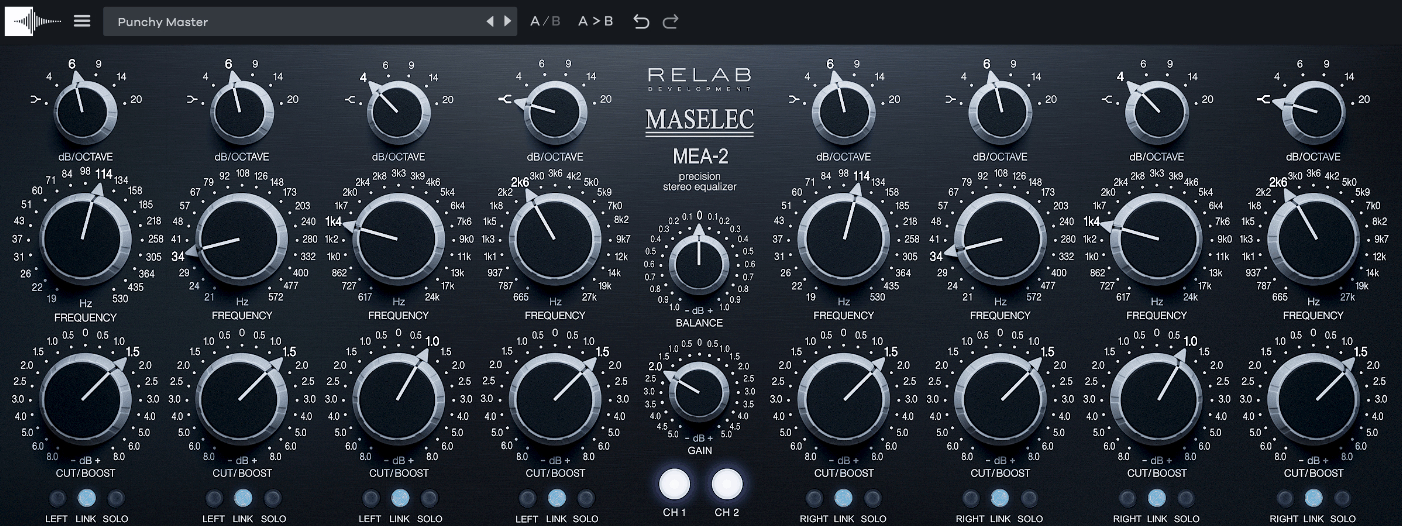
MEA-2 mastering EQ plugin replicates the Maselec hardware unit designed by Leif Mases, using hand-tuned asymmetric Q curves that were developed through extensive listening rather than mathematical formulas.
The filters behave differently depending on whether you’re boosting or cutting, which moves beyond predictable bell curves into territory that feels organic. You get per-band Mid/Side processing where each band can switch between stereo and M/S modes independently, plus individual stereo link control for each band so you’re not forced into applying identical changes to left and right channels.
The plugin includes Solo Isolation functionality that lets you audition specific bands in isolation to identify problematic frequencies without guessing. Modern workflow enhancements like resizable GUI, A/B comparison, and advanced preset management make it practical for DAW-centric mastering sessions.
I’ve found the curves particularly effective for adding warmth without cloudiness and smoothing high-end sheen without brittleness, which comes from how the asymmetrical bandwidth responds to musical content.
- Hand-Crafted Asymmetrical Filter Curves
The MEA-2’s filters use asymmetrical bandwidth that responds differently to boosts versus cuts, moving beyond standard parametric bell shapes. This creates musical broad shelving that avoids abrupt tonal shifts, smooth top-end clarity without brittleness, and articulate low end that stays full even with deeper boosts.
The curves feel organic in context, helping masters breathe rather than sounding clinical. Small adjustments make audible differences, which is exactly what mastering demands.
- Mid/Side Processing
Each band can switch between stereo and Mid/Side processing independently, giving you control to tighten center information like kick and bass while shaping side ambience separately. The individual stereo link control per band means you can choose how linked left and right channels are based on your mix’s specific needs.
This level of spatial control is rare even among high-end mastering EQs and lets you sculpt stereo tone with genuine intention rather than broad compromise.
- Solo Isolation
- Modern Workflow Integration
Beyond hardware replication, the MEA-2 includes practical enhancements like resizable GUI so you’re not stuck with cramped controls, A/B comparison for quickly evaluating different EQ decisions, and advanced preset management for organizing custom setups.
These additions make the plugin both efficient and expressive, drastically improving mastering flow when you’re working alone and need to iterate quickly while maintaining accurate recall of settings.
- Musical Tonal Refinement Over Surgical Correction
The plugin excels at adding balanced warmth and body without clouding mixes, smoothing high-end sheen while avoiding harshness, and enhancing perceived clarity across the spectrum. The curves interpret musical content rather than just applying mathematical boosts or cuts, which means you’re working with personality instead of sterile precision.
8. SPL PQ
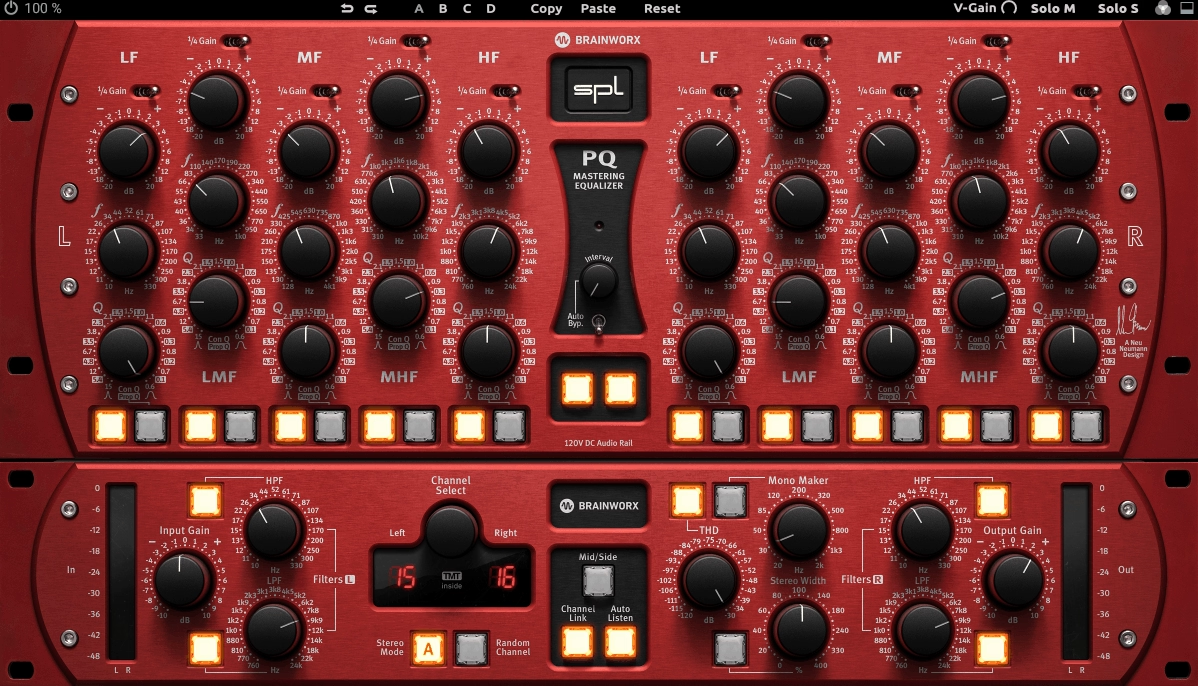
Brainworx’s emulation of the classic SPL PQ hardware parametric equalizer focuses on clarity, control, and neutrality.
SPL PQ emulation delivers up to 8 fully independent bands with continuous frequency selection, Q ranging from surgical to broad, and per-band Mid/Side assignment that lets you process center and stereo content independently.
I like how Brainworx added solo monitoring, spectrum analysis, Mono-Maker functionality, and phase correlation meters without cluttering the workflow! What stands out to me is how the filters maintain phase integrity and minimal distortion even with steep Q settings.
You can dial in tight notch filters to remove resonances or use broader gentle curves for tonal shaping, and I don’t think the EQ introduces phase anomalies or spectral shifts that make masters sound unnatural.
The Mono-Maker control sums low frequencies below a settable threshold into mono, which I recommend using to maintain mono compatibility before the mix hits smaller speakers or mono systems.
- True Parametric Precision with Minimal Artifacting
Each band offers fully adjustable gain, frequency, and Q with filter design that preserves transient detail and stereo coherence. I’ve found the filters stay smooth and transparent even when using steep Q curves, which matters because traditional EQs often introduce phase aberrations and transient smearing at these settings.
You can notch out problematic buildups like boxy guitars or harsh cymbals without muddying adjacent frequency content or killing punch. I would say this precision becomes crucial in mastering where small boost and cut amounts are extremely audible and any unnatural coloration stands out immediately across different playback systems
- Mid/Side Assignment
Rather than forcing all processing to apply equally across channels, SPL PQ lets you choose whether each individual band operates on mid content, side content, or both simultaneously.
Good to use with mixes that have problematic stereo information but solid mono elements. The per-band assignment means you’re not committing your entire EQ curve to one stereo mode, which I find significantly more flexible than global Mid/Side switching.
- Solo Monitoring for Accurate Frequency Identification
The solo and audition feature lets you temporarily isolate the frequency range you’re manipulating so you hear exactly what’s being affected rather than inferring from the whole mix. I don’t think this is a trivial addition because many mastering EQs leave you guessing which frequencies actually cause perceived problems.
When making surgical adjustments on full mixes where changes are subtle but impactful, hearing isolated frequency content makes decision-making immediate and accurate. This eliminates the constant bypassing and re-engaging that slows down workflow with other EQs.
9. Audified RZ062 Equalizer
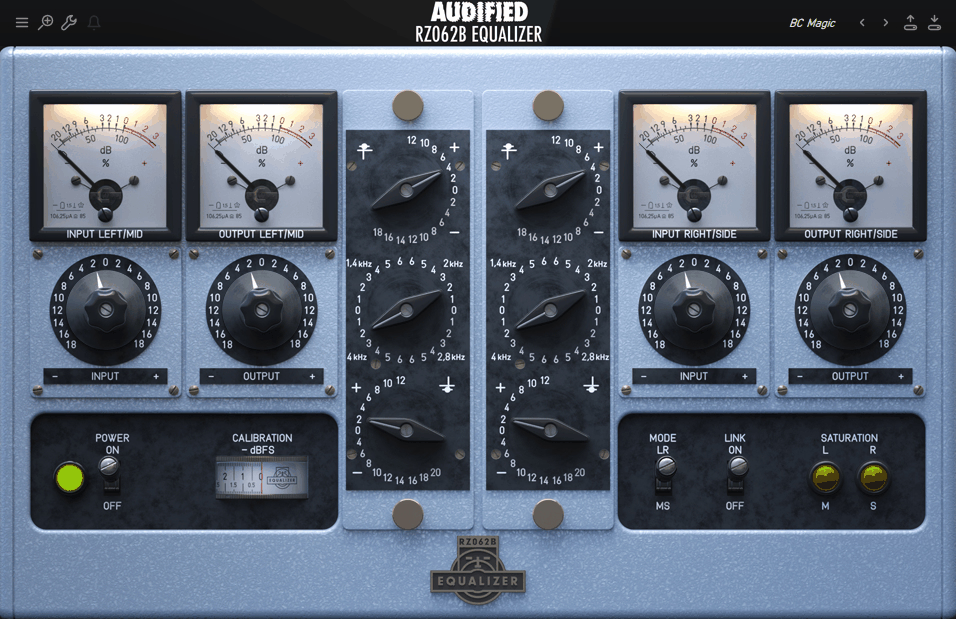
Most mastering EQs either chase surgical precision or add vintage color as an afterthought, but rarely integrate both in a way that feels genuinely usable.
The Audified RZ062 Equalizer emulates rare 1960s German valve EQ modules (Klangfilm RZ062A and RZ062B) through component-level modeling of over 200 individual analog elements including triodes and transformers. The plugin actually delivers two distinct EQ variants in one package, each with different mid-control behavior, plus modern additions like Left/Right and Mid/Side processing alongside adjustable tube saturation through calibration controls.
The EQ structure uses Bass, Mid, and Treble controls with shelving for the extremes, but the mid section operates differently between variants. The A version provides a tilt-style control pivoting around 650 Hz, while the B version offers four discrete presence frequencies ranging from 1.4 kHz to 4 kHz with gain steps of 0.8 dB up to +4.8 dB.
Bass shelving spans 40 Hz to 1 kHz and treble covers 1 kHz to 10 kHz, with boosts reaching +12 dB and cuts extending to -18 dB or deeper depending on the shelf.
- Dual Module Design with Distinct Mid Controls
The package includes two complete EQ variants representing different hardware revisions.
The RZ062A uses a tilt-style mid control where boosting low end simultaneously attenuates high end around a central 650 Hz pivot, functioning like a global tilt EQ for quick overall balance adjustments. The RZ062B provides four discrete mid frequencies around the presence range, each with smooth gain control in 0.8 dB increments.
This dual approach means you can choose between broad tonal rebalancing or focused upper-mid enhancement depending on what your master needs. Having both variants in one plugin eliminates the need to purchase separate tools for different mid-range shaping approaches.
- Component-Level Valve Circuit Emulation
Rather than approximating analog behavior with simple saturation algorithms, the plugin models over 200 individual components from the original hardware including tube stages and transformers.
- Adjustable Tube Saturation Through Calibration
The Input and Output gain knobs work with a Set Calibration function that lets you deliberately push signal into the valve emulation stage, adding controllable harmonic content. You can use subtle amounts to glue mix elements together and add harmonic weight, or push harder for more obvious tube coloration.
The saturation isn’t separated from the EQ circuit but integrated into how the signal path responds, mirroring how the original hardware behaved. This means even EQ adjustments interact with the tube stages to produce harmonically enriched results rather than just frequency shifts.
- Comprehensive Stereo Processing Modes
The plugin offers three stereo operation modes: linked channels where edits affect left and right identically, unlinked channels for independent left/right treatment, and Mid/Side mode where the left channel processes mid content while the right handles side content.
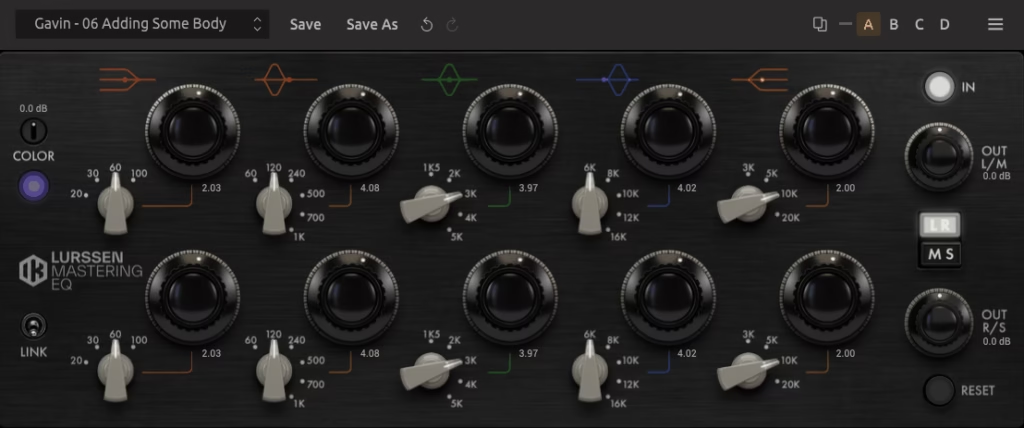
10. IK Multimedia Lurssen Mastering EQ
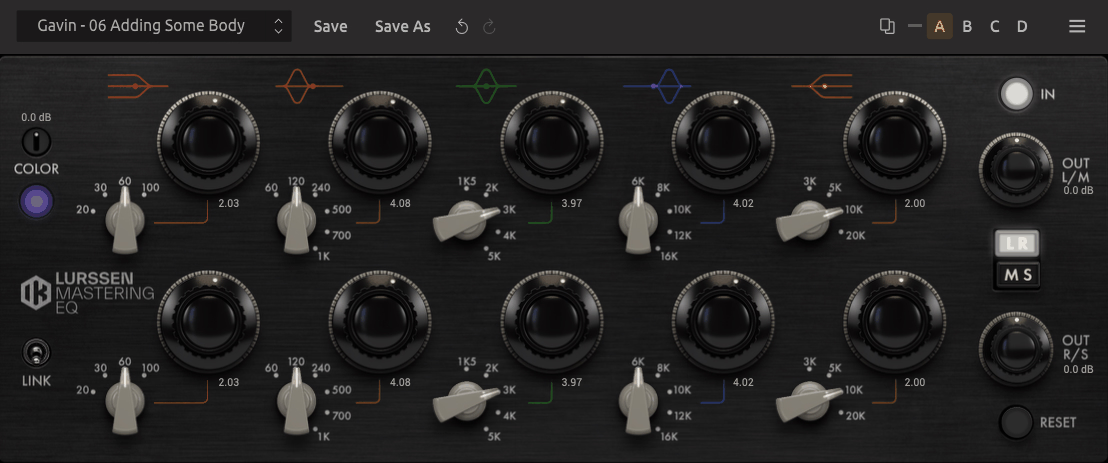
I’ve always been skeptical of plugins that claim to capture legendary hardware, but Lurssen Mastering EQ models a rare stereo tube EQ unit custom-made for mastering engineers Gavin Lurssen and Reuben Cohen.
The plugin delivers smooth, musical curves with analog-like warmth rather than chasing digital precision, which I find refreshing when most mastering EQs prioritize surgical accuracy over character!
You get shelving filters plus three semi-parametric mid bands that don’t act independently like typical digital parametrics but interact with each other the way real analog gear does, where band shapes and center frequencies subtly shift based on other settings.
What I like the most is the Color control that adjusts harmonic saturation from the emulated pre-amp stage. This isn’t just a separate saturation knob tacked on but tied into the circuit model, influencing how the EQ itself behaves.
The plugin includes Mid/Side processing, independent stereo controls, and parameter linking, plus it works either standalone or inside IK’s T-RackS 6 modular environment for building custom mastering chains.
IK includes presets created by Gavin Lurssen and Reuben Cohen that reflect real mastering practices used on professional projects, which I’ve found helpful for understanding how seasoned engineers approach tonal sculpting.
- Tube Circuit Modeling with Interactive Band Behavior
The bands are based on actual tube EQ circuitry rather than mathematical curves, meaning they interact with each other in ways that mirror analog gear. I’ve noticed the low shelf adds weight without boominess, the high shelf lifts presence without harshness, and the three mid bands shape personality rather than just applying static boosts or cuts.
The band interactions create more organic tonal transitions than typical digital EQ curves, which I’d say makes the EQ feel like it’s responding to the music. In my experience, this quality often translates to masters that feel more alive and polished compared to purely clinical tools.
- Integrated Color Control for Harmonic Saturation
The Color parameter adjusts harmonic content from the emulated pre-amp stage in a way that’s tied to the circuit model rather than being a separate effect. You can add subtle tube warmth and weight, increase perceived depth without obvious distortion, or soften brighter material gently while adding harmonic richness.
I find this particularly useful in mastering when a mix sounds a bit flat or digital but you don’t want overt saturation. The control helps glue elements together and gives the final mix a cohesive sonic signature that feels intentional.
- Mid/Side Processing
- Musical Band Structure Designed for Broad Refinement
The shelving filters and semi-parametric mid bands with selectable frequencies provide gain ranges well beyond typical mastering needs, though the numerical readouts reflect analog-style behavior rather than exact dB values. I don’t think this is a plugin for tiny surgical fixes but rather for broad tonal refinement and tasteful shaping.
The filters interact in ways that enhance musicality rather than flattening it, and the streamlined interface encourages listening-based adjustments. I’ve realized this aligns well with mastering’s goals of balance and feel rather than obsessing over precise numbers.
- Professional Presets as Learning References
The included presets from Gavin Lurssen and Reuben Cohen aren’t generic factory settings but reflect actual mastering practices used on professional projects.
Frebies:
1. iZotope Ozone EQ

It would be terrible mistake not to include Ozone EQ in this list!
The standout fact about Ozone mastering EQ plugin is that it’s completely free while delivering features typically found in expensive mastering tools (yep). You get 8 fully adjustable EQ bands, analog and digital curve modes, Mid/Side processing, and Transient/Sustain targeting that lets you shape attack and sustain portions of your signal separately.
The plugin comes as a standalone tool identical to the EQ module inside iZotope’s Ozone 12 suite, available through the free Komplete Start bundle with no trial limitations or feature restrictions.
What separates this from typical free EQs is the Delta mode that isolates exactly what your EQ changes are doing by playing back only the difference between processed and unprocessed signal.
The interface is resizable with smooth visual feedback, plus you get gain matching to prevent loudness bias and an Amount slider that scales preset intensity when you want to dial back aggressive shapes to more subtle levels.
- Transient and Sustain Channel Modes
Beyond static frequency adjustments, these modes let you target attack and sustained portions of audio separately. Transient Mode focuses on the attack portion to bring forward punch in drums and percussive elements without exposing muddiness, while Sustain Mode acts on the sustained signal for shaping body and smoothness in vocals or sustained instruments.
This dynamic awareness adds nuanced control that ordinary EQs don’t offer, particularly valuable in mastering where small spectral tweaks affect perceived punch and clarity without just blindly boosting or cutting frequencies.
- Delta Listening for Isolated Change Audition
The Delta button isolates the difference between processed and unprocessed signal so you hear exactly what the EQ is changing rather than toggling bypass and trusting memory. This matters in mastering where subtle EQ decisions have major perceptual impact but are hard to isolate by ear alone.
You can audition only the affected frequencies in context faster and more precisely than traditional A/B comparison methods.
- Dual Analog and Digital Curve Modeling
Analog mode introduces gentler, music-friendly curves with slight shape variation that lends warmth or smoothness, while digital mode offers sharper, more precise curves suitable for clinical cuts or problem-area attenuation.
This dual-model approach lets you match the character to the task, using warm mix shaping when you need musical enhancement or precision correction when addressing specific frequency problems. Having both options in a free plugin provides flexibility rare among no-cost tools.
2. Analog Obsession OAQ
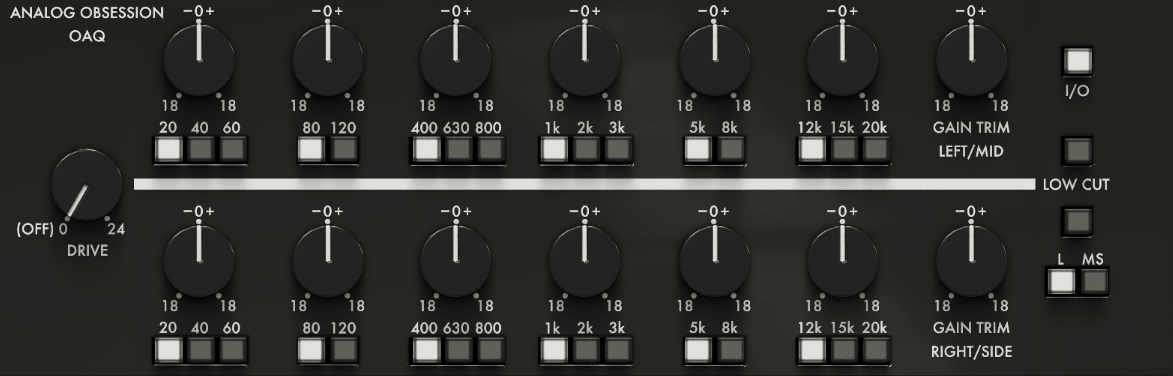
Analog Obsession OAQ delivers six EQ bands with dual-mono, stereo, and Mid/Side routing plus drive control and 4× oversampling without any price tag attached. The bands offer switchable frequency choices spanning lows, mids, and highs with ±18 dB boost/cut range, and I find the stepped frequency approach actually speeds up decisions rather than slowing them down.
What makes OAQ genuinely useful is how it handles routing flexibility. You can switch between dual-mono for independent left/right control, standard stereo processing, or Mid/Side mode for separate center and side EQ. I like having this built directly into a free plugin because it eliminates needing external M/S splitters just to shape stereo field balance during mastering.
- Six Frequency-Stepped Bands Across Full Spectrum
You get two bands each for lows, mids, and highs with selectable frequencies rather than continuous control. Low A covers 20/40/60 Hz, Low B handles 80/120 Hz, Mid A spans 400/630/800 Hz, Mid B hits 1k/2k/3k Hz, High A reaches 5k/8k Hz, and High B targets 12k/15k/20k Hz.
- Complete Routing Flexibility for Spatial Control
The dual-mono, stereo, and Mid/Side options are rare in free plugins and make OAQ genuinely mastering-capable. I use dual-mono when I need independent channel control, stereo for standard processing, and Mid/Side when I want to tighten center low end while leaving side ambience intact or bring out air in the sides without changing vocal and bass focus.
I’ve found this eliminates needing separate M/S splitter plugins in my mastering chain, which simplifies workflow and reduces potential phase issues from external processing.
- Integrated Drive and Oversampling for Harmonic Character
The Drive control ranges from 0 to 24 dB, letting you introduce harmonic saturation that thickens lows, smooths highs, and glues elements together musically. At 0 dB the plugin runs clean like a transparent EQ, but pushing Drive adds character without overt distortion.
I recommend engaging the 4× oversampling option (accessed via the Analog Obsession logo) when using Drive to reduce aliasing and maintain clarity. I’ve experienced how this combination adds warmth or coherence to masters that feel technically balanced but lack musical glue.
3. TDR Nova
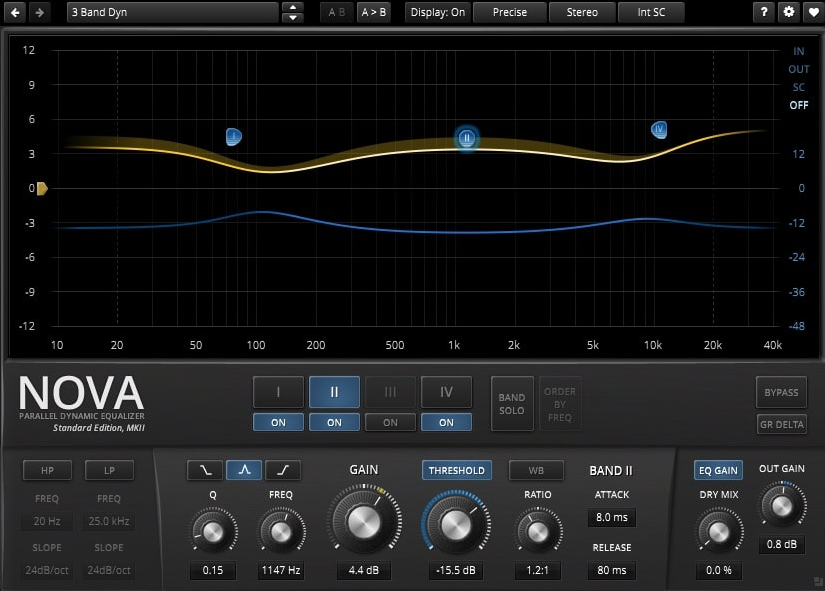
TDR Nova from Tokyo Dawn Records is a great free mastering EQ plugin (and also dynamic) that delivers four bands with dynamic response, a wideband compressor section, and adaptive side-chain options where each band’s gain changes based on incoming signal level rather than sitting static.
You can tame harsh frequencies only when they poke out, brighten sections only when needed, or control resonances that appear at specific dynamics like sibilant vocals or aggressive cymbals.
I like how the interactive visual interface shows real-time frequency curves, dynamic gain activity, and per-band metering that literally lets you see what your adjustments are doing. The free version gives you essential dynamic EQ power that’s missing in most no-cost equalizers, though the paid Nova GE edition unlocks additional advanced features.
- Per-Band Dynamic Response for Adaptive Processing
Each band can operate in static traditional EQ mode or dynamic mode where EQ gain responds to signal level. I’ve found this particularly useful in mastering because you can attenuate problem frequencies only when they cross a threshold rather than cutting relentlessly.
For instance, I set 6 kHz to reduce only when it becomes harsh, preserving brightness during calm passages while controlling harshness during loud sections. This results in more transparent and musical outcomes compared to static cuts that affect the entire track uniformly regardless of context.
- Four Powerful Bands with Multimode Behavior
Despite having only four bands, each one is meaningfully powerful because of dynamic capability. You get adjustable frequency, gain, and bandwidth controls per band plus low cut and high cut filters. I don’t think the band count is limiting because you’re not just placing static boosts and cuts but telling the EQ how to behave over time.
The visual curve display shows real-time response, which I find essential for understanding how bands interact with your audio.
- Integrated Wideband Compressor for Cohesion
The wideband compressor acts across the entire signal independently of dynamic EQ bands, letting you add glue to masters or control overall level fluctuations. I use this when I want to shape sustain and body without affecting specific frequency areas directly.
The compressor works well before or after EQ processing depending on what the mix needs, and I’d say it complements the dynamic bands nicely for overall shaping that goes beyond frequency-specific control.

Hello, I’m Viliam, I started this audio plugin focused blog to keep you updated on the latest trends, news and everything plugin related. I’ll put the most emphasis on the topics covering best VST, AU and AAX plugins. If you find some great plugin suggestions for us to include on our site, feel free to let me know, so I can take a look!